
Ներածություն
This manual provides detailed instructions for the AULCMEET RC80B replacement remote control, designed for use with Edifier R1280DBs active speakers. Please read this manual carefully to ensure proper operation and to maximize your experience with the product.
Ապրանքը ավարտվել էview
The AULCMEET RC80B remote control offers a comprehensive set of functions for your Edifier R1280DBs speakers. Its ergonomic design ensures comfortable handling and intuitive button placement.
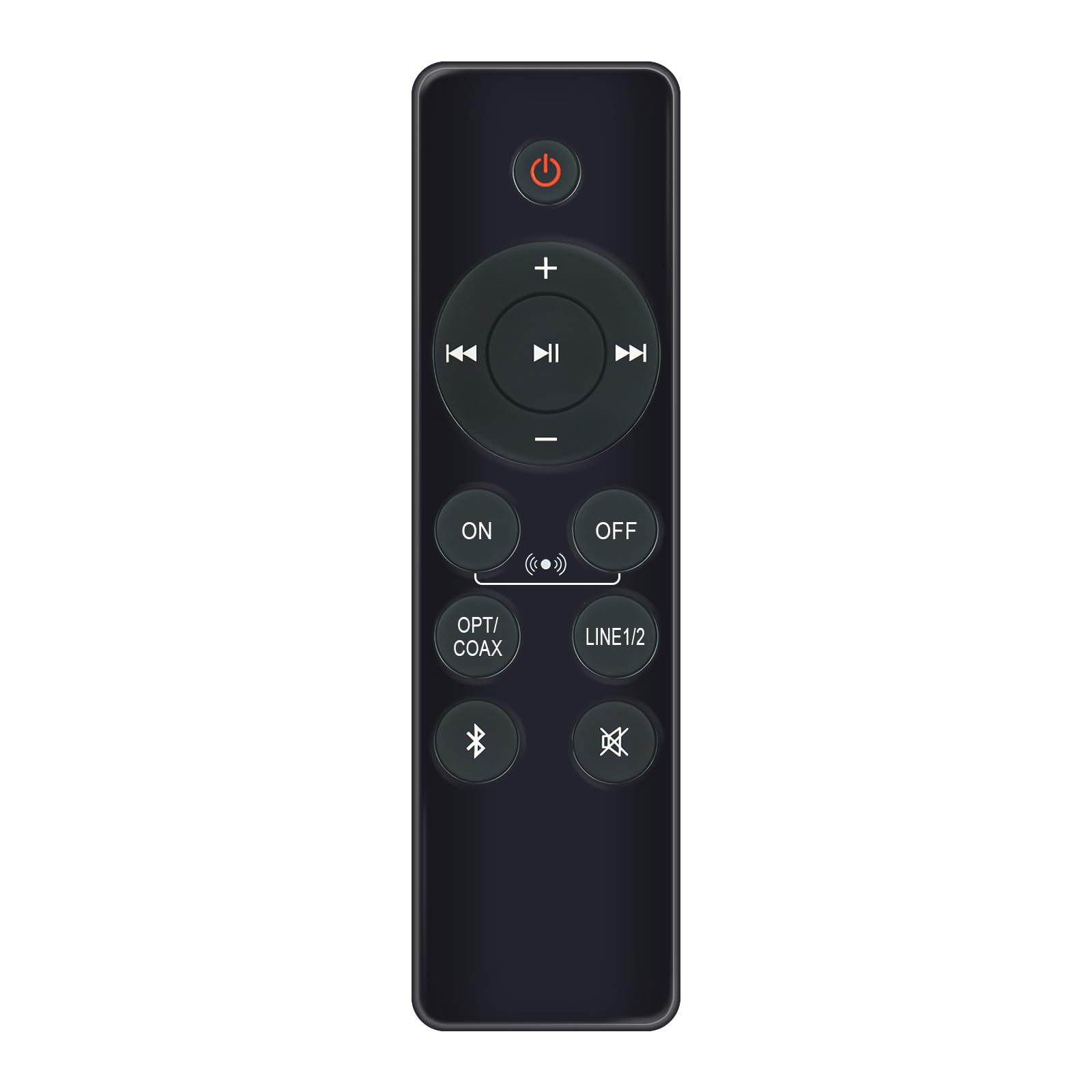
Image: AULCMEET RC80B Replacement Remote Control. The remote measures approximately 13.8 cm (5.43 inches) in length and 3.8 cm (1.5 inches) in width.
Կոճակի գործառույթները.
- Power կոճակը (⏻): Turns the speakers ON or OFF.
- Ձայնի բարձրացում (+) / Ձայնի իջեցում (-): Adjusts the speaker volume.
- Նախորդ հետքերը (⏮) / Next Track (⏭): Skips to the previous or next audio track.
- Նվագարկել/Դադար (⏯): Plays or pauses audio playback.
- ON / OFF (Input Selection): Toggles between different input modes.
- OPT/COAX: Selects Optical or Coaxial input.
- LINE1/2: Selects Line In 1 or Line In 2 input.
- Bluetooth (☋): Activates or selects Bluetooth input.
- Համր (🛇): Mutes or unmutes the speaker audio.
Կարգավորում
The AULCMEET RC80B remote control is designed for immediate use without complex setup procedures. Simply install the batteries, and it is ready to operate your compatible Edifier R1280DBs speakers.
Մարտկոցի տեղադրում.
- Տեղադրեք մարտկոցի խցիկը հեռակառավարման վահանակի հետևի մասում:
- Բացեք մարտկոցի խցիկի կափարիչը:
- Insert two AAA alkaline batteries, ensuring the correct polarity (+ and -) as indicated inside the compartment.
- Ապահով փակեք մարտկոցի խցիկի կափարիչը:
Նշում. No programming or pairing is required for this replacement remote control. It functions directly with the specified Edifier R1280DBs active speakers.
Գործառնական հրահանգներ
To operate your Edifier R1280DBs speakers using the AULCMEET RC80B remote control, point the remote directly towards the speakers' infrared receiver. Ensure there are no obstructions between the remote and the speakers.
- Միացում/անջատում: Սեղմեք ⏻ button to turn the speakers on or off.
- Ձայնի ճշգրտումՕգտագործեք + և - կոճակներ՝ ձայնը մեծացնելու կամ նվազեցնելու համար։
- Ներածման ընտրություն: Սեղմեք ON/OFF, OPT/COAX, LINE1/2, կամ Bluetooth buttons to switch between the available audio input sources.
- Նվագարկման վերահսկում: When using Bluetooth or other compatible sources, use the ⏮ (Previous), ⏭ (Next), and ⏯ (Play/Pause) buttons to control media playback.
- Անջատման գործառույթ: Սեղմեք 🛇 button to temporarily silence the audio. Press it again to restore the sound.
Տեխնիկական պայմաններ
| Բրենդ | AULCMEET |
| Մոդել | RC80B |
| Համատեղելի սարքեր | Edifier R1280DBs Active Speakers |
| Գույն | Սեւ |
| Առանձնահատկություններ | Էրգոնոմիկ դիզայն |
| Հաղորդակցման միջերես | Ինֆրակարմիր (IR) |
| Կոճակների քանակը | 30 |
| Առավելագույն միջակայք | Մոտ 33 ֆուտ (10 մետր) |
| Մարտկոցի տեսակը | 2 x AAA ալկալային մարտկոցներ (չեն ներառվում) |
| Չափերը (L x W) | 13.8 սմ x 3.8 սմ (5.43 x 1.5 դյույմ) |
Անսարքությունների վերացում
If you encounter issues with your AULCMEET RC80B remote control, please refer to the following common solutions:
- Հեռակա չի արձագանքում: Ensure the batteries are correctly installed and are not depleted. Replace batteries if necessary.
- Գործողության կարճ տիրույթ: Check for any obstructions between the remote and the speaker's IR receiver. Ensure the remote is pointed directly at the speakers. Low battery power can also reduce range.
- Հատուկ կոճակը չի աշխատում: Clean the remote control surface and buttons. If the issue persists, the button may be faulty, or the remote may require battery replacement.
- Speakers not responding to any remote: Ensure the speakers are powered on and functioning correctly. Try using the manual controls on the speaker unit if available.
Տեխնիկական սպասարկում
Proper care and maintenance will extend the lifespan of your remote control:
- ՄաքրումՀեռակառավարիչը սրբեք փափուկ, չոր կտորով։ Մի օգտագործեք հղկող մաքրող միջոցներ կամ լուծիչներ։
- Մարտկոցի խնամք: Remove batteries if the remote control will not be used for an extended period to prevent leakage.
- Պահպանում: Store the remote control in a cool, dry place, away from direct sunlight and extreme temperatures.
- Խուսափեք կաթիլներից: Protect the remote from physical impact, as drops can damage internal components.
Երաշխիք և աջակցություն
Specific warranty information for this AULCMEET RC80B replacement remote control is not provided in the product details. For warranty claims, technical support, or further assistance, please contact the seller or manufacturer directly through your purchase platform. Keep your purchase receipt or order number handy for faster service.