
1. Ներածություն
This manual provides essential information for the safe and efficient operation of the CSCPEXCZ SU600 Variable Frequency Drive (VFD). The SU600 VFD is designed to convert single-phase 220V input power to three-phase 380V output, suitable for controlling the speed of three-phase motors ranging from 0.75KW to 5.5KW. Please read this manual thoroughly before installation, operation, or maintenance.
2. Անվտանգության տեղեկատվություն
ԶԳՈՒՇԱՑՈՒՄ. Improper installation or operation can lead to serious injury or death. Only qualified personnel should install, operate, and maintain this equipment.
- Միշտ անջատեք էլեկտրամատակարարումը որևէ լարերի միացում կամ սպասարկում կատարելուց առաջ։
- Ապահովեք VFD-ի և շարժիչի պատշաճ հողանցումը։
- Do not touch electrical components when power is applied.
- Ստուգեք մուտքային և ելքային ծավալըtage ratings match your application.
- Պաշտպանեք VFD-ն խոնավությունից, փոշուց և կոռոզիոն գազերից։
- Install the VFD in a well-ventilated area to prevent overheating.
3. Ապրանքը ավարտված էview
The SU600 VFD is a robust frequency converter designed for industrial and commercial applications requiring precise motor speed control. It features a durable design with main board material characteristics that are waterproof, moisture-proof, and mildew-proof, ensuring reliability in various environments.
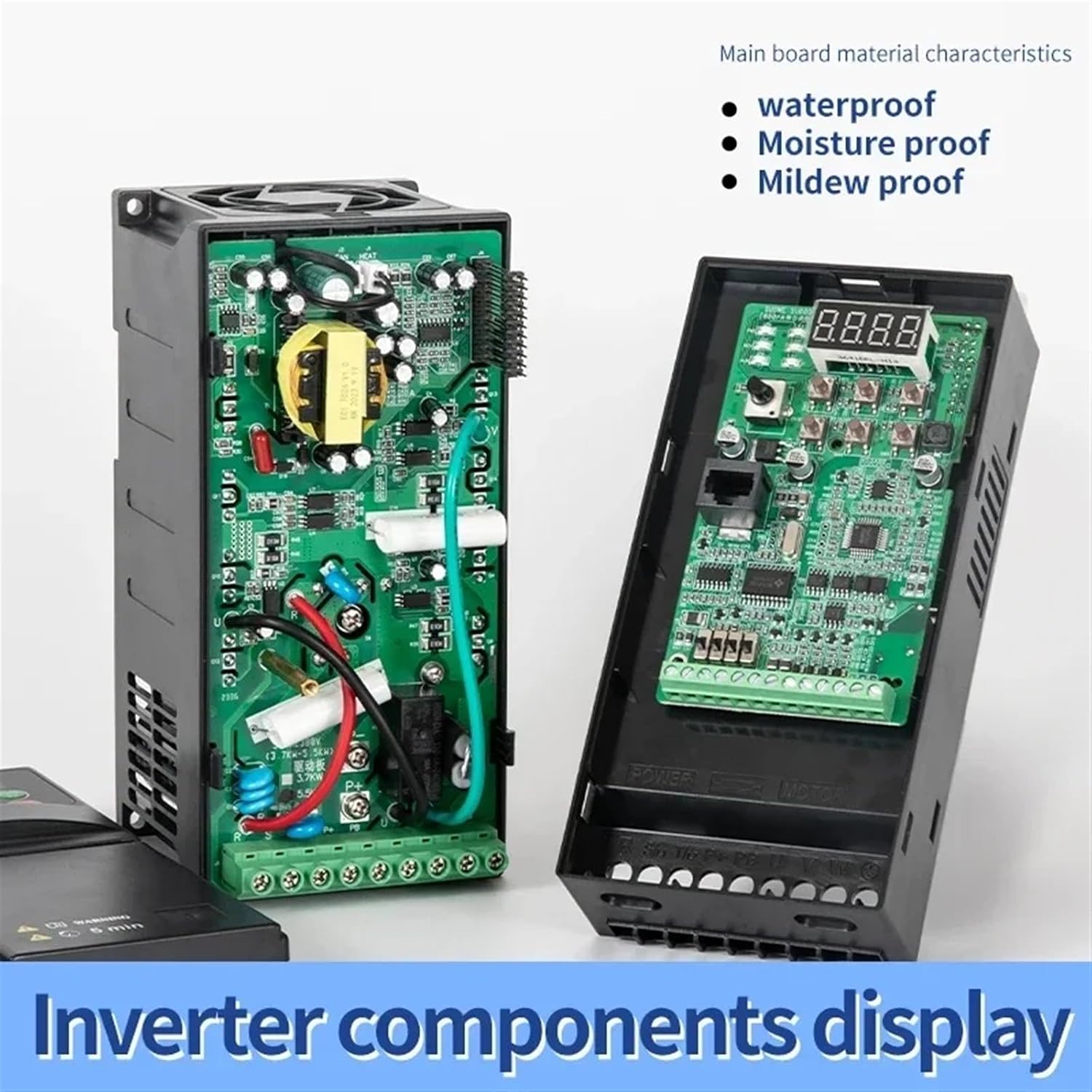
Figure 3.1: Inverter Components Display. This image illustrates the internal layout of the SU600 VFD, highlighting the main circuit board and various electronic components. The main board is designed to be waterproof, moisture-proof, and mildew-proof for enhanced durability.
4. Տեխնիկական պայմաններ
The following table details the key specifications for the SU600-5R5G1 VFD model:

Figure 4.1: SU600-5R5G1 Product Parameters. This image provides a visual summary of the VFD's specifications, including its model number, compatible motor power, electrical ratings, and physical dimensions.
| Պարամետր | Value (SU600-5R5G1) |
|---|---|
| Մոդել | SU600-5R5G1 |
| Adapted Motor Power | 5.5 կՎտ (7.5 ձիաուժ) |
| Ներածման ծավալըtage | Միաֆազ 220 Վ |
| Ելք Voltage | Եռաֆազ 380 Վ |
| Գնահատված ելքային հոսանք | 13 Ա |
| Չափերը (L x W x H) | 185 մմ x 87 մմ x 138 մմ |
| Քաշը | 1.16 կգ |
| Main Board Material | Waterproof, Moisture-proof, Mildew-proof |
5. Կարգավորում և միացում
Proper wiring is crucial for the safe and correct operation of the VFD. Refer to the wiring diagram below and ensure all connections are secure and meet local electrical codes.

Figure 5.1: Wiring Diagram. This diagram illustrates the connection points for the SU600 VFD. It shows the single-phase 220V input power connection (R, S/L1/L2), the three-phase 380V output power connection to the motor (U, V, W), the ground wire, and optional connections for a brake resistor (P+, PB).
Միացման քայլերը.
- Մուտքային էներգիայի միացում. Connect the single-phase 220V AC power supply to terminals R and S/L1/L2. Ensure the power source is properly fused and switched.
- Շարժիչի միացում. Connect the three-phase motor to the output terminals U, V, and W. Verify the motor's voltage and current ratings are compatible with the VFD's output.
- Հիմնավորում: Connect the ground wire from both the power supply and the motor to the VFD's ground terminal. Proper grounding is essential for safety.
- Brake Resistor (Optional): If a brake resistor is required for your application (e.g., for CNC machine tools), connect it to terminals P+ and PB.
- External Operation Panel (Optional): If using an external operation panel, connect it to the external network port as shown in the operating interface diagram.
6. Գործառնական հրահանգներ
The SU600 VFD features an intuitive control panel for easy operation and parameter adjustment.

Figure 6.1: Operation and Display Interface. This image details the VFD's control panel, showing the digital display, programming key (PRG), confirm key (ENT), run key (RUN), stop key (STOP), incremental key (up arrow), and decrement key (down arrow). It also indicates the external network port and an optional external operation panel.
Կառավարման վահանակի գործառույթները.
- PRG (Programming Key): Enters or exits parameter programming mode.
- ENT (Confirm Key): Confirms parameter settings or enters sub-menus.
- RUN (Run Key): Սկսում է շարժիչը:
- STOP (Stop Key): Դադարեցնում է շարժիչը:
- Up/Down Arrows (Incremental/Decrement Keys): Adjusts frequency, navigates menus, or changes parameter values.
- Ցուցադրել: Shows current frequency, current, voltage, and fault indicators (FWD, REV, ALM).
Հիմնական գործողություն.
- Միացում՝ After ensuring all wiring is correct and secure, apply power to the VFD. The display will light up.
- Սահմանել հաճախականությունը. Use the Up/Down arrow keys to set the desired output frequency.
- Շարժիչի մեկնարկը՝ Սեղմեք ՎԱԶԵԼ button to start the motor. The display will show the operating frequency and other relevant parameters.
- Կանգնեցնող շարժիչ՝ Սեղմեք STOP button to stop the motor.
- Պարամետրի ճշգրտում. To change advanced settings, press the PRG key to enter programming mode. Use the Up/Down keys to navigate parameters and ԼՕՌ to confirm changes. Refer to the full product manual for detailed parameter descriptions.
7. Պահպանում
Regular maintenance ensures the longevity and reliable operation of your SU600 VFD.
- Մաքրում: Periodically clean the VFD's exterior and cooling fins to prevent dust accumulation, which can hinder heat dissipation. Use a soft, dry cloth. Do not use liquid cleaners.
- Ստուգում: Պարբերաբար ստուգեք բոլոր լարերի միացումները՝ հերմետիկության և մաշվածության կամ վնասման նշանների համար: Ստուգեք աշխատանքի ընթացքում անսովոր աղմուկների կամ հոտերի առկայությունը:
- Շրջակա միջավայր: Ensure the operating environment remains within the specified temperature and humidity ranges. Keep the VFD away from direct sunlight, excessive vibration, and corrosive substances.
- Վինտիլյատորի ստուգում. Verify that the cooling fan operates freely and is not obstructed.
8: Անսարքություն
Այս բաժինը տրամադրում է ուղեցույց տարածված խնդիրների համար: Բարդ խնդիրների դեպքում կապվեք տեխնիկական աջակցության հետ:
| Խնդիր | Հնարավոր պատճառ | Լուծում |
|---|---|---|
| VFD-ն չի միանում | No input power; loose wiring; internal fault. | Check power supply and fuses. Verify input wiring. If problem persists, contact support. |
| Շարժիչը չի աշխատում | Incorrect wiring; VFD in stop mode; parameter settings incorrect; motor fault. | Check motor wiring (U, V, W). Press RUN. Verify frequency setting. Check motor for issues. |
| Գերհոսանքի խափանում (OC) | Motor overload; short circuit in motor wiring; acceleration time too short. | Reduce motor load. Check motor and wiring for shorts. Increase acceleration time parameter. |
| Overvoltagէլեկտրոնային խափանում (OV) | Deceleration time too short; regenerative load. | Increase deceleration time parameter. Consider adding a brake resistor if regenerative load is present. |
| Undervoltagէլեկտրոնային խզվածք (ուլտրամանուշակագույն) | Մուտքային հատորtage too low; power supply instability. | Ստուգեք մուտքային էլեկտրամատակարարման ծավալըtage. Ensure stable power. |
9. Երաշխիք և աջակցություն
For warranty information, technical assistance, or service, please contact your vendor or the manufacturer directly. Ensure you have your product model number (SU600-5R5G1) and purchase details available when seeking support.
Manufacturer: CSCPEXCZ