
1. Ներածություն
This manual provides instructions for the installation, operation, maintenance, and troubleshooting of your NETGEAR XS516TM 18-Port 10G/Multi-Gigabit Ethernet Smart Switch. This device is designed to provide high-speed network connectivity with advanced management features for business environments.
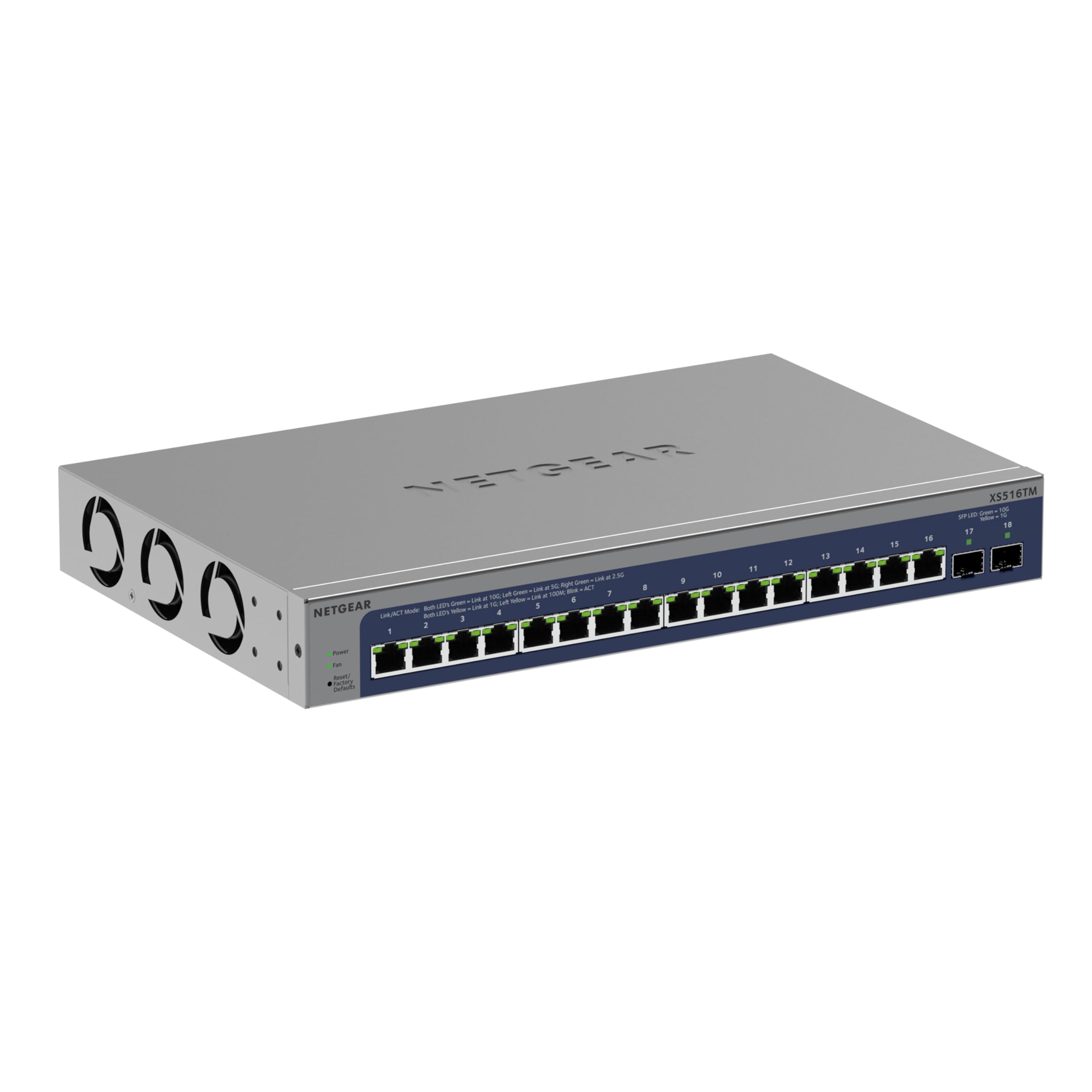
Նկար 1. Առջև view of the NETGEAR XS516TM Smart Switch.
2. Փաթեթի բովանդակությունը
Verify the contents of your package. If any items are missing or damaged, contact your NETGEAR reseller.
- NETGEAR XS516TM Smart Switch
- Հոսանքի լարը
- Mounting kit (for wall or rack mount)
- Ռետինե ոտնաթաթեր սեղանի սեղանի տեղադրման համար
- Տեղադրման ուղեցույց
3. Ֆիզիկական օվերview
The NETGEAR XS516TM switch features 16 multi-gigabit Ethernet ports and 2 SFP+ ports for high-speed connectivity.

Figure 2: Front and rear panel of the XS516TM switch, highlighting the 16 Ethernet ports, 2 SFP+ ports, power input, and status indicators.
Առջևի վահանակի առանձնահատկությունները.
- 16 x 1G/2.5G/5G/10G Ethernet Ports: These ports support various speeds for flexible network connections.
- 2 x 10G SFP+ Ports: For high-speed fiber optic connections or direct attach copper cables.
- LED ցուցիչներ. Provide status information for power, link/activity, and speed for each port.
- Վերականգնման կոճակ. Օգտագործվում է գործարանային լռելյայն կարգավորումները վերականգնելու համար։
Հետևի վահանակի առանձնահատկությունները.
- Էլեկտրաէներգիայի մուտքագրում. Connects to the included power cord.
- Հողամասի պտուտակ. For optional grounding.
4. Կարգավորում և տեղադրում
4.1. Մոնտաժման ընտրանքներ
The XS516TM switch can be installed on a desktop, wall-mounted, or rack-mounted.
- Սեղանի տեղադրում. Attach the included rubber footpads to the bottom of the switch.
- Պատի ամրացում. Use the provided mounting kit to secure the switch to a wall. Ensure the wall can support the weight of the switch and connected cables.
- Դարակի տեղադրում. Use the provided rack-mount brackets to install the switch in a standard 19-inch equipment rack.
4.2. Անջատիչի միացումը
- Connect your network devices (servers, workstations, access points, etc.) to the 1G/2.5G/5G/10G Ethernet ports using appropriate Ethernet cables.
- For high-speed uplinks or connections to other network devices, use the 10G SFP+ ports with compatible SFP+ transceivers or DAC cables.
- Connect the power cord to the switch's power input and then to an AC power outlet.
- Verify the Power LED illuminates, indicating the switch is receiving power.
5. Անջատիչի շահագործումը
The XS516TM is a Smart Switch, offering advanced management capabilities through its web-based interface and optional NETGEAR Insight cloud management.
5.1. Local Configuration and Control
Մուտք գործեք անջատիչի web-based management interface from a connected computer to configure settings such as VLANs, QoS, IGMP, security features, and more. Refer to the detailed software manual for comprehensive configuration instructions.

Նկար 3. Նախample of the Smart Switch software interface for local configuration.
5.2. NETGEAR Insight Remote Management
The switch includes a 1-year subscription to NETGEAR Insight, allowing remote management of your network from anywhere. This feature provides centralized control and monitoring through a cloud-based platform without requiring additional hardware.

Figure 4: NETGEAR Insight interface for remote management on various devices.
NETGEAR Insight-ի հիմնական առանձնահատկությունները ներառում են.
- Բազմատեղակայման աջակցություն
- Ցանցային սկանավորման սարքի հայտնաբերում
- Կազմաձևման պատճենում և կլոնավորում
- Advanced PoE Configuration (if applicable to model)
- Ծրագրային ապահովման ժամանակացույց
- SNMP Device Status
- Տվյալների պատմություն
- Single Sign-on
- Երկու գործոնով վավերացում
- Էլ․ փոստի ծանուցումներ/Push ծանուցումներ
6. Պահպանում
To ensure optimal performance and longevity of your NETGEAR XS516TM switch, follow these maintenance guidelines:
- Մաքրում: Պահեք անջատիչը մաքուր և փոշուց զերծ։ Մաքրման համար օգտագործեք փափուկ, չոր կտոր։ Մի օգտագործեք հեղուկ կամ աէրոզոլային մաքրող միջոցներ։
- Օդափոխում: Ensure proper airflow around the switch. Do not block ventilation openings.
- Fրագրակազմի թարմացումներ. Պարբերաբար ստուգեք NETGEAR-ի աջակցությունը website for the latest firmware updates. Applying updates can improve performance, add new features, and enhance security.
- Բնապահպանական պայմաններ. Operate the switch within the specified temperature and humidity ranges to prevent damage.
7: Անսարքություն
If you encounter issues with your NETGEAR XS516TM switch, refer to the following common troubleshooting steps:
- Հզորություն չկա.
- Համոզվեք, որ սնուցման լարը հուսալիորեն միացված է անջատիչին և աշխատող վարդակիցին։
- Ստուգեք, որ վարդակը գործում է՝ միացնելով մեկ այլ սարք։
- Կապի լույս չկա։
- Ստուգեք, որ Ethernet մալուխը ճիշտ է միացված և՛ կոմուտատորի միացքին, և՛ միացված սարքին։
- Փորձեք այլ Ethernet մալուխ։
- Համոզվեք, որ միացված սարքը միացված է և ճիշտ է աշխատում։
- Ցանցային կապի խնդիրներ՝
- Check the IP configuration of your devices.
- Log into the switch's management interface to check port status, VLAN settings, and other configurations.
- If using NETGEAR Insight, check the device status and logs remotely.
- Perform a factory reset if all other troubleshooting fails (refer to the "Reset Button" in Section 3).
- Դանդաղ կատարում.
- Ensure all connected devices are operating at their optimal speeds.
- Check for network congestion or excessive broadcast traffic.
- Verify cable quality and length meet specifications for 10G/Multi-Gigabit speeds.
For more detailed troubleshooting, consult the full user manual available on the NETGEAR support website or contact NETGEAR technical support.
8. Տեխնիկական պայմաններ
| Առանձնահատկություն | Հստակեցում |
|---|---|
| Բրենդ | NETGEAR |
| Մոդելի համարը | XS516TM-100NAS |
| Նավահանգիստների թիվը | 18 (16 x 1G/2.5G/5G/10G Ethernet, 2 x 10G SFP+) |
| Տվյալների փոխանցման արագություն | 10 Gigabits Per Second (max) |
| Անջատիչի տեսակը | Managed (Smart Switch) |
| Ինտերֆեյս | Ethernet, SFP+ |
| Նյութի քաշը | 3.49 կգ |
| Չափերը (H x W x D) | 1.7 x 13.0 x 8.1 դյույմ |
| Վերին ջերմաստիճանի վարկանիշ | 50 աստիճան ցելսիուս |
| UPC | 606449165456 |
9. Երաշխիք և աջակցություն
NETGEAR provides comprehensive support and warranty for the XS516TM Smart Switch:
- Limited Lifetime Hardware Warranty: Your product is covered by a limited lifetime hardware warranty.
- Հաջորդ աշխատանքային օրվա փոխարինում. In case of hardware failure, a replacement unit can be dispatched on the next business day.
- 24/7 Chat Support: Access to 24/7 chat support with a NETGEAR expert for technical assistance.
For warranty details, product registration, and technical support, please visit the official NETGEAR support webկայքը: www.netgear.com/support