
H3C H3C Magic NX15-UK
H3C Magic NX15 AX1500 Dual Band Gigabit Wi-Fi 6 Router User Manual
Model: H3C Magic NX15-UK
1. Ներածություն
The H3C Magic NX15 is a high-performance Gigabit Wi-Fi 6 router designed to provide a fast and reliable internet experience. Featuring a vertical design, full gigabit network ports, and Wi-Fi 6 (802.11ax) technology on the 5GHz band, it ensures high-speed connectivity. Equipped with four high-gain external antennas and EasyMesh compatibility, it offers wide and flexible network signal coverage. Enhanced security is provided through WPA3 encryption. This manual provides essential information for setting up, operating, and maintaining your H3C Magic NX15 router.
2. Փաթեթի բովանդակությունը
Խնդրում ենք ուշադիր ստուգել փաթեթի պարունակությունը։ Եթե որևէ ապրանք բացակայում է կամ վնասված է, խնդրում ենք կապվել ձեր վաճառողի հետ։
- H3C Magic NX15 AX1500 Dual Band Gigabit Wi-Fi 6 Router
- Power Adapter
- Ethernet մալուխ
- Արագ տեղադրման ուղեցույց (այս ձեռնարկը)
3. Ապրանքը ավարտված էview
Familiarize yourself with the components and interfaces of your H3C Magic NX15 router.
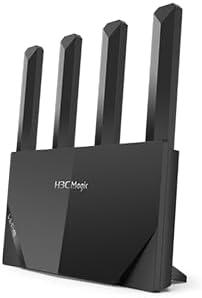
Նկար 3.1: Ճակատ view of the H3C Magic NX15 router, showcasing its vertical design and four external antennas.
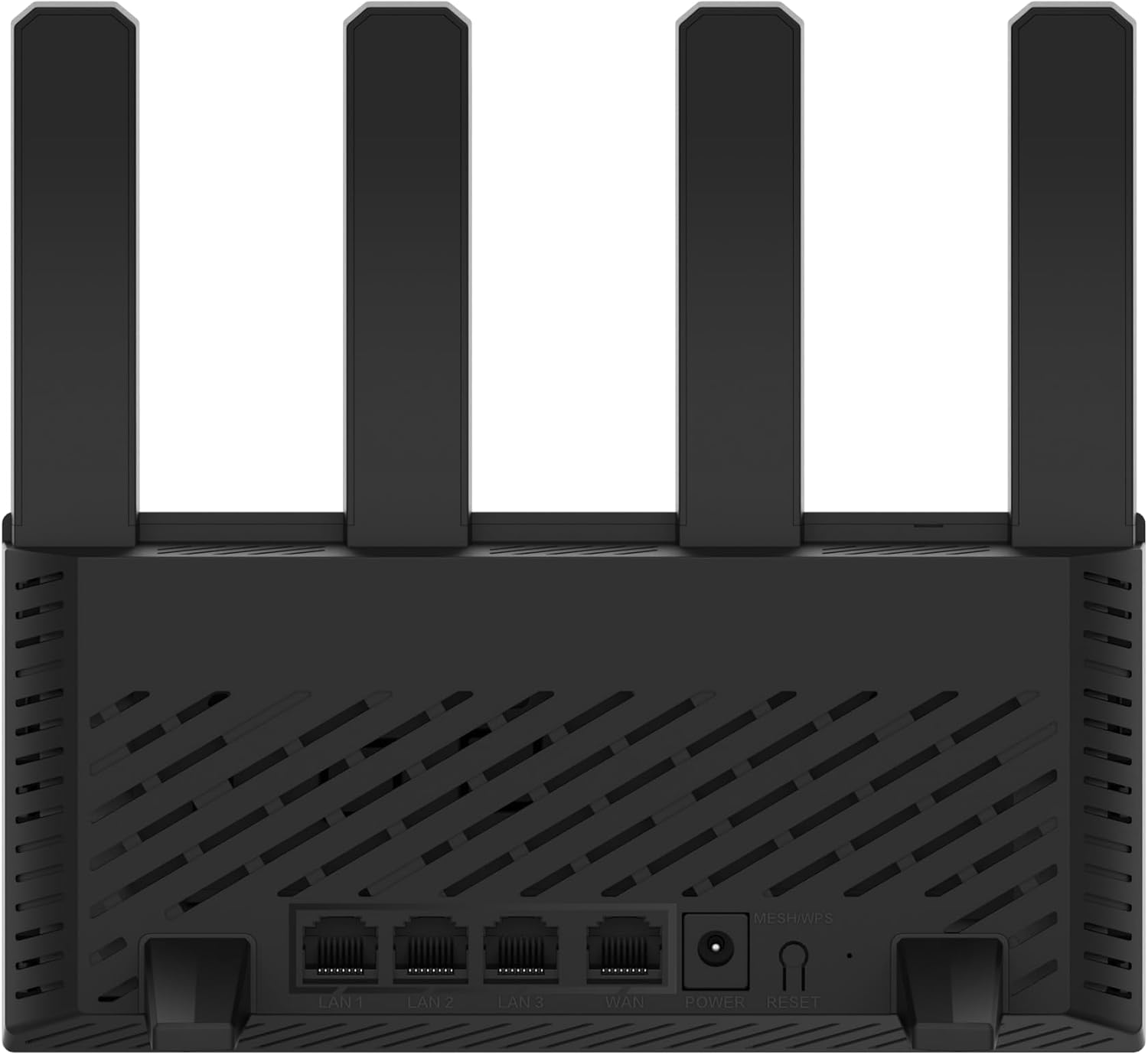
Նկար 3.2: Հետևի view of the H3C Magic NX15 router, displaying the LAN ports, WAN port, power input, and Reset/WPS button.

Նկար 3.3: Վերև view of the H3C Magic NX15 router, highlighting the ventilation design for heat dissipation.

Նկար 3.4: Կողք view of the H3C Magic NX15 router, showing the sleek profile and additional ventilation slots.
Port and Button Descriptions:
- WAN նավահանգիստ. Միանում է ձեր մոդեմին կամ ինտերնետ մատակարարի (ISP) ցանցին։
- LAN միացքներ (LAN1, LAN2, LAN3): Միացեք լարային սարքերի, ինչպիսիք են համակարգիչները, խաղային կոնսոլները կամ խելացի հեռուստացույցները։
- Power նավահանգիստ: Միանում է ներառված սնուցման ադապտերին։
- Վերականգնել/WPS կոճակ.
- Press briefly to activate WPS (Wi-Fi Protected Setup) for easy connection of compatible devices.
- Press and hold for approximately 5-10 seconds to restore the router to factory default settings.
- Ալեհավաքներ. Four high-gain external antennas for optimal Wi-Fi signal coverage.
4. Կարգավորման ուղեցույց
Follow these steps to set up your H3C Magic NX15 router for the first time.
- Բացեք ռաութերը. Զգուշորեն հանեք ռաութերը և բոլոր պարագաները փաթեթավորումից։
- Տեղադրեք ռոուտերը. Տեղադրեք ռաութերը ձեր տան կամ գրասենյակի կենտրոնական մասում՝ հեռու խոչընդոտներից և խանգարման աղբյուրներից (օրինակ՝ միկրոալիքային վառարաններ, անլար հեռախոսներ): Ապահովեք լավ օդափոխություն:
- Միացեք հոսանքի. Connect the included power adapter to the router's power port and then plug the adapter into a power outlet. Wait for the router to power on and its indicator lights to stabilize.
- Միացեք մոդեմին. Connect one end of the provided Ethernet cable to the WAN port on your H3C Magic NX15 router and the other end to your modem's LAN port.
- Սարքերի միացում (ըստ ցանկության). For wired connections, connect an Ethernet cable from one of the router's LAN ports to your computer or other network device.
- Միացեք Wi-Fi-ին.
- Ձեր համակարգչում կամ բջջային սարքում որոնեք հասանելի Wi-Fi ցանցեր։
- Ընտրեք Wi-Fi ցանցի անունը (SSID), որը տպված է ձեր ռաութերի ներքևի մասում գտնվող պիտակի վրա։
- Enter the Wi-Fi password (also printed on the router's label) when prompted.
- Մուտքի ռաութերի կառավարման էջ՝
- Բացեք ա web բրաուզեր (օրինակ՝ Chrome, Firefox, Edge):
- Մուտքագրեք լռելյայն IP հասցեն (սովորաբար
192.168.1.1orh3cmagic.com) into the address bar and press Enter. Refer to the router's label for the exact address. - Follow the on-screen instructions to complete the initial setup, including setting a new administrator password and configuring your internet connection type (e.g., PPPoE, DHCP, Static IP).
5. Գործառնական հրահանգներ
This section details the key features and how to operate your H3C Magic NX15 router.
5.1 Երկակի գոտիով Wi-Fi-ի շահագործում
The H3C Magic NX15 supports dual-band Wi-Fi (2.4GHz and 5GHz) for optimal performance. It features intelligent band steering, which automatically directs your devices to the best available band (2.4GHz for wider coverage, 5GHz for higher speeds) without manual selection.
- 2.4 ԳՀց Band: Provides wider coverage and better penetration through walls, suitable for general browsing and devices further from the router.
- 5 ԳՀց Band: Offers higher speeds and lower latency, ideal for streaming 4K video, online gaming, and high-bandwidth applications, typically for devices closer to the router.
5.2 Intelligent Management via Mobile App
Manage your router conveniently using the dedicated H3C mobile application. The app allows for easy network settings configuration, network speed optimization, and various other operations.
- Ներբեռնեք հավելվածը՝ Որոնել the "H3C Magic" app in your device's app store (Google Play Store for Android or Apple App Store for iOS).
- Տեղադրեք և գործարկեք. Տեղադրեք հավելվածը և բացեք այն:
- Մուտք գործել՝ Use your router's administrator credentials to log in to the app.
- Կառավարեք կարգավորումները. Հավելվածից կարող եք՝
- Change Wi-Fi names and passwords.
- Հետևեք միացված սարքերին։
- Կարգավորեք ծնողական վերահսկողությունը:
- Configure guest Wi-Fi networks.
- Optimize network performance.
5.3 EasyMesh for Whole-Home Wi-Fi
The H3C Magic NX15 supports EasyMesh technology, allowing you to expand your Wi-Fi coverage by adding additional compatible H3C mesh units. This creates a seamless whole-home Wi-Fi network, eliminating dead zones in large or complex house types.
- Refer to the EasyMesh setup guide provided with your additional mesh units for detailed instructions on expanding your network.
- Ensure all mesh units are compatible with the EasyMesh standard.
5.4 Network Security Features
The router includes multiple functions to enhance your private network's security:
- WPA3 գաղտնագրում. Provides the latest and strongest Wi-Fi security protocol.
- Access Allowlist/Denylist: Control which devices can connect to your network based on their MAC addresses.
- Հյուրերի Wi-Fi: Ստեղծեք առանձին Wi-Fi ցանց հյուրերի համար՝ պահպանելով ձեր հիմնական ցանցը անվտանգ և գաղտնի։
- Ծնողական վերահսկողություն. Manage internet access times and block inappropriate content for specific devices.
These security features can be configured via the router's web management interface or the H3C mobile app.
6. Պահպանում
Proper maintenance ensures the longevity and optimal performance of your H3C Magic NX15 router.
- Տեղադրում: Keep the router in a well-ventilated area, away from direct sunlight, heat sources, and moisture. The stereoscopic heat dissipation design with a large metal heat sink helps maintain stable operation.
- Մաքրում: Regularly dust the router's exterior and ventilation slots with a soft, dry cloth. Do not use liquid cleaners or aerosols.
- Fրագրակազմի թարմացումներ. Պարբերաբար ստուգեք և տեղադրեք ներկառուցված ծրագրի թարմացումները ռաութերի միջոցով web management interface or the mobile app. Firmware updates often include performance improvements, new features, and security patches.
- Վերագործարկում. Եթե ցանցային խնդիրներ ունեք, փորձեք վերագործարկել ռաութերը՝ 10 վայրկյանով անջատելով սնուցման ադապտերը, ապա նորից միացնելով այն։
- Անվտանգություն: Regularly change your Wi-Fi password and router administrator password to strong, unique combinations.
7: Անսարքություն
Այս բաժինը անդրադառնում է ձեզ մոտ առաջացող տարածված խնդիրներին և առաջարկում է լուծումներ։
| Խնդիր | Հնարավոր պատճառ | Լուծում |
|---|---|---|
| Ինտերնետ հասանելիություն չկա |
|
|
| Wi-Fi Signal Weak or Unstable |
|
|
| Հնարավոր չէ մուտք գործել ռուտերի կառավարման էջ |
|
|
| Forgot Router Administrator Password | Գաղտնաբառը կորել է | Press and hold the Reset/WPS button on the router for 5-10 seconds to restore factory default settings. You will then need to reconfigure the router. |
8. Տեխնիկական պայմաններ
Detailed technical specifications for the H3C Magic NX15 router.
| Առանձնահատկություն | Մանրամասն |
|---|---|
| Մոդելի անվանումը | H3C Magic NX15 |
| Նյութի մոդելի համարը | H3C Magic NX15-UK |
| Բրենդ | H3C |
| Անլար ստանդարտ | 802.11ax (Wi-Fi 6) |
| Հաճախականության տիրույթի դաս | Երկակի հաճախականությամբ (2.4 ԳՀց և 5 ԳՀց) |
| Անտենաներ | 4 High-Gain External Antennas |
| Նավահանգիստներ | Gigabit WAN, Gigabit LAN (x3) |
| Հատուկ առանձնահատկություններ | Access Point Mode, EasyMesh, WPA3 Security, Parental Control, Guest Wi-Fi, App Management |
| Չափերը (Փաթեթ) | 21 x 19.4 x 6.3 սմ |
| Քաշը (փաթեթ) | 500 գ |
| Արտադրող | H3C |
| Ծագման երկիր | Չինաստան |
| Առաջին հասանելի ամսաթիվը | 24 օգոստոսի 2024 թ |
9. Երաշխիք և աջակցություն
The H3C Magic NX15 router comes with a standard manufacturer's warranty. For specific warranty terms and conditions, please refer to the warranty card included in your product packaging or visit the official H3C webկայք։
Տեխնիկական աջակցություն.
If you encounter any issues or have questions regarding your H3C Magic NX15 router, please contact H3C technical support.
- Առցանց աջակցություն. Visit the official H3C support webԿայք՝ հաճախակի տրվող հարցերի, խնդիրների լուծման ուղեցույցների և դրայվերների/ծրագրակազմի ներբեռնումների համար։
- Կոնտակտային տվյալներ: Refer to the H3C webկայքում կամ ձեր ապրանքի փաստաթղթերում՝ տարածաշրջանային կոնտակտային համարների և էլեկտրոնային փոստի աջակցության համար։
Please have your product model number (H3C Magic NX15-UK) and serial number ready when contacting support.