
1. Ներածություն
Welcome to the WONNIE DC105P Digital Camera user manual. This guide provides essential information for setting up, operating, and maintaining your new camera. Designed for ease of use, this camera captures vivid 56MP photos and Full HD 1080P videos, making it perfect for young photographers to explore their creativity.
2. Անվտանգության տեղեկատվություն
- Տեսախցիկը մի դրեք ջրի կամ ծայրահեղ ջերմաստիճանի ազդեցությանը:
- Պահեք տեսախցիկը ուժեղ մագնիսական դաշտերից հեռու։
- Օգտագործեք միայն նշված մարտկոցները և լիցքավորման մալուխը։
- Խուսափեք տեսախցիկը գցելուց կամ այն ուժեղ հարվածներից ենթարկելուց։
- Մաքրեք ոսպնյակը փափուկ, չոր շորով:
3. Ի՞նչ կա տուփի մեջ
Upon unboxing your WONNIE DC105P Digital Camera, please ensure all the following items are present:
- WONNIE DC105P Digital Camera
- 32GB TF քարտ
- Վերալիցքավորվող մարտկոցներ (x2)
- Type-C USB մալուխ
- Շղթայակապ
- Պահպանման պայուսակ
- Օգտագործողի ձեռնարկ (այս փաստաթուղթը)
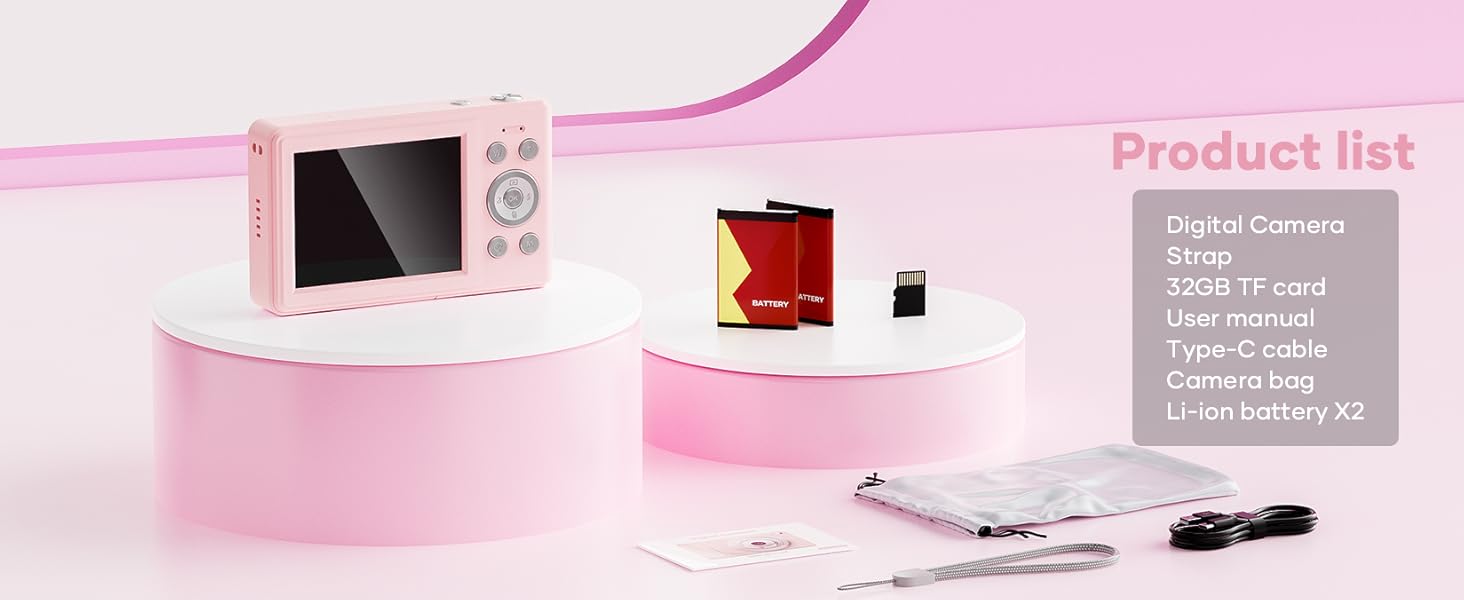
This image displays the WONNIE DC105P Digital Camera alongside its accessories: two rechargeable batteries, a 32GB TF card, a Type-C USB cable, a lanyard, and a soft storage bag, all neatly arranged.
4. Ապրանքը ավարտված էview
Ծանոթացեք տեսախցիկի բաղադրիչներին և կառավարման տարրերին։
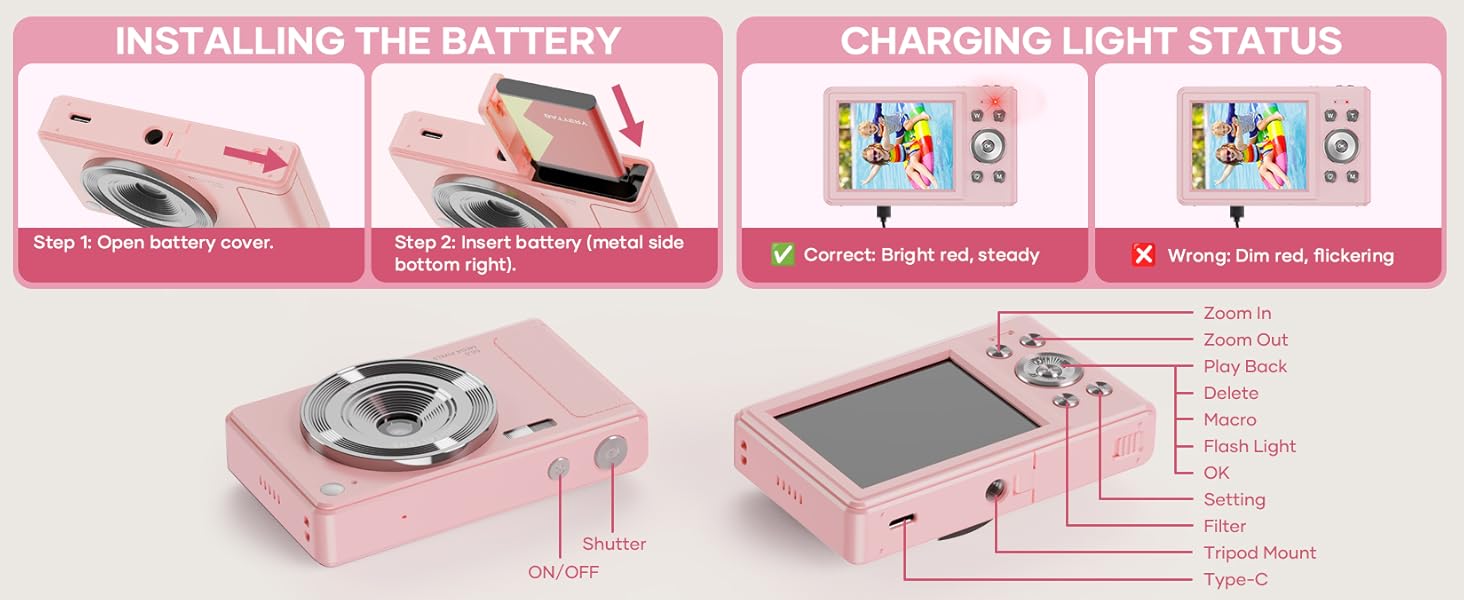
This diagram highlights the various buttons and ports on the WONNIE DC105P Digital Camera, including the power button, shutter button, zoom controls, playback button, menu button, OK button, flash light, tripod mount, and Type-C port.
Հիմնական բաղադրիչներ.
- Ոսպնյակներ: Նկարում է պատկերներ և տեսանյութեր:
- Flash: Ապահովում է լուսավորություն թույլ լուսավորության պայմաններում։
- Կափարիչի կոճակ. Սեղմեք՝ լուսանկարելու կամ տեսաձայնագրումը սկսելու/դադարեցնելու համար։
- Power կոճակը. Միացնում կամ անջատում է տեսախցիկը։
- LCD էկրան. Ցուցադրվում է ուղիղ եթերում view, ընտրացանկեր և վերարտադրում։
- Նավիգացիոն կոճակներ (վերև/ներքև/ձախ/աջ/OK): Used for menu navigation and selecting options.
- Մեծացման կոճակներ (W/T): Adjusts digital zoom.
- Նվագարկման կոճակ. Մտնում է վերարտադրման ռեժիմ՝ view captured media.
- Մենյու կոճակ. Մուտք է գործում տեսախցիկի կարգավորումներին։
- Type-C նավահանգիստ: Լիցքավորման և տվյալների փոխանցման համար:
- Tripod Mount: For attaching the camera to a tripod.
5. Կարգավորում
5.1 Մարտկոցի տեղադրում
- Բացեք մարտկոցի խցիկի կափարիչը, որը գտնվում է տեսախցիկի կողքի վրա։
- Insert the rechargeable battery with the metal contacts facing down and to the right, ensuring it clicks into place.
- Ապահով փակեք մարտկոցի խցիկի կափարիչը:
This image illustrates the two steps for battery installation: first, opening the battery cover, and second, inserting the battery with the metal side facing down and to the right.
5.2 SD քարտի տեղադրում
The camera supports a 32GB TF (Micro SD) card. Insert the TF card into the designated slot in the battery compartment until it clicks.
5.3 Մարտկոցի լիցքավորում
- Միացրեք տեսախցիկը սնուցման աղբյուրին՝ օգտագործելով տրամադրված Type-C USB մալուխը։
- The charging indicator light will show the charging status. A bright red, steady light indicates correct charging. A dim, flickering light indicates an issue.
This image displays the camera's charging light status: a bright red, steady light for correct charging, and a dim, flickering light indicating an incorrect status.
5.4 Կցորդիչի ամրացումը
Thread the lanyard through the designated loop on the camera body to prevent accidental drops.
6. Տեսախցիկի շահագործում
6.1 Միացում/անջատում
Press and hold the Power button (labeled ON/OFF) on the top of the camera to turn it on or off.
6.2 Լուսանկարներ անելը
In photo mode, frame your shot using the LCD screen and press the Shutter button to capture an image. The camera features 56MP resolution for clear photos.

This image shows a child holding the pink WONNIE DC105P Digital Camera, with the screen displaying a photo of children. Other children are in the foreground, emphasizing the camera's ease of use for capturing vibrant 56MP photos and smooth FHD 1080P videos.
Special Photo Features:
- 16x թվային խոշորացում. Use the 'W' and 'T' buttons to zoom in or out.
- 20 Fun Filters: Apply various creative filters to your photos via the menu.
- Ինքնաչափ. Set a delay (2s, 5s, 10s) before taking a photo, ideal for group shots.
- Continuous Shooting (Burst Mode): Capture a rapid sequence of 3 photos.
- Anti-Shake: Digital image stabilization helps reduce blur from camera movement.
- Լրացուցիչ լույս. Activate the built-in fill light for brighter photos in dim environments. (Note: Fill light won't activate in macro mode or when battery is too low.)
- Smile Recognition: Ավտոմատ կերպով լուսանկարում է ժպիտ հայտնաբերելիս։

This image showcases three key features: Self Timer for perfect selfies, Continuous Shooting to capture every moment, and Anti Shake for steady shots.

This image illustrates the camera's 16x digital zoom capability with examples at 4x, 8x, and 16x, alongside a selection of 20 fun filters like Normal, Cold Filter, Warm Filter, and more, for endless creativity.
6.3 Տեսանյութերի ձայնագրում
Switch to video mode (usually indicated by a camcorder icon in the menu) and press the Shutter button to start recording. Press again to stop. Videos are recorded in FHD 1080P with a built-in microphone.
6.4 Playback/Viewing Media
Press the Playback button to enter playback mode. Use the navigation buttons to scroll through your photos and videos. Press the OK button to play videos.
6.5 Փոխանցում Files
You have several options to transfer your media:
- USB-ից համակարգչին. Connect the camera to your computer using the Type-C cable. The camera will appear as a removable disk.
- OTG to Phone: Use a compatible OTG cable adapter (sold separately) to connect the camera to your smartphone (e.g., iPhone 15, Samsung).
- Քարտի ընթերցող: Remove the TF card and insert it into a card reader to transfer files to a computer or phone.

This image illustrates three convenient ways to view and transfer media: directly connecting the camera via USB to a PC, using an OTG adapter to connect to a smartphone, or using a card reader with a smartphone.
6.6 Webտեսախցիկի ֆունկցիոնալությունը
Connect the camera to a computer via the Type-C USB cable. Select 'Webcam' mode on the camera (if prompted) to use it for video calls or live streaming.

This image demonstrates the WONNIE DC105P Digital Camera's capability to function as a webcam, showing it mounted on a laptop for a video call and for live streaming.
7. Տեսանյութի ցուցադրություն
Այս տեսանյութը ընդհանուր պատկերացում է տալիսview of the WONNIE Digital Camera, highlighting its features and suitability for kids and teens.
This video offers an introduction to the digital camera, demonstrating its basic functions and design.
8. Պահպանում
- Մաքրում: Use a soft, lint-free cloth to clean the camera body and screen. For the lens, use a specialized lens cleaning cloth and solution.
- Պահպանում: Store the camera in its provided storage bag in a cool, dry place away from direct sunlight and humidity. Remove the battery if the camera will not be used for an extended period.
- Մարտկոցի խնամք. Fully charge batteries before first use. Avoid completely draining the battery frequently to prolong its lifespan.
9: Անսարքություն
| Խնդիր | Հնարավոր լուծում |
|---|---|
| Տեսախցիկը չի միանում։ | Համոզվեք, որ մարտկոցը ճիշտ է տեղադրված և լիովին լիցքավորված: |
| Հնարավոր չէ լուսանկարներ/տեսանյութեր նկարել։ | Check if the SD card is inserted correctly and has sufficient free space. Ensure the battery is not critically low. |
| Պատկերները մշուշոտ են: | Ensure the lens is clean. Use the anti-shake feature. Hold the camera steady while shooting. |
| Հնարավոր չէ փոխանցել files to computer/phone. | Verify the USB cable connection. Ensure the camera is in the correct mode for data transfer (if prompted). Try a different USB port or cable. For phones, ensure OTG compatibility and adapter. |
| Charging indicator is flickering. | Refer to Figure 5.2 for correct charging status. Re-insert the cable or try a different power source. |
10. Տեխնիկական պայմաններ
| Առանձնահատկություն | Մանրամասն |
|---|---|
| Լուսանկարի ցուցիչի լուծում | 56 պատգամավոր |
| Տեսանյութի բանաձեւ | 1080p FHD |
| Օպտիկական խոշորացում | 16x թվային խոշորացում |
| Էկրանի չափը | 2.8 դյույմ LCD |
| Պատկերի կայունացում | Թվային |
| Պահպանման մեդիա | 32GB TF Card (included), Max 32GB supported |
| Միացում | OTG, USB Type-C |
| Հատուկ առանձնահատկություններ | Stամանակի Սբamp, Anti-shake, Time-lapse, Continuous Shoot, Face Detection, Self-timer, Webcam, Filter Effect, Fill light, Selfie mirror, Auto Shut-off, Built-in Microphone |
| Նյութի քաշը | 0.22 կիլոգրամ (մոտ 0.48 ֆունտ) |
| Չափերը | Մոտավորապես 3.8 x 0.78 x 2.4 դյույմ (պատկերի հիման վրա) |
| Մարտկոցի տեսակը | Lithium Ion (1000mAh, 3.8V) |
11. Երաշխիք և աջակցություն
Your WONNIE DC105P Digital Camera comes with a 1 տարվա երաշխիք. We are committed to providing excellent customer service and offer a hassle-free replacement policy. For any inquiries, missing accessories, or support needs, please contact our customer service team. We aim to respond within 24 hours.
For further assistance, please visit the official WONNIE Store on Amazon: WONNIE Store