
IFYOO IFYOO-G53-Black3
IFYOO G53 Wireless Vertical Ergonomic Mouse
Հրահանգների ձեռնարկ
Ապրանքանիշը: IFYOO | Մոդել: IFYOO-G53-Black3
1. Ներածություն
The IFYOO G53 Wireless Vertical Ergonomic Mouse is designed to provide superior comfort and enhance productivity. Its unique vertical design promotes a natural handshake position, reducing wrist strain and discomfort often associated with traditional mice. This tri-mode mouse offers versatile connectivity options and customizable features to adapt to various computing environments.

Figure 1.1: IFYOO G53 Wireless Vertical Ergonomic Mouse.
2. Հիմնական հատկանիշները
- Superior Ergonomic Design: Keeps your hand in a natural handshake position to reduce wrist stress and pain, helping to prevent Carpal Tunnel Syndrome.
- Եռակի ռեժիմով միացում. Supports 2.4GHz wireless, Bluetooth 5.1, and wired USB-C connections, allowing seamless switching between multiple devices.
- Կարգավորելի DPI. Max 8400 DPI for smooth and accurate tracking, with multiple DPI settings (500, 1600, 2400, 3200, 4000, 4800, 8400) for precise control.
- Դինամիկ RGB լուսավորություն. Features 9 RGB lighting modes for customizable visual effects, which can also be turned off. DPI changes are indicated by logo color.
- 5 Programmable Side Buttons: Boost productivity with shortcuts for forward/backward webpage navigation, changing lighting effects, opening file explorer, or returning to desktop. (Note: Some side button shortcuts may not work with Mac OS, iPad OS, and other operating systems, except for light switch, and are primarily supported on Windows 10/11).
- Վերալիցքավորվող մարտկոց. Built-in 600mAh rechargeable battery with intelligent power saving. Charges via USB-C.

Figure 2.1: Ergonomic design promotes a natural hand position, reducing wrist strain.
3. Փաթեթի բովանդակությունը
Խնդրում ենք համոզվել, որ բոլոր իրերը առկա են փաթեթում։ 👍
- 1x IFYOO G53 Wireless Vertical Ergonomic Mouse
- 1x օգտագործողի ձեռնարկ (այս փաստաթուղթը)
- 1x Type-C USB լիցքավորման մալուխ
- 1x 2.4 GHz USB Receiver (stored at the bottom of the mouse)
4. Կարգավորում
4.1 Մկնիկի լիցքավորում
Before first use, it is recommended to fully charge the mouse. Connect the provided USB-C cable to the charging port on the front of the mouse and the other end to a USB power source (e.g., computer USB port, USB wall adapter). The RGB lighting may indicate charging status.
4.2 Միացում ձեր սարքին
The G53 mouse offers three connection modes:
- 2.4 ԳՀց անլար ռեժիմ.
- Locate the 2.4 GHz USB receiver stored in the magnetic compartment at the bottom of the mouse.
- Միացրեք USB ընդունիչը ձեր համակարգչի հասանելի USB պորտին:
- Slide the mode switch at the bottom of the mouse to the "2.4G" position. The mouse should connect automatically.
- Bluetooth (BT) ռեժիմ՝
- Slide the mode switch at the bottom of the mouse to the "BT" position.
- On your device (Windows, Mac, iPad OS, Android), go to Bluetooth settings and search for new devices.
- Select "IFYOO G53" from the list of available devices to pair.
- Լարային ռեժիմ
- Connect the provided USB-C cable to the mouse's charging port and the USB-A end to your computer's USB port.
- Slide the mode switch at the bottom of the mouse to the "Wired" position. The mouse will function as a wired device and charge simultaneously.

Figure 4.1: Seamless multi-device connectivity with 2.4G, Wired, and Bluetooth modes.
4.3 Driver Software (Windows Only)
To modify mouse configurations and customize buttons (excluding light switch), driver software is available for Windows OS only. Visit www.ifyoo.net to download the latest driver. This software allows for personalized profiles, macro settings, and advanced RGB control.

Figure 4.2: Professional driver software interface for Windows customization.
5. Գործառնական հրահանգներ
5.1 Կոճակի գործառույթներ
The IFYOO G53 mouse features 10 buttons for enhanced control:

Figure 5.1: Mouse layout and button overview.
- Left Button (1): Ստանդարտ ձախ սեղմակի ֆունկցիա։
- Scroll Wheel (2): Վերև/ներքև ոլորել, միջին սեղմումով սեղմել։
- Right Button (3): Ստանդարտ աջ սեղմման գործառույթ։
- DPI կոճակ (4): Ցիկլային կերպով անցնում է DPI կարգավորումների միջով։
- Forward Button (5): Առաջ է շարժվում դեպի web browsers/applications.
- Backward Button (6): Հետ է նավարկում web browsers/applications.
- Light Effect Button (7): Changes RGB lighting modes.
- File Resource Manager (8): Բացվում է File Explorer (Windows only).
- BOSS Button (9): Returns to desktop (Windows only).
- Mode Indicator (10): Displays current connection mode.
- 2.4G Receiver (11): USB dongle for 2.4GHz wireless connection.
- Ռեժիմի կոճակ (12): Switch between 2.4G, Wired, and BT modes.
Note: Due to system compatibility, functions of buttons 5, 6, 8, and 9 can only be used on Windows OS.
5.2 DPI զգայունության կարգավորում
Սեղմեք DPI կոճակ (4) to cycle through the available DPI settings. Each change in DPI will typically be indicated by a change in the logo's LED color, allowing you to visually confirm your current sensitivity level.
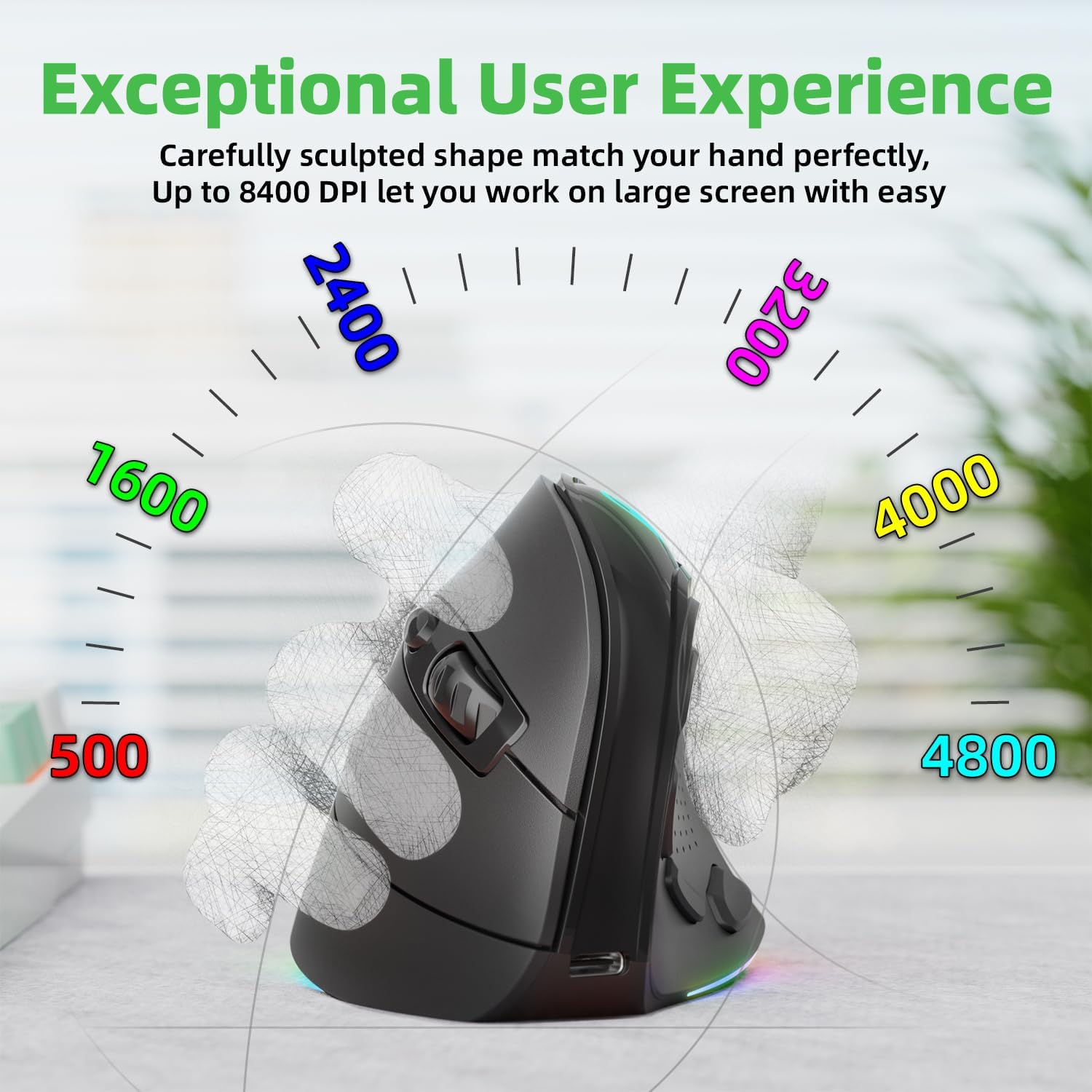
Figure 5.2: Adjustable DPI up to 8400, with logo color indicating current DPI.
5.3 Controlling RGB Lighting
Սեղմեք Light Effect Button (7) to cycle through the 9 dynamic RGB lighting modes. Continue pressing to find your preferred effect or to turn the lighting off.
6. Պահպանում
- Մաքրում: Մկնիկը մաքրելու համար օգտագործեք փափուկ, չոր կտոր։ Համառ կեղտի դեպքում, թեթևակի մաքրեքampՄաքրեք կտորը ջրով կամ մեղմ մաքրող լուծույթով։ Խուսափեք կոշտ քիմիական նյութերից կամ հղկող նյութերից։
- Պահպանում: When not in use for extended periods, store the mouse in a cool, dry place. Ensure the 2.4 GHz receiver is stored securely in its compartment at the bottom of the mouse.
- Մարտկոցի խնամք. Մարտկոցի կյանքը երկարացնելու համար խուսափեք մկնիկը հաճախակի լրիվ լիցքաթափելուց։ Լիցքավորեք այն, երբ մարտկոցի ցուցիչը ցածր է։
7: Անսարքություն
- Մկնիկը չի արձագանքում.
- Համոզվեք, որ մկնիկը լիցքավորված է։
- Check the connection mode switch (2.4G, Wired, BT) is in the correct position.
- 2.4 ԳՀց հաճախականության դեպքում համոզվեք, որ USB ընդունիչը հուսալիորեն միացված է։ Փորձեք այլ USB միացք։
- Bluetooth-ի համար համոզվեք, որ Bluetooth-ը միացված է ձեր սարքում և մկնիկը զուգակցված է։ Փորձեք կրկին զուգակցել։
- In wired mode, ensure the USB-C cable is properly connected.
- Կուրսորի շարժումը անկանոն է կամ դանդաղ։
- Adjust the DPI setting using the DPI button.
- Ensure the mouse sensor is clean and free from debris.
- Օգտագործեք մկնիկը մաքուր, չանդրադարձնող մակերեսի կամ մկնիկի պահոցի վրա։
- Side buttons not working (Mac OS/iPad OS):
- As noted, some side button functions (Forward, Backward, File Resource Manager, BOSS Button) are system-specific and primarily supported on Windows OS. The Light Effect Button should function across all compatible OS.
8. Տեխնիկական պայմաններ
| Բրենդ | IFYOO |
| Մոդելի համարը | IFYOO-G53-Black3 |
| Միացման տեխնոլոգիա | 2.4 ԳՀց անլար, Bluetooth 5.1, լարային (USB-C) |
| Շարժման հայտնաբերման տեխնոլոգիա | Օպտիկական |
| Կոճակների քանակը | 10 |
| DPI կարգավորումներ | Մինչև 8400 (կարգավորելի) |
| Մարտկոց | 600mAh Lithium Polymer (Rechargeable) |
| Լիցքավորման նավահանգիստ | USB-C |
| Համատեղելիություն | Windows 11/10/7/8, Mac OS, iPad OS, Android |
| Նյութի քաշը | 8.4 ունցիա |
| Փաթեթի չափերը | 5.87 x 4.49 x 3.31 դյույմ |
| Ծագման երկիր | Չինաստան |
9. Երաշխիք և աջակցություն
9.1 Մեկ տարվա երաշխիք
IFYOO offers a 90-day free replacement and one-year warranty service from the date of purchase. If there are any problems with the product, please do not hesitate to contact us.
9.2 Հաճախորդների աջակցություն
- Պաշտոնական Webկայքը: www.ifyoo.net
- Հաճախորդների սպասարկման էլ. cs@ifyoo.net (9:00 - 18:00 Monday to Friday)
- Manuals, Drivers, Firmware Updates: support.ifyoo.net
- Վիդեո ձեռնարկներ. www.youtube.com/IFYOO