
1. Ներածություն
This manual provides detailed instructions for the installation, operation, and maintenance of your Acouto 7-Inch TFT LCD VGA Monitor. Please read this manual thoroughly before using the product to ensure proper function and to prevent damage. Keep this manual for future reference.
2. Անվտանգության տեղեկատվություն
- Համոզվեք, որ էլեկտրամատակարարումը համապատասխանում է նշված ծավալինtage (12V) and current (greater than 1A) requirements.
- If using a car power supply, a regulator must be added to prevent interference and voltagե տատանումներ:
- Խուսափեք մոնիտորը ծայրահեղ ջերմաստիճանի, խոնավության կամ արևի ուղիղ ճառագայթների ազդեցության տակ:
- Մի փորձեք ինքներդ ապամոնտաժել կամ վերանորոգել սարքը։ Բոլոր սպասարկման աշխատանքները դիմեք որակավորված մասնագետներին։
- Keep the monitor away from water or other liquids to prevent electric shock.
3. Փաթեթի բովանդակությունը
Ստուգեք, որ ստորև թվարկված բոլոր ապրանքները ներառված են ձեր փաթեթում.
- 1 x 7-Inch LCD Display Screen (1024x600)
- 1 x Driver Board (Control Kit)
- 1 x Flat Cable (for connecting LCD to driver board)
- 1 x USB սնուցման լար
- 1 x Հեռակառավարման վահանակ

Image 3.1: Complete package contents including the LCD screen, driver board, various cables, and a remote control.
4. Ապրանքը ավարտված էview
The Acouto 7-Inch TFT LCD VGA Monitor is a versatile display solution featuring a 1024x600 resolution. It is designed for various applications, including use with Raspberry Pi 3/2 or as a general computer display. The monitor supports multiple input types and offers image adjustment capabilities.
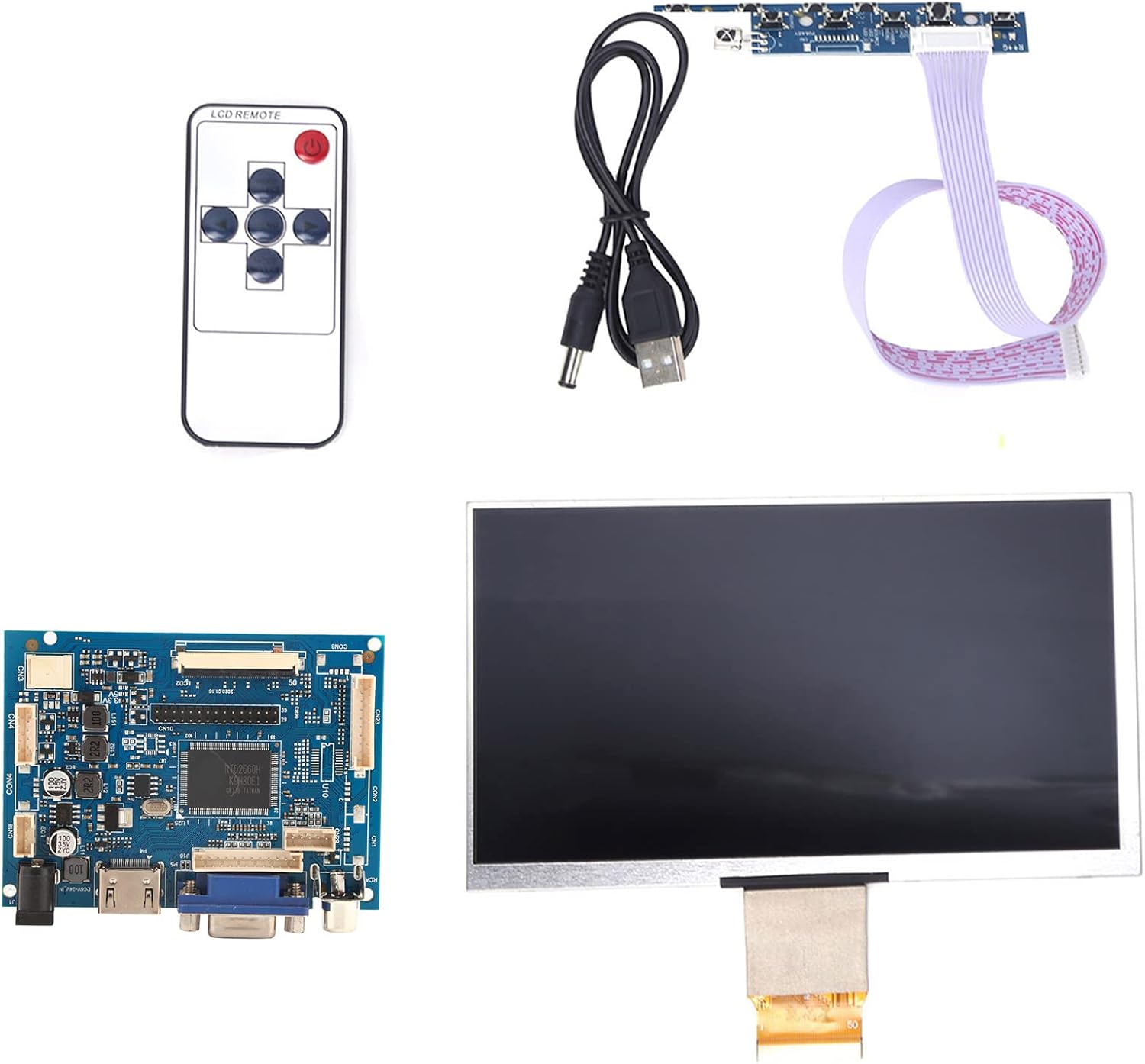
Պատկեր 4.1. Ավարտվել էview of the Acouto 7-inch TFT LCD VGA Monitor kit components.
4.1. LCD էկրան
The 7-inch TFT LCD panel provides a clear display with a physical resolution of 1024x600 pixels. It supports various resolutions from 640x480 to 1600x1200 through arbitrary adjustment.

Image 4.2: The 7-inch TFT LCD display screen.
4.2. Driver Board
The driver board serves as the control unit for the LCD, featuring multiple input interfaces including 2 x AV channels, VGA, and 1 x HD input (version 1.2). It also includes buttons for menu navigation and settings adjustment.

Image 4.3: The driver control board with input ports.
4.3. Հեռակառավարման վահանակ
A remote control is included for convenient adjustment of settings and input selection.

Image 4.4: The included remote control.
5. Կարգավորում
Follow these steps to set up your Acouto 7-Inch TFT LCD VGA Monitor:
- Connect the LCD to the Driver Board: Carefully connect the flat cable from the LCD display to the corresponding connector on the driver board. Ensure the connection is secure and correctly oriented.
- Connect Video Input: Choose your desired video input (VGA, HD, AV1, or AV2) and connect the appropriate cable from your source device (e.g., Raspberry Pi, computer, DVD player) to the driver board.
- Միացրեք հոսանքը. Connect the USB power cord to the driver board's power input, and then connect it to a 12V power source (greater than 1A). If using a car power supply, ensure a regulator is in place.
- Միացում՝ Once all connections are secure, power on the monitor and your source device.

Image 5.1: LCD screen connected to the driver board.
6. Գործառնական հրահանգներ
6.1. Միացնել/անջատել
Press the power button on the driver board or the remote control to turn the monitor on or off.
6.2. Մուտքի ընտրություն
Use the 'Input' button on the driver board or remote control to cycle through available video inputs (AV1, AV2, VGA, HD).
6.3. Մենյու նավարկություն
Access the On-Screen Display (OSD) menu by pressing the 'Menu' button. Use the arrow buttons to navigate and the 'OK' or 'Enter' button to select options. Adjust settings such as brightness, contrast, color, and aspect ratio.
6.4. Image Flip and Convert
The monitor supports image flipping (up/down, left/right) and display format conversion (4:3 / 16:9). These functions can be accessed through the OSD menu or dedicated buttons on the remote control, providing a customizable viewփորձը.
Note: AV2 video input is designed for automatic camera screen display, typically used in automotive applications for reverse cameras.
7. Պահպանում
Ձեր մոնիտորի երկարակեցությունն ու օպտիմալ աշխատանքն ապահովելու համար հետևեք հետևյալ սպասարկման ուղեցույցներին.
- Էկրանի մաքրում. Զգուշորեն սրբեք էկրանը փափուկ, թել չթողնող կտորով։ Համառ հետքերի դեպքում մի փոքր սրբեքampen the cloth with water or a non-abrasive screen cleaner. Do not spray liquid directly onto the screen.
- C-ի մաքրումasing: Մոնիտորի մակերեսը մաքրելու համար օգտագործեք փափուկ, չոր կտորasinէ. Խուսափեք ուժեղ լվացող միջոցների կամ լուծիչների օգտագործումից։
- Պահպանում: When not in use for extended periods, store the monitor in a cool, dry place, away from direct sunlight and dust.
8: Անսարքություն
If you encounter any issues with your monitor, refer to the following troubleshooting guide:
| Խնդիր | Հնարավոր պատճառ | Լուծում |
|---|---|---|
| Էկրան չկա / Սև էկրան |
|
|
| Image distorted / Poor quality |
|
|
| Հեռակառավարումը չի աշխատում |
|
|
9. Տեխնիկական պայմաններ
Detailed technical specifications for the Acouto 7-Inch TFT LCD VGA Monitor:
| Առանձնահատկություն | Հստակեցում |
|---|---|
| Բրենդ | Ակուտո |
| Մոդելի անվանումը | Acouto536ocyn8e0 |
| Էկրանի չափը | 7 դյույմ |
| Ցուցադրման տեսակը | TFT LCD |
| Ֆիզիկական լուծում | 1024 x 600 |
| Աջակցված բանաձեւեր | 640x480- ից 1600x1200 |
| Ասպեկտների հարաբերակցություն | 4:3 (convertible to 16:9) |
| Ապարատային միջերես | VGA, HD (version 1.2), 2 x AV channels |
| Մարդկային ինտերֆեյսի մուտքագրում | Buttons, Remote Control |
| Գործող Voltage | 12V (Power supply > 1A required) |
| Գնահատված հզորություն | 6-7 Վտ |
| Ապրանքի չափերը | 30 x 19 x 4 սմ |
| Ապրանքի քաշը | 323 գ |
10. Երաշխիք և աջակցություն
For warranty information and technical support, please refer to the documentation provided at the time of purchase or contact your retailer. Keep your purchase receipt as proof of purchase for any warranty claims.