
1. Ներածություն
Thank you for choosing the HAVIT F2093 Computer Fan Hub. This device is designed to enhance your computer's cooling performance and aesthetic appeal by providing centralized control over up to six PWM (Pulse Width Modulation) fans and addressable RGB lighting. With its efficient SATA power connection and convenient 21-key remote control, managing your PC's thermal and lighting setup becomes straightforward.
Please read this manual thoroughly before installation and operation to ensure proper usage and to maximize the lifespan of your product.
2. Ապրանքը ավարտված էview
The HAVIT F2093 Fan Hub acts as a central control unit for your computer's cooling fans and RGB lighting. It connects directly to your power supply via a SATA connector, ensuring stable power delivery for all connected components.
Հիմնական հատկանիշները:
- Supports up to 6 PWM (4-pin) fans for precise speed control.
- Supports up to 6 addressable RGB fans for customizable lighting effects.
- Efficient and stable power delivery via SATA connection.
- Includes a 21-key remote control for convenient fan speed and RGB lighting adjustments.
Փաթեթի բովանդակությունը.
- 1 x HAVIT F2093 Computer Fan Hub
- 1 x 21-Բանալի հեռակառավարման վահանակ
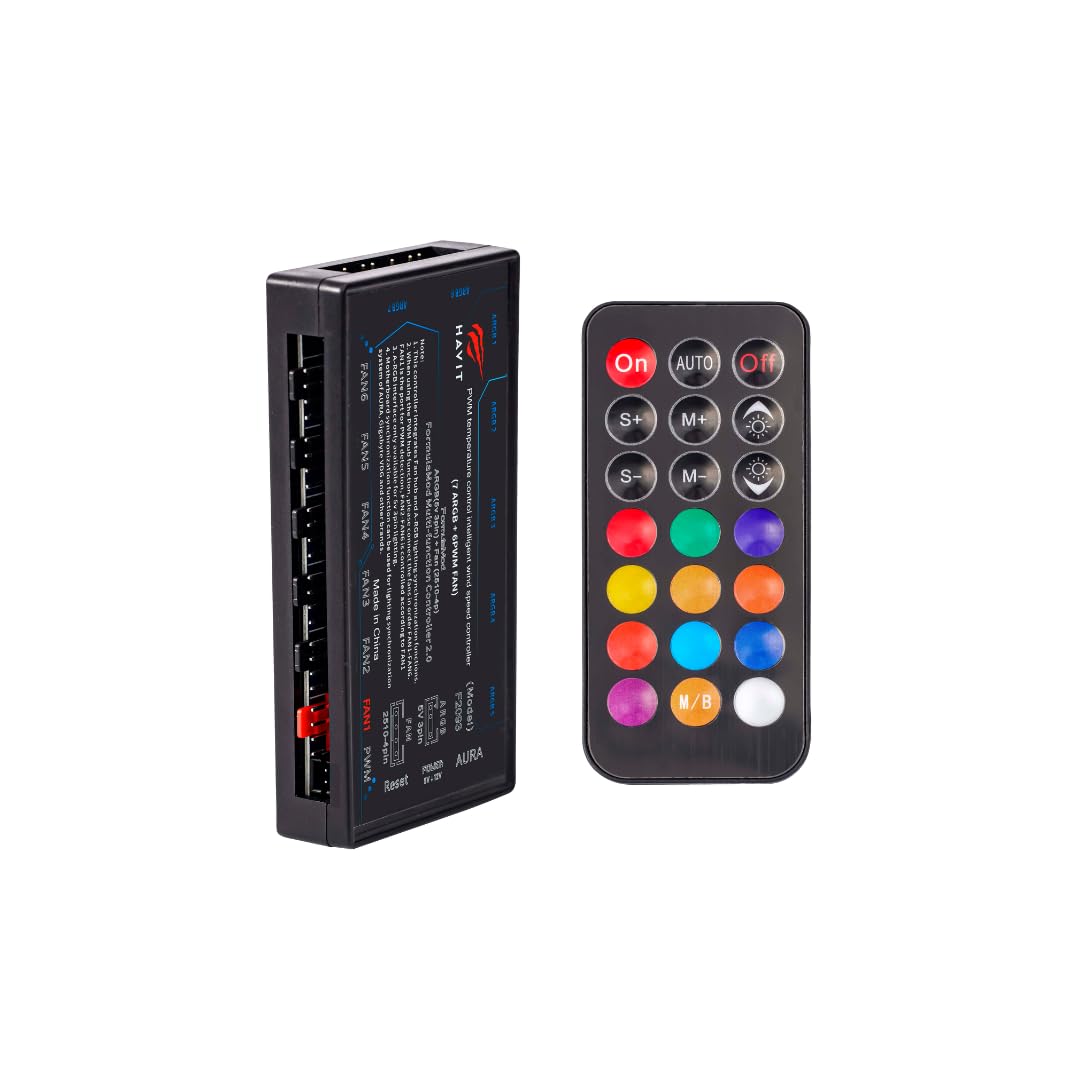
Image 1: The HAVIT F2093 Computer Fan Hub and its accompanying 21-key remote control. The hub features multiple ports for fan and RGB connections, while the remote allows for wireless adjustments.
3. Կարգավորման հրահանգներ
Follow these steps to properly install your HAVIT F2093 Fan Hub:
- Պատրաստեք ձեր համակարգչի պատյանը. Համոզվեք, որ ձեր համակարգիչը անջատված է և վարդակից չի միացված։ Բացեք ձեր համակարգչի պատյանը՝ ներքին բաղադրիչներին մուտք գործելու համար։
- Տեղադրեք օդափոխիչի կենտրոնը՝ Choose a suitable location within your PC case for the fan hub. It is recommended to place it in an area that allows for easy cable management and access to fan and RGB connections. The hub can be mounted using double-sided adhesive tape (not included) or screws (not included) if your case has appropriate mounting points.
- Միացրեք SATA սնուցման բլոկը՝ Locate an available SATA power connector from your power supply unit (PSU). Connect this SATA power cable securely to the SATA power input port on the HAVIT F2093 Fan Hub. This connection is crucial for providing power to both the fans and the RGB lighting.
- Connect PWM Fans: Connect your 4-pin PWM fans to the designated fan ports on the hub. The hub supports up to six PWM fans. Ensure each fan connector is inserted correctly and fully seated.
- Connect Addressable RGB Cables: If your fans or other components have addressable RGB lighting, connect their 3-pin or 4-pin RGB cables to the corresponding RGB ports on the hub. Ensure the orientation of the RGB connector matches the hub's pins to avoid damage. The hub supports up to six addressable RGB devices.
- Մալուխի կառավարում. Route all cables neatly to ensure proper airflow within your PC case and to prevent interference with other components.
- Համակարգչի պատյանը փակել՝ Once all connections are secure and cables are managed, close your PC case and reconnect the power cable.
4. Գործառնական հրահանգներ
The HAVIT F2093 Fan Hub is controlled using the included 21-key remote control. Ensure the remote has a working battery (typically CR2025 or CR2032, not always included) before use.
Վինտիլյատորի արագության կառավարում (PWM):
The remote allows you to adjust the speed of all connected PWM fans simultaneously. Look for buttons labeled with fan icons or speed indicators (e.g., 'FAN SPEED +', 'FAN SPEED -', 'AUTO', 'MAX', 'MIN').
- Բարձրացնել օդափոխիչի արագությունը. Press the designated button to increase fan RPM, providing more airflow for cooling.
- Նվազեցնել օդափոխիչի արագությունը. Press the designated button to reduce fan RPM, minimizing noise.
- Ավտոմատ ռեժիմ. Some remotes may offer an 'AUTO' mode, allowing the hub to adjust fan speeds based on temperature (requires motherboard PWM signal passthrough, if supported by the hub).
- Maximum/Minimum Speed: Dedicated buttons might set fans to their highest or lowest possible speeds.
RGB լուսավորության կարգավորում.
The 21-key remote provides extensive control over the addressable RGB lighting effects of your connected fans.
- Գույնի ընտրություն. Use the color palette buttons to select static colors.
- Լուսավորման ռեժիմներ. Cycle through various dynamic lighting effects such as breathing, pulsing, rainbow, or sequential patterns. Buttons may be labeled 'MODE', 'EFFECT', or similar.
- Պայծառության ճշգրտում. Increase or decrease the brightness of the RGB lighting.
- Էֆեկտների արագությունը. Կարգավորեք դինամիկ լուսավորության էֆեկտների արագությունը։
- Միացնել/Անջատել. Turn the RGB lighting on or off.
5. Պահպանում
Regular maintenance helps ensure optimal performance and longevity of your HAVIT F2093 Fan Hub and connected components.
- Փոշու հեռացում. Periodically open your PC case and use compressed air to gently remove dust accumulation from the fan hub, fans, and other internal components. Dust can impede airflow and lead to overheating.
- Մալուխի ստուգում. Occasionally check all connections to the fan hub (SATA power, fan cables, RGB cables) to ensure they are secure and free from damage.
- Հեռակառավարման մարտկոց. If the remote control becomes unresponsive, replace its battery. Refer to the remote's casing for the correct battery type (e.g., CR2025, CR2032).
6: Անսարքություն
If you encounter issues with your HAVIT F2093 Fan Hub, refer to the following common problems and solutions:
| Խնդիր | Հնարավոր պատճառ | Լուծում |
|---|---|---|
| Երկրպագուները չեն պտտվում | No power to hub; Loose fan connection; Faulty fan. | Ensure SATA power cable is securely connected to the hub and PSU. Check all fan connections to the hub. Test fans individually if possible. |
| RGB լուսավորությունը չի աշխատում | Loose RGB connection; Incorrect RGB header type; Faulty RGB device. | Verify RGB cables are correctly connected to the hub with proper orientation. Ensure your RGB devices are addressable (3-pin) if connected to an ARGB port. |
| Հեռակառավարման վահանակը չի արձագանքում | Dead battery; Obstruction between remote and hub sensor. | Replace the remote control battery. Ensure there is a clear line of sight between the remote and the hub's IR receiver (if applicable). |
| Fans always run at full speed | PWM signal not detected; Hub in default mode. | Ensure fans are 4-pin PWM type. Use the remote to adjust fan speed. Check if the hub requires a specific connection to the motherboard for PWM signal. |
7. Տեխնիկական պայմաններ
| Մոդելի համարը | F2093 |
| Բրենդ | ՀԱՎԻԹ |
| Գույն | Սեւ |
| Նյութ | Պլաստիկ |
| Նյութի քաշը | 360 գրամ |
| Նյութերի քանակը | 1 (Fan Hub) |
| Չափերը (L x W x H) | 12.3 x 7.1 x 3.3 սմ |
| Power միակցիչ | SATA |
| Վենտիլյատորի միացումներ | Up to 6 (4-pin PWM) |
| RGB Ports | Up to 6 (Addressable RGB) |
| Վերահսկման մեթոդ | 21-Բանալի հեռակառավարման վահանակ |
| Ծագման երկիր | Չինաստան |
8. Երաշխիք և աջակցություն
For warranty information, please refer to the documentation provided at the time of purchase or visit the official HAVIT website. This manual does not contain specific warranty details.
If you require technical assistance or have questions regarding your HAVIT F2093 Computer Fan Hub, please contact HAVIT customer support through their official channels. Keep your purchase receipt or proof of purchase handy when contacting support.