
1. Անվտանգության կարևոր տեղեկատվություն
Խնդրում ենք կարդալ և հասկանալ բոլոր անվտանգության հրահանգները նախքան այս ապրանքը հավաքելը և օգտագործելը: Այս հրահանգներին չհետևելը կարող է հանգեցնել վնասվածքի կամ ապրանքի վնասման:
- Always assemble the desk according to the provided instructions. Ensure the desk is fully assembled and stable before use.
- Do not exceed the maximum weight recommendation of 150 pounds for the working surface.
- Keep the desk away from heat sources and moisture to prevent damage.
- Always unplug the desk from the power source before cleaning or performing any maintenance.
- Համոզվեք, որ բոլոր էլեկտրական միացումները անվտանգ են և համապատասխանում են տեղական էլեկտրական կանոններին։
2. Փաթեթի բովանդակությունը
Հավաքումը սկսելուց առաջ ստուգեք, որ բոլոր բաղադրիչները առկա են։ Եթե որևէ մաս բացակայում է կամ վնասված է, խնդրում ենք կապվել հաճախորդների սպասարկման հետ։
- Desktop Panels (L-shaped)
- 5-Tier Storage Shelf Panels
- Մետաղական շրջանակի բաղադրիչներ
- Built-in Power Outlet Unit (3 AC, 2 USB)
- LED լուսային ժապավեն կառավարիչով
- Ականջակալի կեռիկ
- Մոնտաժային պարագաներ (պտուտակներ, ամրակներ և այլն)
- Հավաքման գործիքներ (Ալեն բանալի, պտուտակահան)
- Հրահանգների ձեռնարկ
3. Համագումարի հրահանգներ
Assembly of the Pamray L-Shaped Computer Desk requires careful attention to the provided instructions. All necessary tools are included in the accessory box.
3.1 General Assembly Guidance
For a smooth assembly experience, we recommend reviewing the comprehensive installation videos available on the product page or by scanning the transparency label on the packaging. These videos provide visual guidance for each step.
- Բացեք բոլոր բաղադրիչները և դրեք դրանք մաքուր, փափուկ մակերեսի վրա՝ քերծվածքներից խուսափելու համար։
- Identify each part using the labels and diagrams in the instruction manual.
- Follow the step-by-step diagrams carefully. Do not overtighten screws until the entire section is assembled, then tighten all connections securely.
- Ensure the 'X'-shaped back braces are correctly installed for enhanced stability.
3.2 Շրջադարձելի դարակի տեղադրում
The 5-tier side shelf can be installed on either the left or right side of the desk to suit your space and preference. The instruction manual provides specific steps for both configurations.

3.3 Power Outlet and LED Light Installation
Integrate the built-in power outlet and LED light strip during the assembly process as indicated in the manual. Ensure all cables are routed safely and neatly.

4. Կարգավորում և շահագործում
4.1 Սկզբնական տեղաբաշխում
Position the desk in your desired location, ensuring it is on a level surface. The adjustable feet can be used to stabilize the desk on uneven floors.
4.2 Using the Built-in Power Outlets
The desk is equipped with 3 AC outlets and 2 USB ports. Connect the desk's power cord to a wall outlet. You can then plug in your devices such as monitors, laptops, and chargers directly into the desk's integrated power strip.
4.3 Operating the LED Lights
The integrated LED light strip offers extensive customization options:
- Հավելվածի վերահսկում. Download the dedicated app to remotely control the LED lights. The app provides access to 213 dynamic multicolor lighting modes and over 10,000 color options.
- Պայծառության ճշգրտում. Adjust the brightness and hues to match your mood or enhance your workspace ambiance.
- Երաժշտության համաժամացում. Some modes allow the lights to sync with music or sound.

5. Պահպանում
Կանոնավոր խնամքը կօգնի երկարացնել ձեր սեղանի կյանքը և տեսքը։
- Մաքրում: Սեղանի մակերեսները սրբեք փափուկ,amp կտոր։ Խուսափեք հղկող մաքրող միջոցների կամ կոշտ քիմիական նյութերի օգտագործումից, որոնք կարող են վնասել մակերեսը։
- Կառուցվածքային ամբողջականություն. Պարբերաբար ստուգեք բոլոր պտուտակներն ու բոլտերը՝ համոզվելու համար, որ դրանք ամուր են ամրացված։ Անհրաժեշտության դեպքում կրկին ամրացրեք։
- Էլեկտրական բաղադրիչներ. Ensure the power cord and outlet unit are free from damage. Do not attempt to repair electrical components yourself.
- Քաշի բաշխում. Distribute weight evenly across the desktop and shelves. Do not place excessively heavy items on any single point.
6: Անսարքություն
If you encounter issues with your Pamray L-Shaped Computer Desk, refer to the following common solutions:
- Գրասեղանի ցնցումներ. Ensure all assembly screws are fully tightened. Check if the floor is uneven and adjust the desk's leveling feet accordingly.
- LED լույսերը չեն աշխատում. Verify that the LED light strip is properly connected to its power source and the desk's power outlet. Check the app connection and ensure the lights are turned on.
- Էլեկտրական վարդակները չեն գործում. Confirm the desk's main power cord is securely plugged into a working wall outlet. Test the wall outlet with another device.
- Բացակայող կամ վնասված մասեր. If you discover any missing or damaged parts during assembly, do not proceed. Contact Pamray customer support immediately for assistance.
7. Տեխնիկական պայմաններ
| Առանձնահատկություն | Մանրամասն |
|---|---|
| Բրենդ | Pamray |
| Մոդելի համարը | S14pink49 |
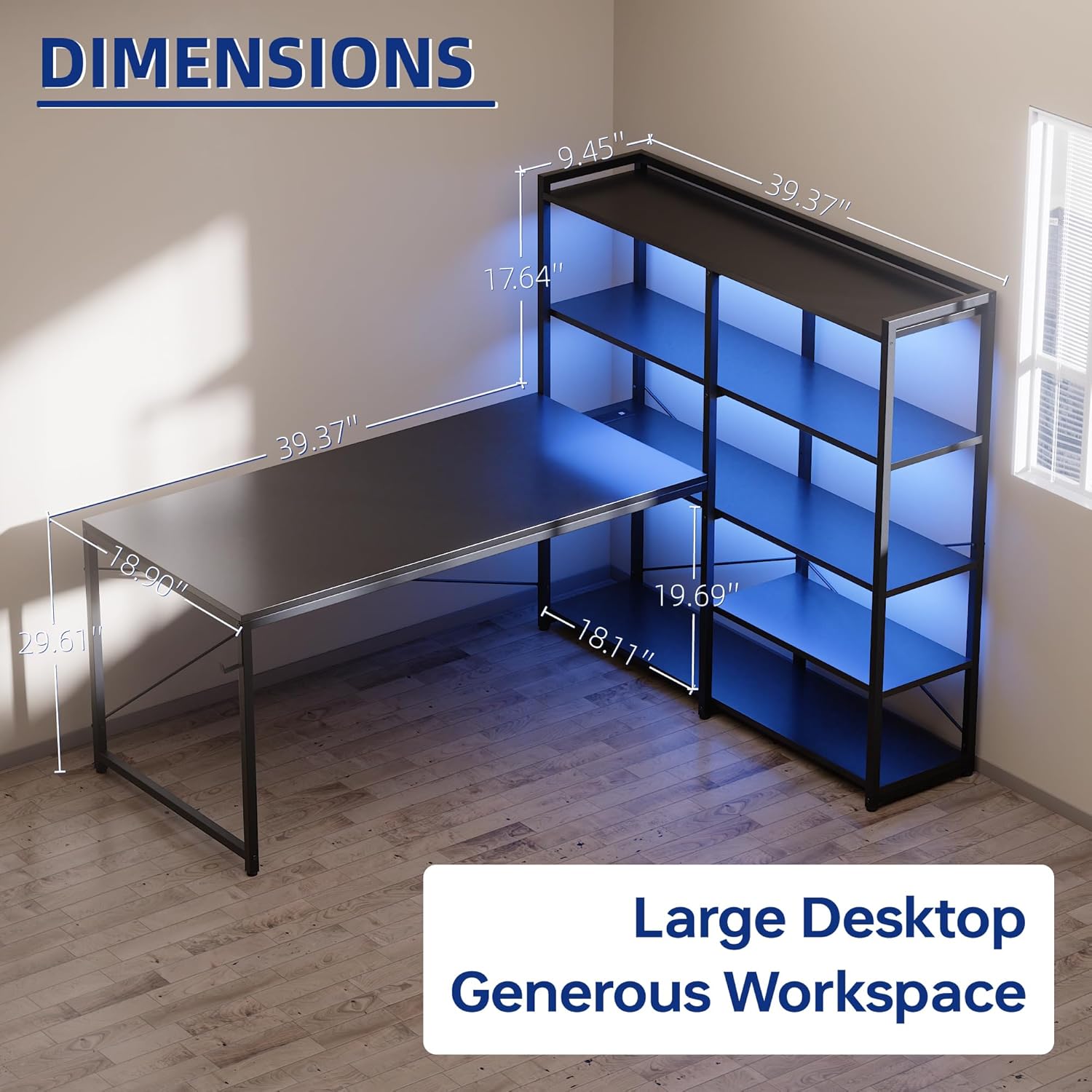
| Ապրանքի չափերը | 18.9"D x 48.8"W x 29.61"H |
| Գույն | Վարդագույն |
| Նյութի տեսակը | Metal, Wood (FSC-Certified Tabletop) |
| Քաշը | 42.35 ֆունտ |
| Առավելագույն քաշի առաջարկություն | 150 ֆունտ |
| Դարակների քանակը | 5-tier metal shelf (reversible) |
| Ներառված բաղադրիչներ | Built-in Outlet, LED Lights, Headphone Hook |
| Power Outlet Specs | 3 AC Outlets (125V/12A), 2 USB Ports (5V/2A), Rated Power 1500W |
| LED լույսեր | 213 Dynamic Multicolor Modes, 10,000+ Color Options, App Control |
| Պահանջվում է ժողով | Yes (Tools and instructions included) |
8. Պաշտոնական արտադրանքի տեսանյութ
Watch the official product video for a visual guide on the features and assembly of the Pamray L-Shaped Computer Desk.
9. Երաշխիք և աջակցություն
The Pamray L-Shaped Computer Desk comes with a limited warranty. For warranty details, product support, or to order replacement parts, please contact Pamray customer service.
Please have your model number (S14) and purchase information ready when contacting support.