
Ներածություն
This manual provides essential information for the safe and efficient operation of your Hisense 8,000 BTU 350 Sq Ft Dual Hose Portable Air Conditioner with Inverter & Wi-Fi. Please read it thoroughly before installation and use, and retain it for future reference.
The Hisense HAP0825TWD Portable Air Conditioner is designed for quick cooling with a special dual hose system that provides faster, more efficient cooling and consistent room temperatures. Enjoy quiet and efficient cooling with inverter technology and a cross-flow fan for strong airflow without the noise. Its easy-to-read LED display and simple snap-together window kit for 25" to 50" wide windows make installation a breeze. Perfect for quietly and effectively cooling larger spaces.
Ինչ կա տուփի մեջ
Upon unpacking, ensure all components are present and in good condition. The package should contain:
- Hisense 8,000 BTU 350 Sq Ft Dual Hose Portable Air Conditioner with Inverter Unit
- Հեռակառավարման վահանակ
- AC հոսանքի լար
- Window Installation kit (includes window sleeve, smaller sleeve extensions, and collars for hoses)
- Սարքավորումների հավաքածու
- Օգտագործողի ուղեցույց / Հրահանգների ձեռնարկ
- Insulation strips

Նկար 1. Առջև view of the Hisense portable air conditioner.
Կարգավորում և տեղադրում
The Hisense portable air conditioner offers flexible installation options for both vertical and horizontal sliding windows. The dual hose system ensures efficient cooling.
- Prepare the Window Kit: Assemble the window panel sections to fit your window opening (25" to 50" wide). Use the smaller sleeve extensions if your window requires a longer panel.
- Պատուհանի վահանակի տեղադրում. Secure the assembled window panel into the window opening. Ensure a tight seal to prevent air leakage.
- Միացրեք խողովակները՝ Connect the two flexible exhaust hoses to the designated ports on the back of the air conditioner unit. Then, attach the other ends of the hoses to the collars on the window panel. Ensure both hoses are securely fastened to prevent air escape.
- Տեղադրեք միավորը. Place the air conditioner unit on a flat, stable surface near the window, ensuring the hoses are not kinked or obstructed.
- Էլեկտրաէներգիայի միացում. Plug the AC power cord into a grounded 115 Volt, 60 Hz, 15 Amp electrical outlet. Do not use an extension cord.

Figure 2: Hisense portable air conditioner properly installed in a living room, demonstrating the dual hose connection to a window.
Գործառնական հրահանգներ
Your Hisense portable air conditioner features simple controls and multiple operating modes for optimal comfort.

Figure 3: Top control panel of the unit, showing buttons for Wi-Fi, Power, Mode, Fan Speed, Timer, Sleep, and Filter reset, along with an LED display.
Կառավարման վահանակ և հեռակառավարման վահանակ
The unit can be operated using the intuitive control panel on top or the included remote control. The remote control allows for convenient adjustments from a distance.

Figure 4: The remote control for the Hisense portable air conditioner, featuring buttons for power, mode, fan speed, timer, quiet mode, swing, super, dimmer, and filter.
Գործառնական ռեժիմներ
- Cool ռեժիմ: Provides powerful cooling for your space. Adjust the temperature using the up/down arrows.
- Խոնավեցման ռեժիմ. Helps remove excess moisture from the air, improving comfort and preventing mold growth.
- Երկրպագուի ռեժիմ. Circulates air without cooling, ideal for gentle air movement.
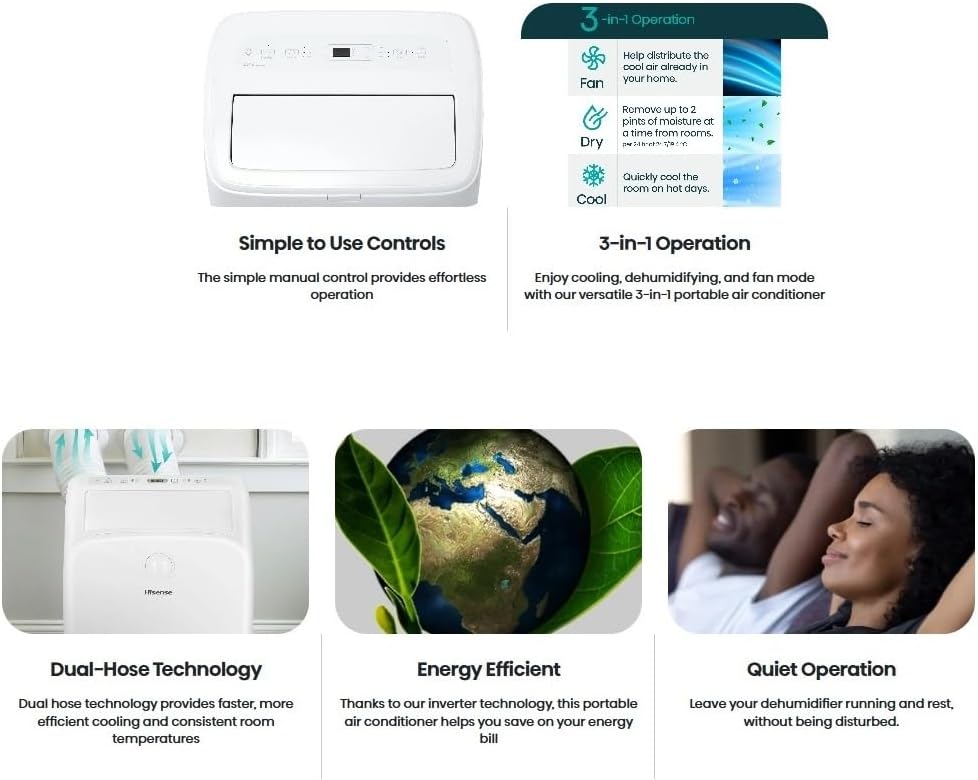
Figure 5: Visual representation of the 3-in-1 operation modes: Fan, Dry (Dehumidify), and Cool, highlighting their respective functions.
Հիմնական հատկանիշները
- Dual-Hose Technology: Provides faster, more efficient cooling and consistent room temperatures by drawing in fresh air and exhausting hot air separately.
- Inverter տեխնոլոգիա. Offers energy-efficient operation, potentially saving up to 40% more energy compared to non-inverter models.
- Հանգիստ գործողություն. Designed to operate quietly, especially in "Quiet" mode, achieving noise levels as low as 42 dB(A).
- Drain-free Operation (Cooling mode): The unit is self-evaporating in cooling mode, eliminating the need for frequent manual draining.
- Wi-Fi կապ. Control your unit remotely via Wi-Fi (refer to the separate Wi-Fi setup guide for detailed instructions).
Տեխնիկական սպասարկում
Օդորակիչի կանոնավոր սպասարկումը ապահովում է օպտիմալ աշխատանք և երկարակեցություն։
- Ֆիլտրի մաքրում. The air filter should be cleaned regularly (e.g., every two weeks or as needed) to maintain airflow and cooling efficiency. Refer to the full user guide for detailed filter removal and cleaning instructions.
- Միավորի մաքրում. Սարքի արտաքին մասը սրբել փափուկով, դamp կտոր. Մի օգտագործեք կոպիտ քիմիական կամ հղկող մաքրող միջոցներ:
- Դրենաժային: While the unit is largely self-evaporating in cooling mode, occasional drainage may be required, especially in high humidity conditions or when using dehumidify mode. Locate the drain plug at the bottom of the unit for manual drainage.

Նկար 6. Հետևի view of the unit, highlighting the air vents and the location of the drain plug at the bottom.
Անսարքությունների վերացում
If you encounter issues with your air conditioner, refer to the following common troubleshooting steps. For more complex problems, consult the full user manual or contact customer support.
| Խնդիր | Հնարավոր պատճառ | Լուծում |
|---|---|---|
| Միավորը չի միանում | Հոսանք չկա, հոսանքի լարը անջատված է, անջատիչը անջատված է։ | Ստուգեք էլեկտրական միացումը, վերագործարկեք անջատիչը։ |
| Անբավարար սառեցում | Dirty air filter, blocked air intake/exhaust, room too large, windows/doors open. | Clean filter, clear obstructions, ensure proper room size, close windows/doors. |
| Միավորը աղմկոտ է | Սարքը հավասարեցված չէ, օդափոխիչը խցանված է։ | Ensure unit is on a flat surface, check for obstructions. |
Տեխնիկական պայմաններ
- Ապրանքանիշը: Hisense
- Մոդել: HAP0825TWD-cr
- Սառեցման հզորությունը. 8,000 BTU (Seasonally Adjusted Cooling Capacity)
- Ծածկույթի Տարածք: Մինչև 350 քառ
- Գործառույթները: 3-in-1 (Cool, Dehumidify, Fan)
- Աղմուկի մակարդակը. 42 dB(A) (in Quiet mode)
- Տեխնոլոգիա: Inverter, Dual Hose System
- Միացում: Wi-Fi
- Հզորությունը: 115 վոլտ, 690 Վտ
- Չափերը: 12.9"D x 17.48"W x 28.26"H
- Նյութի Քաշը: 65 ֆունտ
- Տեղադրման տեսակը: Հարկ
Երաշխիք և աջակցություն
For warranty information, product registration, or technical support, please refer to the official Hisense website or the contact details provided in your product's full user guide. Registering your product can provide access to important updates and support.
Կոնտակտային տվյալներ: For assistance, please call 1-877-465-3566 (USA).