
SatelliteSale SS-RC-NOTUS-M2
SatelliteSale Notus M2 Remote Control User Manual
Model: SS-RC-NOTUS-M2 | Brand: SatelliteSale
1. Ներածություն
This manual provides detailed instructions for the SatelliteSale Notus M2 Remote Control, a voice-activated Bluetooth replacement designed for Optimum Stream Devices. It covers setup, operation, maintenance, and troubleshooting to ensure optimal performance and user experience.

Պատկեր՝ առջևի view of the SatelliteSale Notus M2 Remote Control.
2. Փաթեթի բովանդակությունը
Ստուգեք, որ բոլոր իրերը առկա են փաթեթում.
- 1 x SatelliteSale Notus M2 Remote Control
- 2 x AAA մարտկոցներ (նախապես տեղադրված կամ առանձին ներառված)
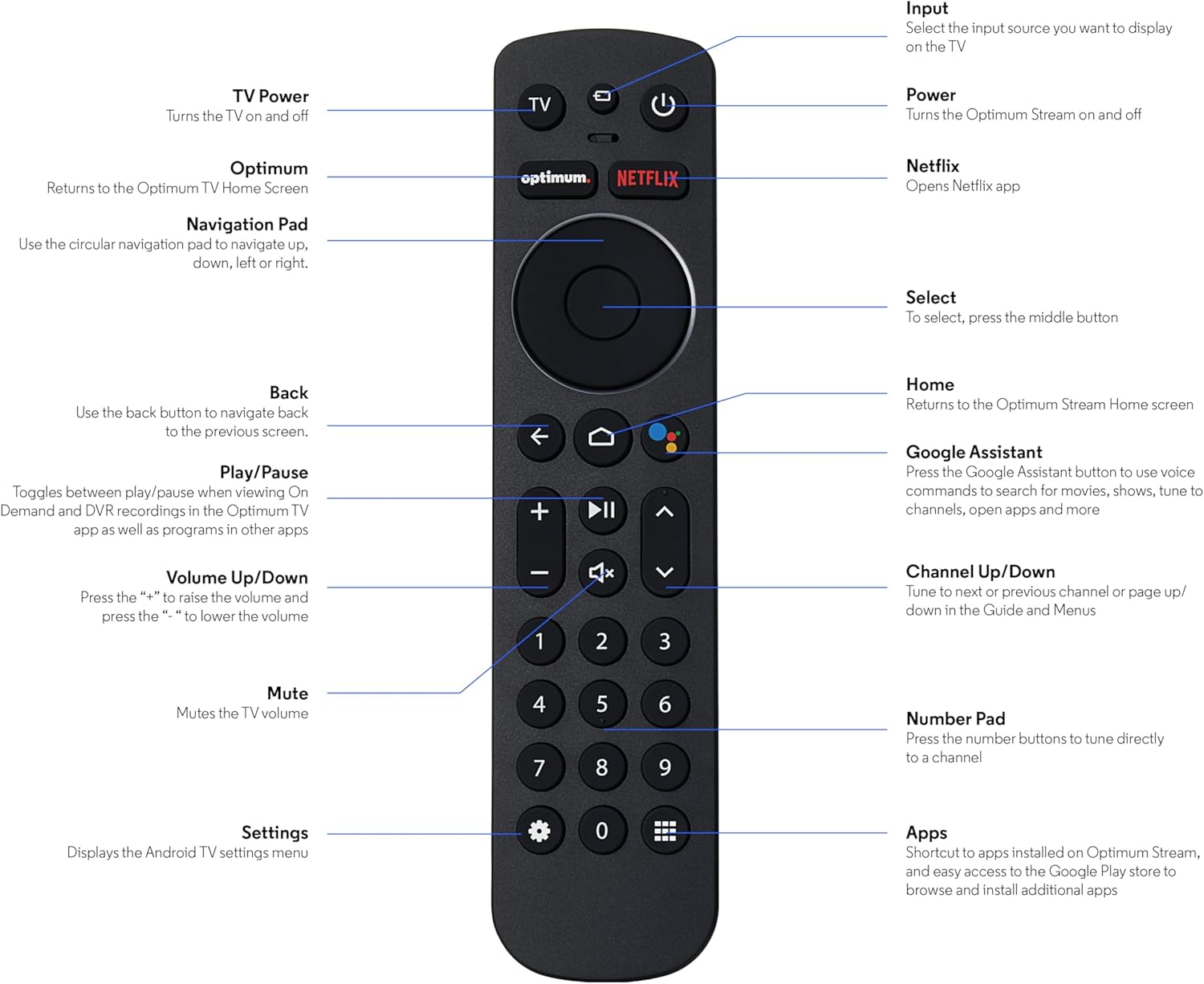
Image: The SatelliteSale Notus M2 Remote Control shown alongside two AAA batteries.
3. Հեռակառավարման դասավորությունը և գործառույթները
Familiarize yourself with the buttons and their functions on your SatelliteSale Notus M2 Remote Control.

Image: Detailed diagram of the SatelliteSale Notus M2 Remote Control with labels for each button and its corresponding function.
- TV Power: Հեռուստացույցը միացնում և անջատում է:
- Մուտքագրում: Selects the input source to display on the TV.
- Հզորությունը: Turns the Optimum Stream device on and off.
- Օպտիմալ: Returns to the Optimum TV Home Screen.
- Netflix. Opens the Netflix application directly.
- Նավիգացիոն վահանակ (շրջանաձև): Use to navigate up, down, left, or right within menus.
- Select (Middle Button of Nav Pad): Հաստատում է ընտրությունը:
- Հետ: Վերադառնում է նախորդ էկրանին:
- Գլխավոր: Returns to the Optimum Stream Home screen.
- Google Assistant (Microphone Icon): Activates voice commands for search, playback control, and hands-free assistance.
- Նվագարկել/Դադար. Toggles between play and pause for content.
- Ձայնի բարձրացում/Նվազում (+/-): Կարգավորում է հեռուստացույցի ձայնը:
- Անջատել՝ Mutes the TV volume.
- Channel Up/Down (Arrows): Tunes to the next or previous channel, or navigates pages in guides and menus.
- Թվային ստեղներ (0-9): Directly tunes to a channel or enters numerical input.
- Կարգավորումներ (Gear Icon): Displays the Android TV settings menu.
- Apps (Grid Icon): Provides shortcuts to installed apps on Optimum Stream and access to the Google Play Store.
4. Կարգավորում
4.1 Մարտկոցի տեղադրում
The remote requires two AAA batteries. Ensure correct polarity when inserting.
- Տեղադրեք մարտկոցի խցիկը հեռակառավարման վահանակի հետևի մասում:
- Բացելու համար սահեցրեք մարտկոցի կափարիչը ներքև։
- Տեղադրեք երկու AAA մարտկոցներ՝ համապատասխանեցնելով (+) և (-) կոնտակտները, ինչպես նշված է խցիկի ներսում։
- Replace the battery cover by sliding it back into place until it clicks.

Պատկեր՝ View of the remote control with the battery compartment open, showing the correct orientation for AAA battery insertion.
4.2 Pairing Your Remote with Optimum Stream Device
Your remote is designed to be paired with your Optimum Stream device for full functionality, including Bluetooth connectivity and voice control. If your remote becomes unpaired or if you are setting up a new remote, follow these steps:

Image: An illustration explaining the importance of direct line of sight for initial pairing and the flexibility of remote placement after pairing.
Կարևոր նշում. For initial pairing, the Optimum Stream box needs to be in direct line of sight of the remote. If your box is behind a TV or in a cabinet, you may need to temporarily relocate it so the remote can be directly pointed at the Stream box. Once pairing is complete, the Stream box can be moved out of sight as the remote uses Bluetooth.
- Ensure batteries are correctly installed in your remote.
- Turn on your TV and your Optimum Stream cable box.
- Press any button on the Stream remote to ensure you are on the Home Screen.
- Գլխավոր էկրանից ընտրեք Կարգավորումներ (փոխանցման պատկերակ):
- Ընտրել Device and Remote Settings > Հեռակառավարվող սարքեր և պարագաներ.
- Ընտրել Add Stream Remote.
- Հետևեք էկրանի հրահանգներին՝ զուգավորման գործընթացը ավարտելու համար:
- You will see an on-screen confirmation once the remote is successfully paired.

Image: Visual representation of pairing steps 1 through 5, showing the remote and on-screen prompts.

Image: Visual representation of pairing steps 6 through 9, detailing the final stages of the pairing process.
5. Գործառնական հրահանգներ
5.1 Ձայնային կառավարում
The SatelliteSale Notus M2 remote features voice control for convenient operation. Press the microphone button (Google Assistant icon) and speak your command clearly. You can use voice commands to:
- Որոնել content (movies, TV shows, actors).
- Վերահսկել վերարտադրումը (նվագարկել, դադարեցնել, արագացնել առաջ, հետ փաթաթել):
- Բացել հավելվածները։
- Tune to specific channels.
- Get information (weather, sports scores).

Image: A person using the voice control feature of the remote, with sound waves emanating from the remote towards the TV screen.

Պատկեր՝ Նախկինample of a voice command, "Hey Google, turn on the Spider-Man movie," displayed on screen with the remote.
5.2 Bluetooth Wireless Connectivity
Once paired, the remote utilizes Bluetooth for communication with your Optimum Stream device. This means you do not need a direct line of sight to operate the device, allowing for greater flexibility in remote usage and device placement.
5.3 Dedicated Streaming App Buttons
The remote includes dedicated buttons for popular streaming applications, such as Netflix. Pressing these buttons provides one-touch access to your favorite entertainment platforms.
6. Պահպանում
- Մաքրում: Use a soft, dry cloth to clean the remote. Do not use liquid cleaners or aerosols.
- Մարտկոցի փոխարինում. Փոխարինեք մարտկոցները, երբ հեռակառավարման վահանակի արձագանքը դանդաղ է դառնում կամ այն դադարում է աշխատել: Միշտ փոխարինեք երկու մարտկոցները միաժամանակ նոր AAA մարտկոցներով:
- Պահպանում: Պահեք հեռակառավարիչը զով, չոր տեղում՝ ուղիղ արևի լույսից և ծայրահեղ ջերմաստիճաններից հեռու։
7: Անսարքություն
| Խնդիր | Հնարավոր պատճառ | Լուծում |
|---|---|---|
| Հեռակառավարիչը չի արձագանքում։ | Սատկած կամ պակաս մարտկոցներ: | Փոխարինեք երկու AAA մարտկոցները նորերով։ |
| Remote not controlling Optimum Stream device. | Remote is unpaired or pairing failed. | Follow the pairing instructions in Section 4.2. Ensure direct line of sight during initial pairing. |
| Ձայնային կառավարումը չի աշխատում։ | Remote not paired via Bluetooth, or microphone issue. | Ensure the remote is properly paired via Bluetooth (Section 4.2). Speak clearly and close to the microphone. |
| Կոճակները կպչուն են կամ չեն արձագանքում։ | Կոճակների տակ կեղտ կամ բեկորներ։ | Մաքրեք հեռակառավարիչը փափուկ, չոր կտորով։ Խուսափեք թափվելուց։ |
8. Տեխնիկական պայմաններ
| Առանձնահատկություն | Մանրամասն |
|---|---|
| Մոդելի համարը | SS-RC-NOTUS-M2 |
| Միացում | Bluetooth անլար |
| Հատուկ առանձնահատկություններ | Voice Activated (Google Assistant), Dedicated App Buttons, Ergonomic Design |
| Համատեղելի սարքեր | Optimum Stream Box (powered by Android TV) |
| Էլեկտրաէներգիայի աղբյուր | 2 x AAA մարտկոց (ներառված է) |
| Գույն | Անփայլ սև |
| Նյութի քաշը | 3.66 ունցիա |
| Փաթեթի չափերը | 7.28 x 1.89 x 1.22 դյույմ |
9. Երաշխիք և աջակցություն
For warranty information or technical support, please refer to the official SatelliteSale webկայքում կամ ուղղակիորեն կապվեք նրանց հաճախորդների սպասարկման ծառայության հետ: Պահպանեք ձեր գնման կտրոնը երաշխիքային պահանջների համար:
Արտադրող: Արբանյակային Վաճառք
Webկայքը: Visit the SatelliteSale Store on Amazon
Ask a question about this manual
Ask about setup, troubleshooting, compatibility, parts, safety, or missing instructions. Manuals+ will review the question and use this page’s manual context to help answer it.