
Ներածություն
Thank you for choosing the Vibox IV-584 Gaming PC. This manual provides essential information for setting up, operating, maintaining, and troubleshooting your new computer. The Vibox IV-584 is a high-performance desktop PC designed for gaming and demanding tasks, featuring an AMD Ryzen 7 5700X processor, NVIDIA GeForce RTX 3050 graphics, 16GB of RAM, and a 500GB SSD, pre-installed with Windows 11 Home.
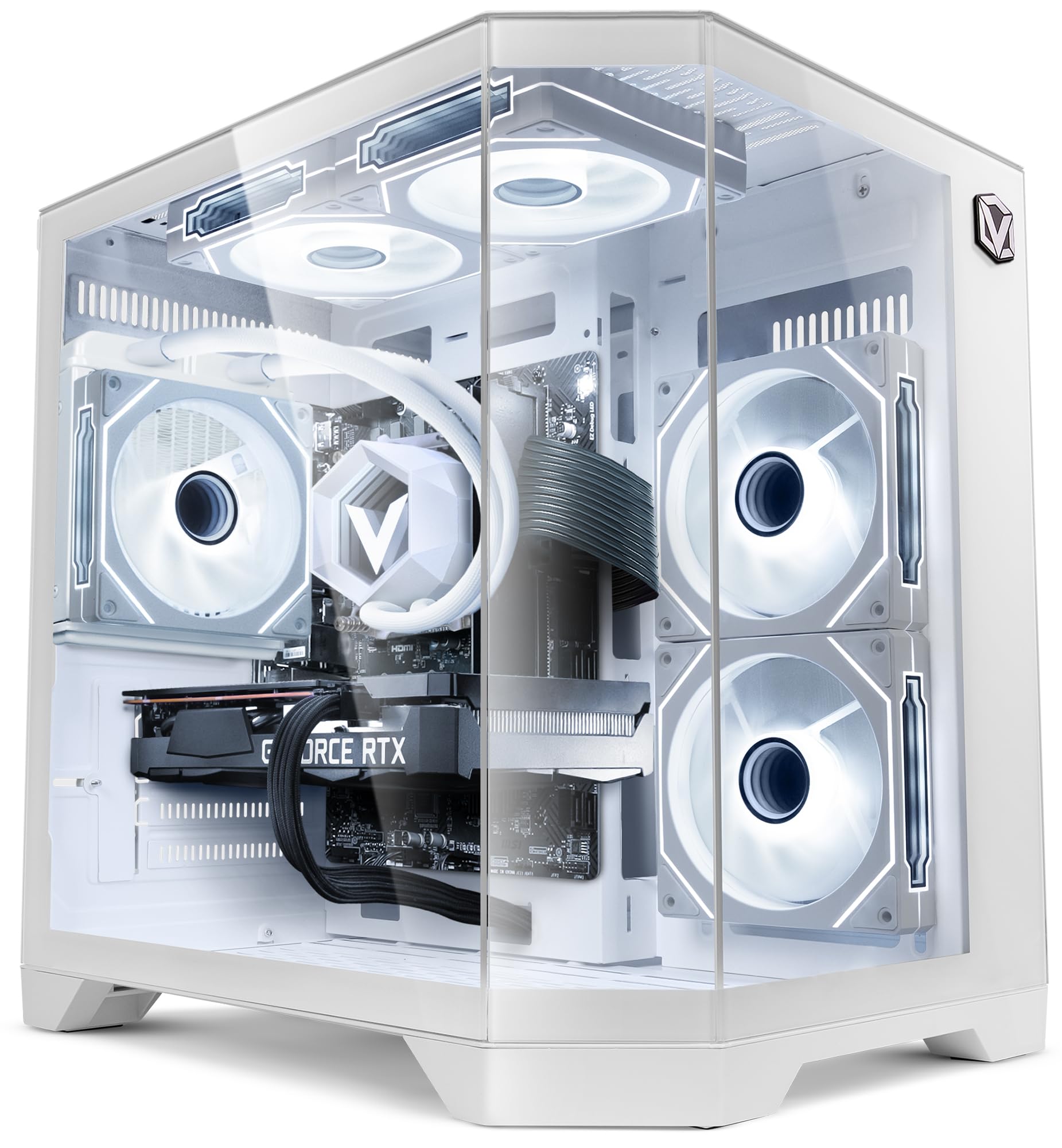
Image: The Vibox IV-584 Gaming PC, showcasing its internal components and sleek design.
1. Կարգավորում
Follow these steps to set up your Vibox IV-584 Gaming PC:
- Համակարգիչը փաթեթավորեք. Carefully remove the computer and all accessories from the packaging. Retain the packaging for future transport or warranty claims.
- Միացնել ծայրամասային սարքերը.
- Connect your monitor(s) to the graphics card ports (HDMI or DisplayPort) located at the rear of the PC.
- Միացրեք ձեր ստեղնաշարը և մկնիկը առկա USB միակցիչներին։
- Միացրեք ցանկացած այլ ծայրամասային սարք, ինչպիսիք են բարձրախոսները, ականջակալները կամ արտաքին կրիչները։
- Networkանցային կապ
- For a wired connection, connect an Ethernet cable from your router to the Ethernet port on the PC.
- For a wireless connection, ensure the included Wi-Fi adapter is installed (if not pre-installed) and follow Windows 11 instructions to connect to your network.
- Էլեկտրաէներգիայի միացում. Միացրեք սնուցման մալուխը համակարգչի հետևի մասում գտնվող սնուցման բլոկին (PSU), այնուհետև այն միացրեք պատի վարդակիցին։
- Սկզբնական բեռնում։ Press the power button on the front of the PC. The system will boot into Windows 11. Follow the on-screen instructions for initial setup, including language, region, and user account creation.

Պատկեր՝ Վերևview of the versatile connectivity ports, including USB 2.0, USB 3.0, power button, and audio jacks.
2. Համակարգչի շահագործումը
Your Vibox IV-584 comes with Windows 11 Home pre-installed, offering a modern and efficient operating environment.
- Windows 11 Basics: Familiarize yourself with the Windows 11 interface, including the Start Menu, Taskbar, and File Explorer. Microsoft provides extensive online resources for learning Windows 11.
- Խաղեր. This PC is optimized for gaming. Ensure your graphics drivers are up to date for the best performance. You can download the latest drivers from the NVIDIA webկայք։
- Ծրագրային ապահովման տեղադրում. Install your preferred games and applications. The 500GB SSD provides fast loading times for your operating system and frequently used software.
- Ցանցային միացում. Use the integrated Wi-Fi or Ethernet connection to access the internet, download games, and play online.

Image: Key features of Windows 11 Home, highlighting benefits for gaming such as faster loading times with DirectStorage, AutoHDR, and optimized CPU performance.
3. Պահպանում
Regular maintenance ensures the longevity and optimal performance of your PC:
- Մաքրում:
- Keep the exterior of the PC clean with a soft, dry cloth.
- Periodically clean dust from the air vents and fans using compressed air. Ensure the PC is powered off and unplugged before cleaning.
- Ծրագրային թարմացումներ. Regularly check for and install updates for Windows 11, graphics drivers (NVIDIA), and other installed software to ensure security and performance.
- Համակարգի պահուստային պատճեններ՝ Create regular backups of your important data to an external drive or cloud storage to prevent data loss.
- Հեղուկ սառեցում. The PC features a liquid cooling system. This system is generally maintenance-free. Avoid opening the liquid cooling unit. Ensure proper airflow around the PC to aid cooling.

Image: An illustration demonstrating the optimized inverse airflow design for next-generation cooling within the PC chassis.
4: Անսարքություն
Ահա որոշ տարածված խնդիրների լուծումներ.
- Համակարգիչը չի միանում.
- Ստուգեք, թե արդյոք սնուցման մալուխը ամուր միացված է և՛ համակարգչին, և՛ պատի վարդակիցին։
- Ensure the power switch on the PSU (at the back of the PC) is in the 'ON' position.
- Փորձեք այլ հոսանքի վարդակից:
- Մոնիտորի վրա ցուցադրություն չկա.
- Verify that the monitor is powered on and the video cable is securely connected to the graphics card (not the motherboard's integrated video ports).
- Համոզվեք, որ ձեր մոնիտորի վրա ընտրված է ճիշտ մուտքային աղբյուրը։
- Try connecting the monitor to a different video port on the graphics card if available.
- Դանդաղ կատարում.
- Փակեք ավելորդ ֆոնային հավելվածները:
- Ensure Windows and graphics drivers are up to date.
- Ստուգեք վնասակար ծրագրերի կամ վիրուսների առկայությունը։
- Հետևեք համակարգի ջերմաստիճանին՝ համոզվելու համար, որ համակարգիչը չի գերտաքանում։
- Ցանցային կապի խնդիրներ՝
- Լարային միացումների դեպքում ստուգեք Ethernet մալուխի և ռաութերի կարգավիճակը։
- For Wi-Fi, ensure the adapter is properly installed and drivers are updated. Restart your router and PC.
- Run Windows Network Troubleshooter.
5. Տեխնիկական պայմաններ
Detailed technical specifications for your Vibox IV-584 Gaming PC:
| Բաղադրիչ | Հստակեցում |
|---|---|
| Բրենդ | Vibox |
| Մոդելի համարը | IV-584 |
| Պրոցեսոր | AMD Ryzen 7 5700X (8 միջուկ, մինչև 4.6 ԳՀց) |
| Գրաֆիկական քարտ | NVIDIA GeForce RTX 3050 6GB GDDR6 |
| RAM | 16GB DDR4 3200 MHz (Dual-channel) |
| Պահպանում | 500 ԳԲ SSD |
| Օպերացիոն համակարգ | Windows 11 Home |
| Միացում | Wi-Fi (300 Mbps adapter included), Ethernet |
| Նավահանգիստներ | USB (various), HDMI, DisplayPort |
| Սառեցում | Liquid Cooling, RGB Fans |
| Գործի ձևավորում | Tempered Glass (3 panels), RGB Lighting |
| Չափերը (L x W x H) | Մոտավորապես 35 x 28 x 38 սմ |
| Էլեկտրաէներգիայի վարդակից տեսակը | Type C/EF - 2 pin (EU/FR-DE hybrid) |

Image: The Vibox AIO 120mm liquid cooling unit, designed for efficient and compact cooling.

Image: Vibox Hex RGB Infinity 120mm fans, offering multiple colors and RGB modes for customization.

Image: The PC case design featuring three tempered glass panels, showcasing its elegant and high-end look, along with approximate dimensions.
6. Երաշխիք և աջակցություն
Your Vibox IV-584 Gaming PC comes with comprehensive warranty and support:
- Ապրանքի երաշխիք. The PC includes a 2-year warranty on parts and lifetime labor warranty. Please refer to your purchase documentation for full terms and conditions.
- Տեխնիկական աջակցություն. For technical assistance, troubleshooting beyond this manual, or warranty claims, please contact Vibox customer support through their official webկայքը կամ ձեր գնման հետ տրամադրված կոնտակտային տվյալները: