
1. Ներածություն
This manual provides instructions for the setup, operation, and maintenance of your Retroid Pocket Classic handheld gaming console. The Retroid Pocket Classic is a portable Android-based gaming device featuring a 3.92-inch OLED touchscreen, designed for a versatile gaming experience.

Image 1.1: Retroid Pocket Classic consoles in white and yellow.
2. Ի՞նչ կա տուփի մեջ
Ստուգեք, որ բոլոր իրերը առկա են փաթեթում.
- Retroid Pocket Classic Gaming Console
- Լիցքավորման մալուխ (USB-C)
- Օգտագործողի ձեռնարկ (այս փաստաթուղթը)
3. Սարքն ավարտված էview
Familiarize yourself with the physical components and controls of your Retroid Pocket Classic.
3.1 Frontակատ View

Պատկեր 3.1. Առջև view of the Retroid Pocket Classic.
- 3.92-inch OLED Touchscreen: The primary display for all operations and gaming.
- D-Pad: Directional input for navigation and gameplay.
- Գործողությունների կոճակներ. (A, B, X, Y or similar layout) for in-game actions.
- Սկսել/Ընտրել կոճակները՝ For game and system functions.
- Բարձրախոսի վանդակաճաղեր. Աուդիո ելք.
3.2 Top and Back View

Պատկեր 3.2: Վերև view showing shoulder buttons and ports.
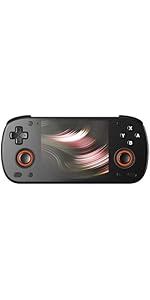
Image 3.3: Curved back design and trigger buttons.
- Ուսի կոճակներ (L1, R1): Located on the top edge.
- Trigger Buttons (L2, R2): Located on the back, below the shoulder buttons.
- USB-C նավահանգիստ: Լիցքավորման և տվյալների փոխանցման համար:
- 3.5 մմ Աուդիո Jack: Ականջակալները միացնելու համար։
- Micro SD քարտի բնիկ. Պահեստը ընդլայնելու համար։
- Power կոճակը. Սարքը միացնելու/անջատելու կամ քնի ռեժիմի դնելու համար։
- Ձայնի կոճակներ. To adjust audio output.
3.3 Internal Components (Cooling)

Image 3.4: Integrated active cooling system.
The Retroid Pocket Classic features an integrated active cooling system designed to maintain optimal performance and manage heat during extended use.
4. Կարգավորում
4.1 Սկզբնական լիցքավորում
Before first use, fully charge the device. Connect the provided USB-C charging cable to the console's USB-C port and the other end to a compatible USB power adapter (not included). The device has a 5000mAh battery.
4.2 Միացում/անջատում
- Միացնել. Սեղմեք և պահեք միացման կոճակը, մինչև էկրանը լուսավորվի։
- Անջատելու համար. Սեղմեք և պահեք միացման կոճակը, այնուհետև էկրանին երևացող տարբերակներից ընտրեք «Անջատել»։
- Քնելու/արթնանալու համար՝ Համառոտ սեղմեք Power կոճակը:
4.3 Wi-Fi միացում
To access online features and download applications, connect to a Wi-Fi network:
- Գնալ դեպի Կարգավորումներ.
- Ընտրել Ցանց և ինտերնետ.
- Հպեք Wi-Fi և միացրեք այն:
- Ընտրեք ձեր ցանկալի ցանցը ցանկից և մուտքագրեք գաղտնաբառը, եթե ձեզ հուշեն։
4.4 Google հաշվի կարգավորում
The Retroid Pocket Classic runs Android 14 and supports the Google Play Store. To download apps and games, you will need to sign in with a Google account during the initial setup process or later via the Settings menu.
4.5 Միկրո SD քարտի տեղադրում
To expand the device's storage (128GB internal), insert a Micro SD card into the designated slot. Ensure the card is inserted correctly until it clicks into place. The device supports various Micro SD card capacities.
5. Գործառնական հրահանգներ
5.1 Android ինտերֆեյսի նավարկություն
The device operates on Android 14. Use the touchscreen for navigation, tapping icons to open applications, swiping to scroll, and using gestures for system controls. The D-pad and action buttons can also be used for navigation within compatible applications and games.
5.2 Downloading and Installing Applications
Applications and games can be downloaded from the Google Play Store. Open the Play Store app, search for your desired content, and follow the on-screen prompts to download and install.
Note: The Retroid Pocket Classic does not come with preloaded games. Users are responsible for acquiring and installing their own game content.
5.3 Պահեստի կառավարում
Դեպի view and manage internal and external storage, go to Կարգավորումներ > Պահպանում. Here you can see storage usage and manage files. For optimal performance, ensure sufficient free space is available.
5.4 Bluetooth կապ
The device supports Bluetooth 5.1 for connecting wireless accessories such as headphones or external controllers.
- Գնալ դեպի Կարգավորումներ.
- Ընտրել Միացված սարքեր.
- Հպեք Irուգակցեք նոր սարք and select your accessory from the list.
6. Պահպանում
6.1 Սարքի մաքրում
Use a soft, dry, lint-free cloth to clean the device's exterior. For the screen, a screen cleaner specifically designed for electronics can be used. Avoid using harsh chemicals or abrasive materials.
6.2 Մարտկոցի խնամք
Մարտկոցի կյանքը երկարացնելու համար.
- Խուսափեք ծայրահեղ ջերմաստիճանից:
- Հաճախակի մի՛ լիցքաթափեք մարտկոցը։
- Store the device with a partial charge if not used for extended periods.
6.3 Ծրագրային ապահովման թարմացումներ
Կանոնավոր կերպով ստուգեք և տեղադրեք համակարգի թարմացումները՝ օպտիմալ աշխատանքն ու անվտանգությունն ապահովելու համար: Անցեք Կարգավորումներ > Համակարգ > Համակարգի թարմացում հասանելի թարմացումները ստուգելու համար։
7: Անսարքություն
7.1 Սարքը չի միանում
- Ensure the device is sufficiently charged. Connect it to a power source for at least 30 minutes.
- Փորձեք սեղմած պահել միացման կոճակը 10-15 վայրկյան՝ վերագործարկումը ստիպելու համար։
7.2 Wi-Fi կապի խնդիրներ
- Verify that Wi-Fi is enabled in Settings.
- Վերագործարկեք ձեր Wi-Fi ռաութերը։
- Forget the network and reconnect, ensuring the password is correct.
7.3 Հավելվածների խափանում կամ սառեցում
- Փակեք և վերաբացեք ծրագիրը։
- Մաքրեք ծրագրի քեշը և տվյալները՝ օգտագործելով Կարգավորումներ > Հավելվածներ > [Հավելվածի անուն] > Պահեստ և քեշ.
- Համոզվեք, որ հավելվածը թարմացված է իր վերջին տարբերակին։
- Վերագործարկեք սարքը:
7.4 Էկրանի անպատասխանատվություն
- Վերագործարկեք սարքը՝ սեղմած պահելով սնուցման կոճակը։
- Համոզվեք, որ էկրանը մաքուր է և զերծ է կեղտից։
8. Տեխնիկական պայմաններ

Image 8.1: Retroid Pocket Classic detailed specifications.
| Առանձնահատկություն | Մանրամասն |
|---|---|
| Մոդելի անվանումը | RP CLASSIC |
| Պրոցեսոր | G1 Gen2 (8-Core Kryo CPU, 2 Performance Cores, 6 Efficiency Cores) |
| GPU | Adreno A12 |
| RAM | 6GB LPDDR4x @2133M |
| Պահպանում | 128GB EMMC 5.1 (expandable via Micro SD card) |
| Էկրան | 3.92-inch AMOLED, 1240x1080 @60fps |
| Օպերացիոն համակարգ | Android 14 |
| Wi-Fi | Wi-Fi 5 |
| Bluetooth | Bluetooth 5.1 |
| Ինտերֆեյս | USB-C / 3.5mm Audio Jack / TF Card Slot |
| Տեսանյութի ելք | N/A |
| Մարտկոց | 5000 mAh |
| Լիցքավորման արագություն | 27 Վտ |
| Չափերը | 138 x 89.8 x 26 մմ (5.43 x 3.53 x 1 դյույմ) |
| Քաշը | 223 գ (7.9 ունցիա) |
9. Երաշխիք և աջակցություն
For warranty information and technical support, please refer to the official Retroid Pocket webկայքում կամ կապվեք նրանց հաճախորդների սպասարկման ծառայության հետ: Պահպանեք ձեր գնման ապացույցը երաշխիքային պահանջների համար:
Online resources and community forums may also provide helpful information and troubleshooting tips.