
1. Ներածություն
This manual provides instructions for the Ceybo EN2D36H ZDA1221216 Replacement Remote Control. This remote is designed to be fully compatible with various Hisense VIDAA Smart TV models, offering a direct replacement without the need for complex programming. Simply insert batteries, and the remote is ready for use.
The remote features dedicated shortcut buttons for popular streaming services, allowing quick access to your favorite entertainment platforms.
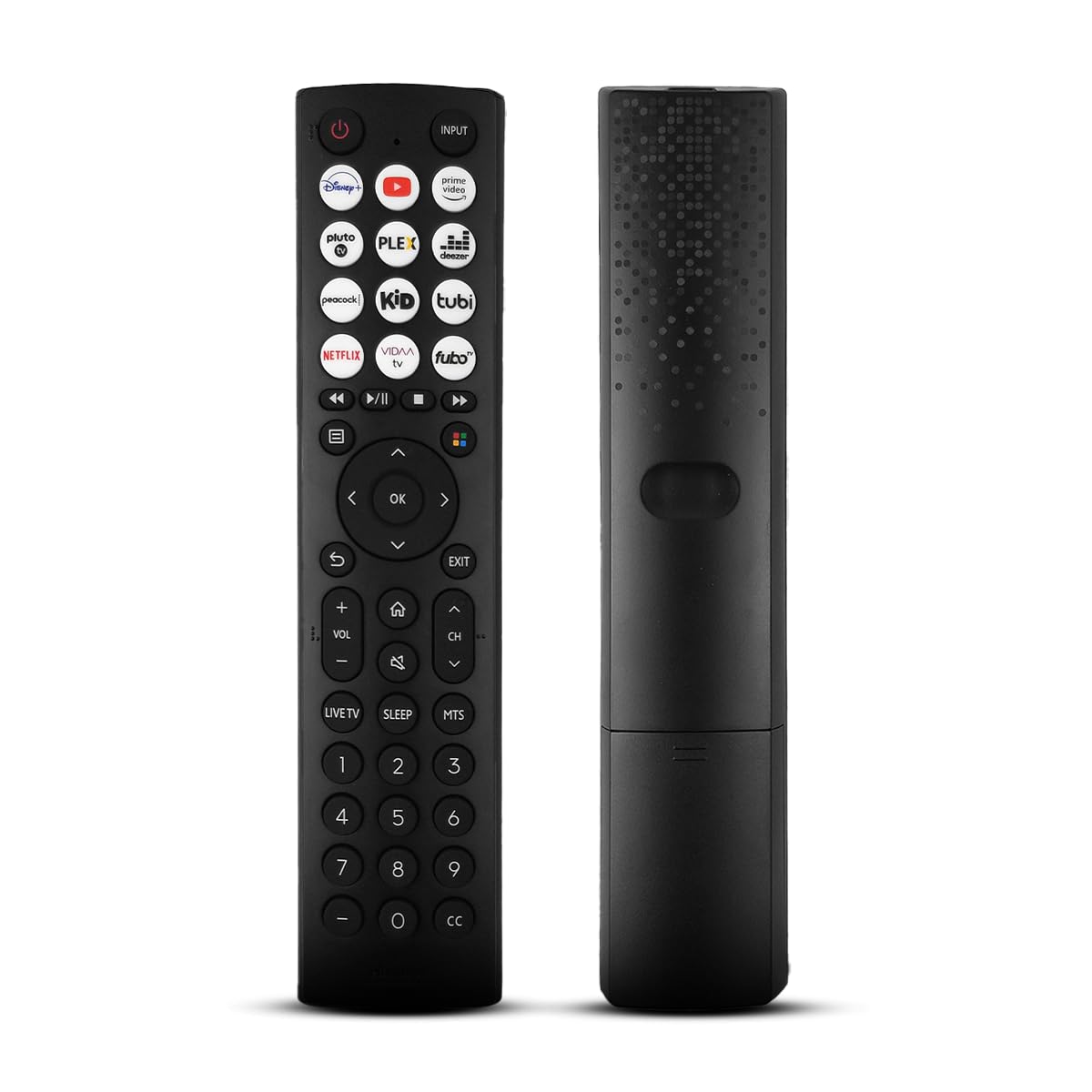
Ճակատ view of the Ceybo EN2D36H ZDA1221216 replacement remote control, designed for Hisense televisions.
2. Առանձնահատկություններ
- Լայն Համատեղելիություն. Works with Hisense A4 Series UHD TVs and A6 Series UHD Smart TVs, including models such as 32A35HUV, 32A45GV, 40A35HUV, 40A45GV, 43A6GV, 43A35HUV, 43A45GV, 50A6GV, 55A6GV, and 65A6GV.
- Instant Streaming Access: Dedicated shortcut buttons for Disney+, YouTube, Prime Video, Pluto TV, Plex, Deezer, Peacock, Kidoodle, Tubi, Netflix, Vida, and Fubo.
- Plug & Play Functionality: No setup or programming required. The remote is ready to use immediately after battery installation.
- Full TV Control: Provides comprehensive control over TV functions including power, volume, input selection, channel navigation, and menu access.
- Էրգոնոմիկ դիզայն. Թեթև է և նախատեսված է հարմարավետ կառավարման համար։

This image displays the Ceybo EN2D36H ZDA1221216 remote control alongside several Hisense televisions, illustrating its compatibility with Hisense A4 and A6 Series UHD Smart TVs.
3. Կարգավորում
The Ceybo EN2D36H ZDA1221216 remote control is designed for immediate use without any programming steps.
3.1 Մարտկոցի տեղադրում
- Տեղադրեք մարտկոցի խցիկը հեռակառավարման վահանակի հետևի մասում:
- Սահեցրեք մարտկոցի կափարիչը ներքև կամ սեղմեք փականը և բարձրացրեք՝ բացելու համար։
- Տեղադրեք երկու (2) AAA մարտկոց՝ համոզվելով, որ դրական (+) և բացասական (-) կոնտակտները ճիշտ համընկնում են խցիկի ներսում նշված նշումների հետ։
- Տեղադրեք մարտկոցի կափարիչը՝ այն իր տեղը սահեցնելով, մինչև այն ապահով կերպով ամրանա։
Once batteries are installed, the remote is ready to operate your compatible Hisense TV.

This image illustrates the battery compartment of the remote control, indicating that it is powered by two AAA batteries for lasting performance.

This image emphasizes the effortless setup of the remote control, stating that it requires no pairing and is ready to use immediately after battery insertion.
4. Գործառնական հրահանգներ
Point the remote control directly at your Hisense TV's infrared receiver for optimal performance.
4.1 Հիմնական գործառույթներ
- Power կոճակը (⏻): Սեղմեք ՝ հեռուստացույցը միացնելու կամ անջատելու համար:
- Մուտքագրման կոճակ. Press to cycle through available input sources (HDMI, AV, etc.).
- Ձայնի բարձրացում/Նվազում (VOL +/-): Կարգավորում է հեռուստացույցի ձայնի մակարդակը։
- Ալիքի վերև/ներքև (ալիք +/-): Փոխում է հեռուստաալիքը։
- Անջատման կոճակ (🔇): Անջատում կամ միացնում է հեռուստացույցի ձայնը:
4.2 Նավիգացիա և մենյու
- Ուղղորդող վահանակ (վերև, ներքև, ձախ, աջ): Navigates through menus and on-screen options.
- OK կոճակ: Հաստատում է ընտրությունները կամ բացում ընտրացանկերը:
- Հետ կոճակ (↩): Վերադառնում է նախորդ էկրանին կամ ընտրացանկին:
- Ելքի կոճակ: Ելք է կատարում ընթացիկ ընտրացանկից կամ հավելվածից։
- Գլխավոր կոճակ (🏠): Մուտք է գործում հեռուստացույցի գլխավոր խելացի հանգույցին կամ գլխավոր էկրանին։
4.3 Streaming Shortcut Buttons
Press any of the dedicated shortcut buttons to directly launch the corresponding streaming application:
- Դիսնեյ+
- YouTube
- Prime Video
- Pluto TV
- Plex
- Դիզեր
- Սիրամարգ
- Kidoodle
- Տուբի
- Netflix
- Վիդա
- Fubo

The remote control is shown with a magnified view of its dedicated shortcut buttons for popular streaming services like Disney+, YouTube, Prime Video, Pluto TV, Plex, Deezer, Peacock, Kidoodle, Tubi, Netflix, Vida, and Fubo.

The remote control is presented to highlight its user-friendly design, featuring large and clearly labeled buttons for intuitive navigation and access to all functions.
5. Պահպանում
5.1 Մաքրում
Հեռակառավարիչը մաքրելու համար օգտագործեք փափուկ, չոր կտոր։ Համառ կեղտի դեպքում թեթևակի սրբեքampՋրով լվացեք կտորը։ Խուսափեք կոշտ քիմիական նյութերի, հղկող մաքրող միջոցների կամ լուծիչների օգտագործումից, քանի որ դրանք կարող են վնասել հեռակառավարման վահանակի մակերեսը կամ ներքին բաղադրիչները։
5.2 Մարտկոցի փոխարինում
Replace batteries when the remote's response becomes sluggish or it stops functioning. Always replace both AAA batteries at the same time with new ones. Do not mix old and new batteries, or different types of batteries, as this can lead to leakage or improper operation. Dispose of used batteries according to local regulations.
6: Անսարքություն
If you experience issues with your Ceybo EN2D36H ZDA1221216 remote control, refer to the following common solutions:
| Խնդիր | Հնարավոր պատճառ | Լուծում |
|---|---|---|
| Հեռակառավարիչը չի աշխատում։ | Մեռած կամ սխալ տեղադրված մարտկոցներ։ | Փոխարինեք մարտկոցները նոր AAA մարտկոցներով՝ ապահովելով ճիշտ բևեռականություն (+/-): |
| Հեռակառավարիչը չի արձագանքում։ | Obstruction between remote and TV, or remote is too far. | Համոզվեք, որ հեռուստացույցի ինֆրակարմիր ընդունիչը լավ տեսանելի է։ Մոտեցեք հեռուստացույցին։ |
| Հատուկ կոճակները չեն աշխատում։ | Dirt or debris under the button, or internal malfunction. | Մաքրեք հեռակառավարիչը։ Եթե խնդիրը շարունակվում է, այն կարող է փոխարինման կարիք ունենալ։ |
| TV does not respond to remote. | TV's IR receiver is blocked or malfunctioning. | Check the TV's IR receiver for obstructions. Test with another remote if available to confirm TV functionality. |
7. Տեխնիկական պայմաններ
- Ապրանքանիշը: Ցեյբո
- Մոդելի անվանումը: EN2D36H ZDA1221216
- Միացման տեխնոլոգիա. Ինֆրակարմիր (IR)
- Վերահսկիչի տեսակը. Կոճակի վերահսկում
- Համատեղելի սարքեր. Television (Hisense VIDAA Smart TVs)
- Power Source: 2 x AAA մարտկոցներ (ներառված չէ)
- Առավելագույն միջակայք. 30 ոտնաչափ (մոտավորապես 9 մետր)
- Հատուկ առանձնահատկություններ. Ergonomic, Lightweight, No Programming Required
- Գույնը: Սեւ
8. Երաշխիք և աջակցություն
For warranty information or technical support, please refer to the product packaging or contact Ceybo customer service through the retailer where the product was purchased. Keep your purchase receipt as proof of purchase.