
1. Ներածություն
Շնորհակալություն գնման համարasing the GOVO GOSURROUND 600 2.1 Channel Soundbar. This manual provides essential information for the safe and efficient use of your new audio system. Please read it thoroughly before operation and retain it for future reference.
Փաթեթի բովանդակությունը
Համոզվեք, որ ստորև թվարկված բոլոր իրերը առկա են ձեր փաթեթում.
- 1 x GOVO GOSURROUND 600 Soundbar
- 1 x սուբվուֆեր
- 1 x Հեռակառավարման վահանակ
- 1 x Aux մալուխ
- 1 x Օգտագործողի ձեռնարկ
- 1 x Երաշխիքային քարտ
2. Անվտանգության տեղեկատվություն
Անվտանգ շահագործումն ապահովելու և վնասներից խուսափելու համար խնդրում ենք պահպանել հետևյալ անվտանգության միջոցառումները.
- Մի՛ ենթարկեք սարքը անձրևի, խոնավության կամ ծայրահեղ ջերմաստիճանների ազդեցությանը։
- Մի՛ բացեք c-նasinէ. Բոլոր սպասարկման հարցերը հանձնարարեք որակավորված անձնակազմին:
- Սարքը պահեք արևի ուղիղ ճառագայթներից, ջերմության աղբյուրներից և ուժեղ մագնիսական դաշտերից հեռու։
- Ապահովեք սաունդբարի և սուբվուֆերի շուրջը պատշաճ օդափոխություն։
- Օգտագործեք միայն սարքի հետ տրվող հոսանքի ադապտեր:
- Անջատեք էլեկտրական խրոցը կայծակի ժամանակ կամ երկար ժամանակ չօգտագործելիս։
3. Ապրանքը ավարտված էview
The GOVO GOSURROUND 600 system consists of a soundbar and a wired subwoofer, designed to enhance your audio experience with 2.1 channel sound and deep bass.

Նկար 3.1: The GOVO GOSURROUND 600 Soundbar and its accompanying wired subwoofer.
Soundbar Controls and Indicators
The soundbar features integrated controls and indicators for easy access. Specific button functions are detailed in the Operating Instructions section.
Հեռակառավարման վահանակ
The included remote control provides full functionality for managing your soundbar settings, including power, volume, input selection, and equalizer modes.

Նկար 3.2: The remote control for the GOVO GOSURROUND 600 Soundbar, showing various function buttons.
4. Կարգավորում
Follow these steps to set up your GOVO GOSURROUND 600 Soundbar system.
4.1 Տեղադրում
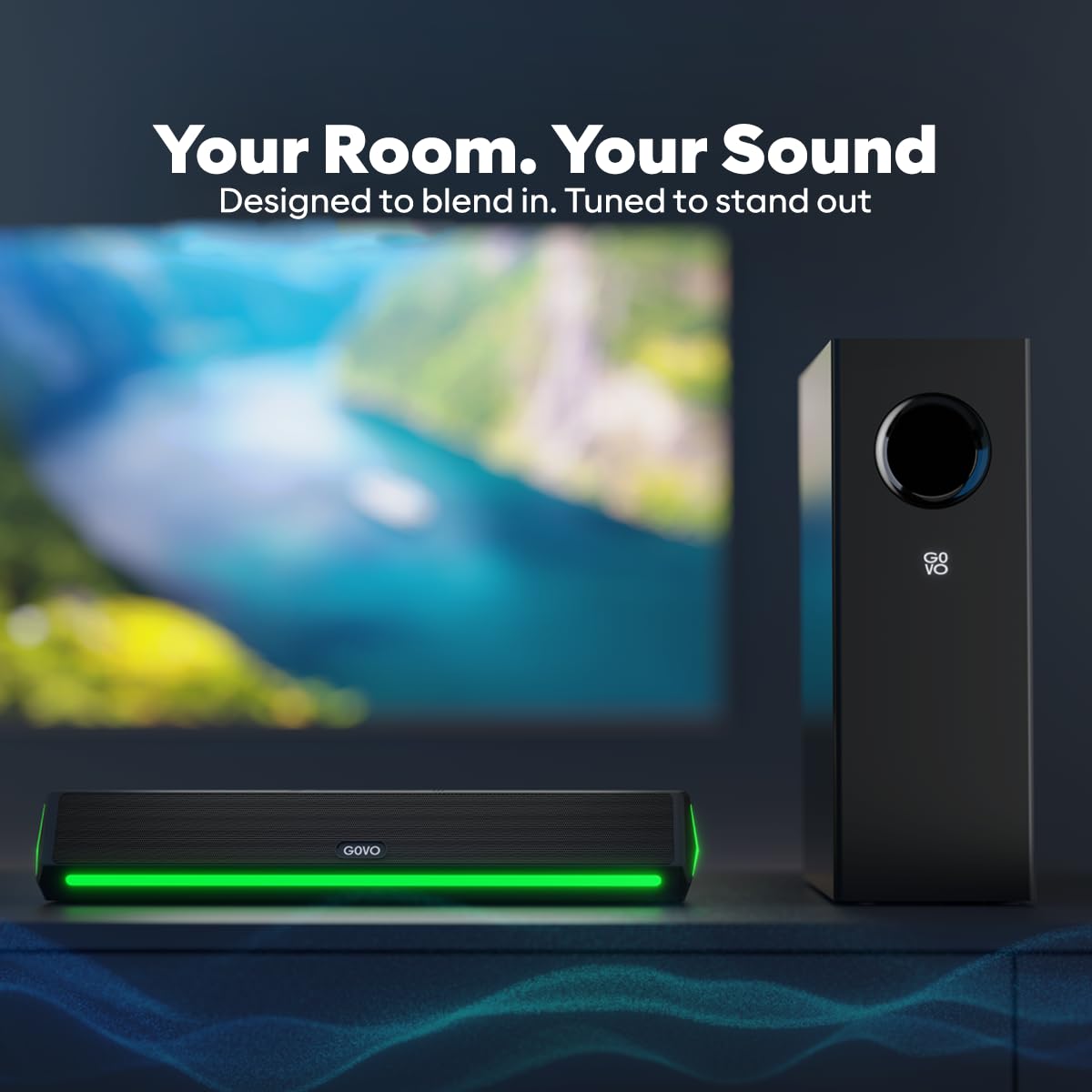
- Place the soundbar centrally below your television or display.
- Position the subwoofer on the floor near the soundbar, ensuring it has adequate space for sound dispersion.
Նկար 4.1: Recommended placement of the soundbar in front of a television and the subwoofer beside it.
4.2 Սաբվուֆերի միացում
The subwoofer connects to the soundbar via a wired connection. Locate the dedicated subwoofer output port on the soundbar and the input port on the subwoofer. Connect them securely using the provided cable.
4.3 Էլեկտրաէներգիայի միացում
Connect the power adapter to the DC input port on the soundbar, then plug the adapter into a wall outlet. Ensure the power outlet is easily accessible.
Նկար 4.2: Rear panel of the soundbar showing the HDMI, AUX, USB, SUB (subwoofer output), and DC power input ports.
5. Գործառնական հրահանգներ
This section details how to operate your GOVO GOSURROUND 600 Soundbar.
5.1 Միացում/անջատում
- Միացնելու համար սեղմեք կոճակը Իշխանություն կոճակը հեռակառավարման վահանակի կամ սաունդբարի վրա։
- Անջատելու համար սեղմեք կոճակը Իշխանություն button again. The soundbar will enter standby mode.
5.2 Ձայնի վերահսկում
- Մամուլ VOL+ հեռակառավարման վահանակի վրա՝ ձայնը մեծացնելու համար:
- Մամուլ VOL- հեռակառավարման վահանակի վրա՝ ձայնը նվազեցնելու համար:
- Սեղմեք Խլացնել կոճակը՝ ձայնը լռեցնելու կամ միացնելու համար։
5.3 Մուտքային աղբյուրի ընտրություն
Սեղմեք ՄՈՒՏՔ button on the remote control or the soundbar to cycle through available input sources: Bluetooth, HDMI (ARC), AUX, and USB.
5.4 Հավասարիչի (EQ) ռեժիմներ
The soundbar features 5 preset equalizer modes to optimize audio for different content types. Press the EQ button on the remote to switch between:
- Փոփ
- Ռոք
- Ջազ
- Դասական
- Երկիր
5.5 Բասի և բարձր հաճախականությունների կարգավորում
Օգտագործեք ԲԱՍ+ / ԲԱՍ- և TRE+ / TRE- buttons on the remote control to fine-tune the bass and treble levels according to your preference.
6. Միացում
The GOVO GOSURROUND 600 offers multiple connectivity options for various devices.
6.1 Bluetooth Pairing (BT v5.3)
- Power on the soundbar and select the Bluetooth input mode using the ՄՈՒՏՔ button. The indicator light will flash, indicating pairing mode.
- On your mobile device, enable Bluetooth and search for "GOVO GOSURROUND 600" in the list of available devices.
- Select the soundbar to pair. Once connected, the indicator light will stop flashing and remain solid.
6.2 HDMI (ARC) միացում
For optimal audio quality and control, connect your TV to the soundbar using an HDMI cable (not included) via the HDMI (ARC) port.
- Connect one end of an HDMI cable to the HDMI (ARC) port on your TV.
- Connect the other end to the HDMI (ARC) port on the soundbar.
- Select HDMI input on the soundbar using the ՄՈՒՏՔ կոճակը։
- Համոզվեք, որ ձեր հեռուստացույցի HDMI ARC գործառույթը միացված է դրա աուդիո կարգավորումներում։
6.3 AUX միացում
Use the provided 3.5mm AUX cable to connect devices with an analog audio output.
- Connect one end of the AUX cable to the AUX port on the soundbar.
- Connect the other end to the headphone jack or audio output port of your device.
- Select AUX input on the soundbar using the ՄՈՒՏՔ կոճակը։
6.4 USB վերարտադրում
Սաունդբարը աջակցում է աուդիո վերարտադրումը USB կրիչ սարքերից։
- Տեղադրեք աուդիո պարունակող USB կրիչ files-ի մեջ մտեք ձայնային վահանակի USB պորտ:
- Select USB input on the soundbar using the ՄՈՒՏՔ կոճակը։
- Playback will begin automatically. Use the remote control to navigate tracks.
7. Պահպանում
Ճիշտ խնամքը ապահովում է ձեր սաունդբար համակարգի երկարակեցությունը և աշխատանքը։
- Մաքրում: Օգտագործեք փափուկ, չոր կտոր՝ սաունդբարի և սուբվուֆերի մակերեսները մաքրելու համար: Մի օգտագործեք հեղուկ մաքրող միջոցներ կամ հղկող նյութեր:
- Պահպանում: Եթե սարքը երկար ժամանակով եք պահում, անջատեք այն հոսանքից և պահեք զով, չոր տեղում։
- Օդափոխում: Ensure that the speaker grilles and vents are not obstructed to prevent overheating.
8: Անսարքություն
Այս բաժինը կարող է օգնել ձեզ հանդիպել հաճախ հանդիպող խնդիրների լուծումների հարցում։
| Խնդիր | Հնարավոր պատճառ | Լուծում |
|---|---|---|
| Ոչ մի ուժ | Հոսանքի մալուխը միացված չէ։ Հոսանքի վարդակը ակտիվ չէ։ | Ստուգեք սնուցման մալուխի միացումը։ Փորձեք այլ վարդակից։ |
| Ոչ մի ձայն | Incorrect input source; Volume too low; Mute activated; Cables not connected properly | Select correct input source; Increase volume; Deactivate mute; Reconnect audio cables securely |
| Bluetooth-ի զուգավորումը ձախողվեց | Սաունդբարը զուգավորման ռեժիմում չէ։ Սարքը չափազանց հեռու է։ Խանգարում է։ | Ensure soundbar is in BT mode and flashing; Move device closer; Turn off other Bluetooth devices |
| Հեռակառավարումը չի աշխատում | Մարտկոցները սպառվել են։ Հեռակառավարման վահանակի և ձայնային վահանակի միջև խոչընդոտ կա։ | Replace remote batteries; Remove any obstructions; Ensure remote is pointed at the soundbar's sensor |
| Սաբվուֆերը բաս չի արտադրում | Subwoofer cable loose; Bass level set too low | Check and secure the subwoofer connection cable; Increase bass level using the remote control |
9. Տեխնիկական պայմաններ
Technical specifications for the GOVO GOSURROUND 600 Soundbar system.
| Մոդելի անվանումը | GoSurround 600 |
| Բարձրախոսի տեսակը | Սաունդբար սաբվուֆերով |
| Շրջապատող ձայնի ալիքի կազմաձևում | 2.1 |
| Բարձրախոսի առավելագույն ելքային հզորություն | 90 Վտ |
| Subwoofer տրամագիծը | 4 դյույմ |
| Speaker Size (Soundbar) | 2 Inches (2 x 2" speakers) |
| Անլար կապի տեխնոլոգիա | Bluetooth v5.3 |
| Միացման տեխնոլոգիա | Auxiliary, Bluetooth, HDMI (ARC), USB |
| EQ ռեժիմները | Pop, Rock, Jazz, Classic, Country |
| Վերահսկման մեթոդ | Հեռավոր |
| Ապրանքի չափերը | 20D x 12W x 33.5H Centimeters (Note: These dimensions likely refer to the subwoofer or packaging, as the soundbar is typically longer.) |
| Նյութի քաշը | 2.8 կգ |
| Նյութ | Պլաստիկ |
| Էլեկտրաէներգիայի աղբյուր | Լարով էլեկտրական |
10. Երաշխիք և աջակցություն
The GOVO GOSURROUND 600 Soundbar comes with a Սահմանափակ երաշխիք. Please refer to the included Warranty Card for detailed terms and conditions, including the warranty period and coverage.
For technical assistance, troubleshooting beyond this manual, or warranty claims, please contact GOVO customer support. Contact information can typically be found on the warranty card or the official GOVO webկայք։
Խնդրում ենք պահպանել ձեր գնման կտրոնը որպես երաշխիքային ծառայությունների գնման ապացույց։