
Ներածություն
This manual provides comprehensive instructions for the setup, operation, and maintenance of your YIQU Smart Color Changing Christmas Lights. These 66-foot string lights feature 200 RGB LEDs, offering a wide range of colors and dynamic modes controllable via remote or a smartphone application. Designed for both indoor and outdoor use, they include features like music synchronization, timer options, and memory function.
Անվտանգության տեղեկատվություն
Խնդրում ենք այս ապրանքը օգտագործելուց առաջ կարդալ և հասկանալ բոլոր անվտանգության հրահանգները: Այս հրահանգներին չհետևելը կարող է հանգեցնել էլեկտրական ցնցման, հրդեհի կամ լուրջ վնասվածքի:
- The Christmas lights have passed UL safety certification, ensuring high quality and safety in use.
- Operate with low voltage power to prevent overheating. The LED string lights are safe to touch.
- For outdoor use, ensure the power plug is protected from water or rain. The long leading wire assists in achieving this function.
- Do not attempt to modify or repair the product yourself. Contact customer support for assistance.
- Պահել երեխաների և ընտանի կենդանիներից հեռու:
Փաթեթի բովանդակությունը
Ստուգեք, որ բոլոր իրերը ներառված են ձեր փաթեթում.
- 1 x հոսանքի վարդակից
- 1 x String Lights (66 FT, 200 LED)
- 1 x Հեռակառավարման վահանակ
Կարգավորում
- Բացեք լույսերը. Carefully uncoil the string lights from their packaging. Ensure the wires are not tangled.
- Տեղադրում: Determine the desired location for your lights. These lights are suitable for both indoor and outdoor environments. For outdoor use, ensure the power adapter is in a dry, protected area.
- Էլեկտրաէներգիայի միացում. Connect the string lights to the provided power plug. Insert the power plug into a standard 110V-120V AC outlet.
- Նախնական միացում. Once plugged in, the lights should illuminate. You can use the remote control or the smartphone app for further customization.
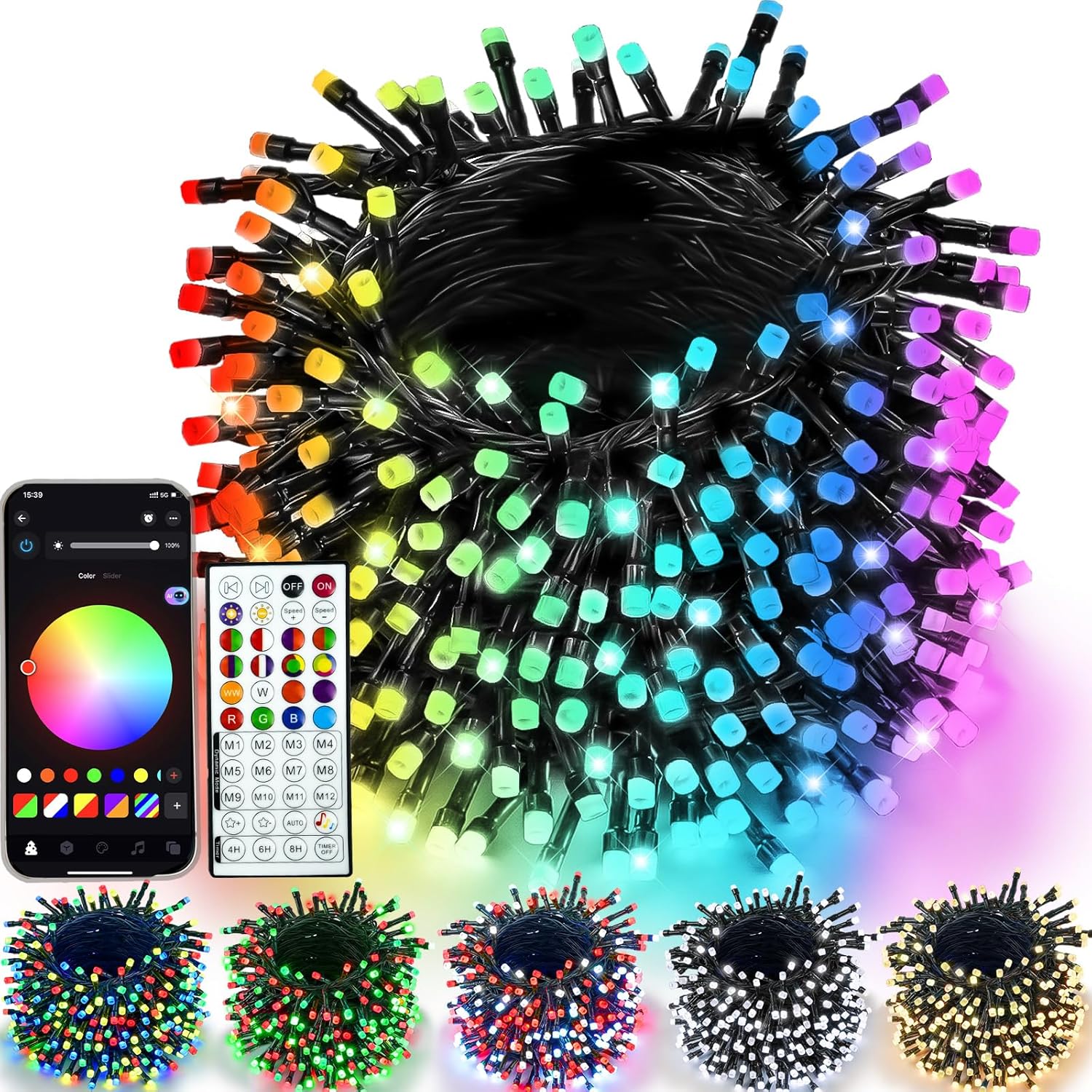
Figure 1: YIQU Smart Color Changing Christmas Lights with remote and app interface.
Գործառնական հրահանգներ
1. Հեռակառավարման վահանակի օգտագործումը
The included 44-key wireless remote allows control of the lights from up to 40 meters away. Ensure the remote has a working battery and is pointed towards the light controller.
- ON/OFF: Press the 'ON' or 'OFF' buttons to power the lights.
- Գույնի ընտրություն. Choose from 16 million colors using the color palette buttons.
- Դինամիկ ռեժիմներ. Select from various pre-set dynamic modes (M1-M12) to create different lighting effects.
- Պայծառության ճշգրտում. Use the brightness control buttons to increase or decrease light intensity.
- Արագության կարգավորում. Adjust the speed of dynamic modes using the speed control buttons.
- Ժամաչափ: Set the timer for 4H, 6H, or 8H using the dedicated buttons.

Figure 2: Remote control functions for the YIQU Smart Christmas Lights.
2. Սմարթֆոնի հավելվածի կառավարում
Download the dedicated smartphone application to unlock advanced control features and customization options.
- Ներբեռնեք հավելվածը ՝ Scan the QR code provided in the product packaging or search for the "YIQU Lights" app in your device's app store.
- Միացնել. Follow the in-app instructions to connect your smartphone to the string lights via Bluetooth.
- Հավելվածի առանձնահատկությունները.
- Color & Effect Adjustment: Easily adjust brightness, color, and lighting effects.
- Խելացի օգնական. Use voice commands to control light changes.
- Խմբի վերահսկում. Control multiple YIQU devices simultaneously.
- Custom Timer: Set specific on/off times.

Figure 3: Smartphone app interface for controlling YIQU Smart Christmas Lights.
3. Music Synchronization
The lights can synchronize with music, creating a dynamic visual experience. This feature is primarily controlled via the smartphone app.
- Ակտիվացրեք երաժշտական ռեժիմը. In the app, select the "Music Mode" option.
- Import Music: Click "Add Music" to import music files from your device or select from the built-in music library.
- Խոսափողի գործառույթը. The lights can react to music rhythms picked up by your phone's microphone (voice-activated version only). Adjust brightness and sensitivity as needed.

Figure 4: Music synchronization feature in action with the YIQU Smart Christmas Lights.
4. Timer Options & Memory Function
The lights include built-in timer options and a memory function to retain your last settings.
- Pre-set Timers: Use the remote to select 4H (4 hours ON, 20 hours OFF), 6H (6 hours ON, 18 hours OFF), or 8H (8 hours ON, 24 hours OFF).
- Custom Timers: Set custom on/off schedules via the smartphone app.
- Հիշողության գործառույթ. The lights will automatically recall your last lighting setting when powered on again.

Figure 5: Timer options and memory function for convenient operation.
Առանձնահատկություններ
- Multiple Colors and Modes: 16 million color options with various lighting effects and adjustable speed/brightness.
- Կրկնակի հսկողություն. Operate via a 44-key wireless remote or a dedicated smartphone application.
- Երաժշտության համաժամացում. Lights change with the rhythm of music, enhancing ambiance.
- Խելացի օգնական. Voice control functionality through the app.
- Timer & Memory: Pre-set and custom timer options, plus memory of last settings.
- Երկարակյաց և անվտանգ. UL certified, low voltage, and IP44 waterproof for indoor/outdoor use.
- Լայն կիրառություն. Suitable for various occasions and holidays, including Christmas, Halloween, and parties.
Տեխնիկական պայմաններ
| Առանձնահատկություն | Մանրամասն |
|---|---|
| Բրենդ | YIQU |
| Մոդելի համարը | GP-SW290DC0310-IP44(US) |
| Լույսի տեսակը | LED լարային լույսեր |
| LED-ների քանակը | 200 |
| Երկարություն | 66 ոտնաչափ |
| Գույնի ընտրանքներ | RGB (16 միլիոն գույներ) |
| Վերահսկման մեթոդներ | Հեռակառավարման վահանակ, սմարթֆոնի հավելված |
| Էլեկտրաէներգիայի աղբյուր | Լարով էլեկտրական |
| Հատtage | 29 վոլտ |
| Վատtage | 6 Վտ |
| Անջրանցիկ վարկանիշ | IP44 (Suitable for Indoor/Outdoor) |
| Հատուկ առանձնահատկություններ | Music Sync, Timer, Memory Function, Intelligent Assistant |
Տեխնիկական սպասարկում
- Մաքրում: Disconnect the power before cleaning. Wipe the lights gently with a soft, dry cloth. Do not use harsh chemicals or abrasive cleaners.
- Պահպանում: When not in use, carefully coil the string lights to prevent tangling. Store them in a cool, dry place away from direct sunlight and extreme temperatures.
- Ստուգում: Periodically inspect the lights and wiring for any damage. If any damage is found, discontinue use and contact customer support.
Անսարքությունների վերացում
- Լույսերը չեն միանում.
- Ensure the power plug is securely connected to a working outlet.
- Ստուգեք, թե արդյոք հեռակառավարման մարտկոցը փոխարինման կարիք ունի։
- Verify the lights are not set to an "OFF" timer mode.
- Հեռակառավարումը չի աշխատում.
- Ensure there are no obstructions between the remote and the light controller.
- Փոխարինեք հեռակառավարման մարտկոցը:
- Հավելվածի միացման խնդիրներ.
- Համոզվեք, որ Bluetooth-ը միացված է ձեր սմարթֆոնի վրա:
- Վերագործարկեք հավելվածը և նորից փորձեք միանալ:
- Ensure the lights are within Bluetooth range.
Պաշտոնական արտադրանքի տեսանյութեր
Watch these official videos for visual guidance and demonstrations of the YIQU Smart Color Changing Christmas Lights.
Video 1: YIQU APP Christmas String Lights - A demonstration of the lights' features and app control.
Երաշխիք և աջակցություն
For warranty information, technical support, or any inquiries regarding your YIQU Smart Color Changing Christmas Lights, please refer to the contact information provided in your product packaging or visit the official YIQU webկայք. Պահպանեք ձեր գնման անդորրագիրը երաշխիքային պահանջների համար: