
1. Ներածություն
Thank you for choosing the THOMSON WS902DUO Cosy Bookshelf Speakers. These active stereo speakers deliver a powerful 150W audio experience with deep bass from two 10 cm woofers. They offer versatile connectivity options including Bluetooth 5.3, Optical, HDMI (ARC), RCA, and USB playback. The included remote control and side panel adjustments provide precise control over your audio. Please read this manual carefully before use to ensure proper operation and to maximize your listening experience.

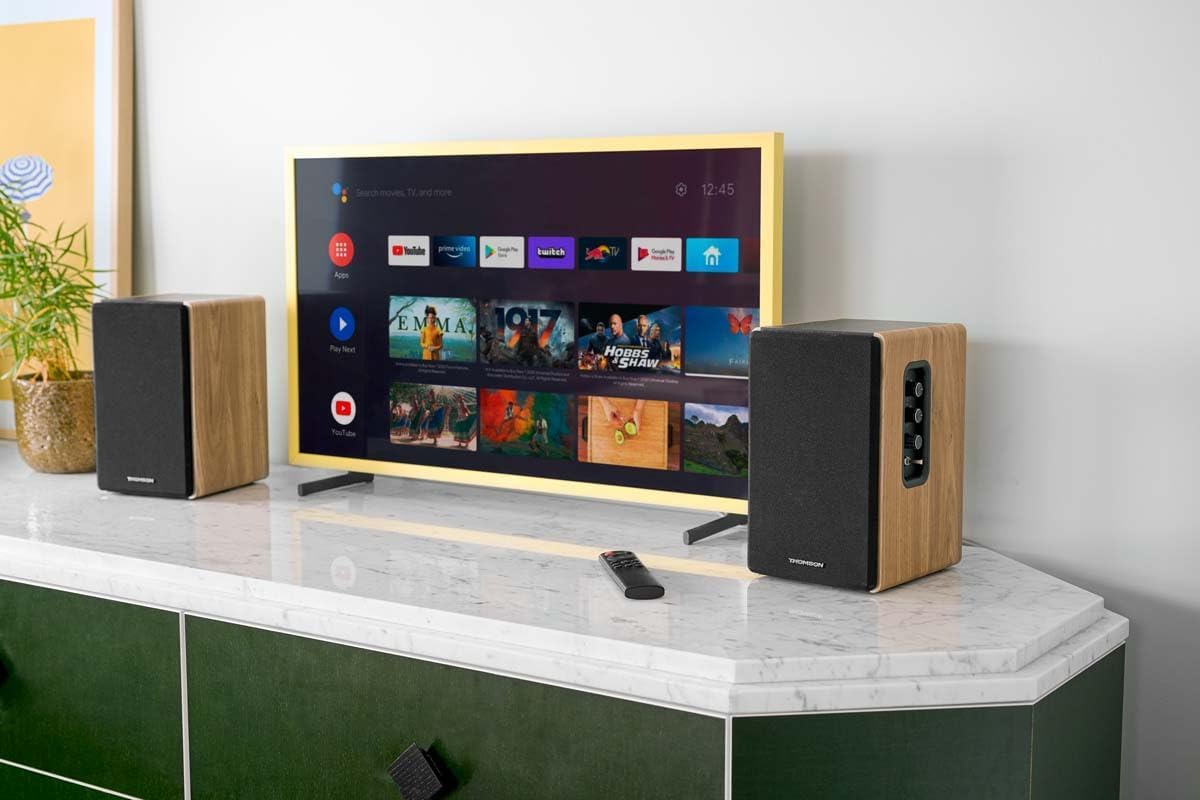
Image 1.1: THOMSON WS902DUO Bookshelf Speakers in a living space, showcasing their elegant wood finish.
2. Անվտանգության կարևոր ցուցումներ
- Արտադրանքը շահագործելուց առաջ ուշադիր կարդացեք այս հրահանգները։
- Պահպանեք այս հրահանգները հետագա հղումների համար:
- Ուշադրություն դարձրեք արտադրանքի և շահագործման հրահանգների բոլոր նախազգուշացումներին:
- Հետևեք բոլոր հրահանգներին:
- Մի օգտագործեք այս սարքը ջրի մոտ:
- Մաքրեք միայն չոր շորով։
- Մի՛ փակեք օդափոխության բացվածքները։ Տեղադրեք արտադրողի հրահանգներին համապատասխան։
- Մի տեղադրեք ջերմային աղբյուրների մոտ, ինչպիսիք են ռադիատորները, ջերմային ռեգիստրները, վառարանները կամ այլ սարքավորումները (այդ թվում՝ ampջեռուցիչներ), որոնք ջերմություն են արտադրում:
- Մի խախտեք բևեռացված կամ հիմնավորվող խրոցակի անվտանգության նպատակը: Բևեռացված խրոցը ունի երկու սայր, որոնցից մեկը մյուսից ավելի լայն է: Հողանցման տիպի խրոցը ունի երկու սայր և երրորդ հողակցման մատը: Լայն սայրը կամ երրորդ սրունքը տրամադրված են ձեր անվտանգության համար: Եթե տրամադրված վարդակից չի տեղավորվում ձեր վարդակից, դիմեք էլեկտրիկին՝ հնացած վարդակից փոխարինելու համար:
- Պաշտպանեք հոսանքի լարը քայլելուց կամ կծկվելուց, հատկապես խրոցակներում, հարմար պահարաններում և այն կետում, որտեղ դրանք դուրս են գալիս սարքից:
- Օգտագործեք միայն արտադրողի կողմից նշված կցորդներ/պարագաներ:
- Օգտագործեք միայն արտադրողի կողմից նշված սայլի, տակդիրի, եռոտանի, փակագծի կամ սեղանի հետ կամ վաճառվում է սարքի հետ: Երբ օգտագործվում է սայլ, զգույշ եղեք սայլը/սարքի համակցությունը տեղափոխելիս՝ շրջվելու հետևանքով վնասվածքներից խուսափելու համար:
- Անջատեք այս սարքը կայծակային փոթորիկների ժամանակ կամ երկար ժամանակ չօգտագործելու դեպքում:
- Ամբողջ սպասարկումը փոխանցեք որակավորված սպասարկող անձնակազմին: Սպասարկումը պահանջվում է, երբ սարքը որևէ կերպ վնասվել է, օրինակ՝ սնուցման լարը կամ վարդակից վնասված է, հեղուկ է թափվել կամ առարկաներ են ընկել սարքի մեջ, սարքը ենթարկվել է անձրևի կամ խոնավության, նորմալ չի աշխատում։ , կամ հեռացվել է:
3. Փաթեթի բովանդակությունը
Խնդրում ենք ստուգել, որ ստորև թվարկված բոլոր ապրանքները ներառված են ձեր փաթեթում.
- THOMSON WS902DUO Bookshelf Speakers (2 units)
- Հեռակառավարման վահանակ
- Power Cable
- Բարձրախոսի միացման մալուխ
- 3.5mm Jack to RCA Adapter Cable
- Օգտագործողի ձեռնարկ (այս փաստաթուղթը)

Image 3.1: Packaging of the THOMSON WS902DUO Bookshelf Speakers.
4. Ապրանքը ավարտված էview
4.1. Side Control Panel (Active Speaker)
The active speaker features a side control panel for easy access to essential functions.

Image 4.1: Side control panel.
- Բասի կառավարում. Կարգավորում է ցածր հաճախականության ելքային ազդանշանը։
- Treble Control: Կարգավորում է բարձր հաճախականության ելքային ազդանշանը։
- Ձայնի վերահսկում. Կարգավորում է ձայնի ընդհանուր ծավալը։
- Էլեկտրական անջատիչ. Միացնում կամ անջատում է բարձրախոսները։
- LED ցուցիչ: Shows the current status or selected input.
4.2. Rear Panel (Active Speaker)
The rear panel of the active speaker provides all necessary input and output connections.
Նկար 4.2. Հետևի վահանակի միացումներ։
- Օպտիկական մուտք. For connecting digital audio sources like TVs, game consoles, or Blu-ray players.
- Օժանդակ մուտք (RCA): For connecting analog audio sources such as turntables, CD players, or PCs. A 3.5mm jack adapter is provided.
- TV Audio (HDMI ARC): For connecting to a TV's HDMI ARC port, allowing TV remote control of the speaker volume.
- USB նվագարկում. MP3 նվագարկելու համար fileուղղակիորեն USB ֆլեշ կրիչից:
- Sub Out: For connecting an external active subwoofer for enhanced bass.
- Բարձրախոսի ելք. Միանում է պասիվ բարձրախոսին։
- Էլեկտրաէներգիայի մուտքագրում. Միանում է գլխավոր էլեկտրամատակարարմանը։
4.3. Հեռակառավարման վահանակ
The remote control provides convenient access to all speaker functions from a distance.

Image 4.3: Remote control.
- Power կոճակը. Turns the speakers on/off.
- Անջատելու կոճակ: Անջատում/անջատում է ձայնը:
- Umeավալ +/-: Կարգավորում է ձայնի մակարդակը:
- Playback Controls (Play/Pause, Skip): USB-ով նվագարկման համար։
- Source Selection Buttons (OPT, BT, ARC, USB, LINE): Ընտրում է աուդիո մուտքի աղբյուրը։
- EQ Mode Buttons (MOVIE, MUSIC, DIALOG): Selects preset equalization modes.
5. Կարգավորում
5.1. Բարձրախոսի տեղադրում
Place the speakers on a stable, flat surface such as a bookshelf, desk, or speaker stands. For optimal stereo imaging, position the speakers equidistant from your listening position and at ear level. Ensure there is adequate space around the speakers for ventilation.
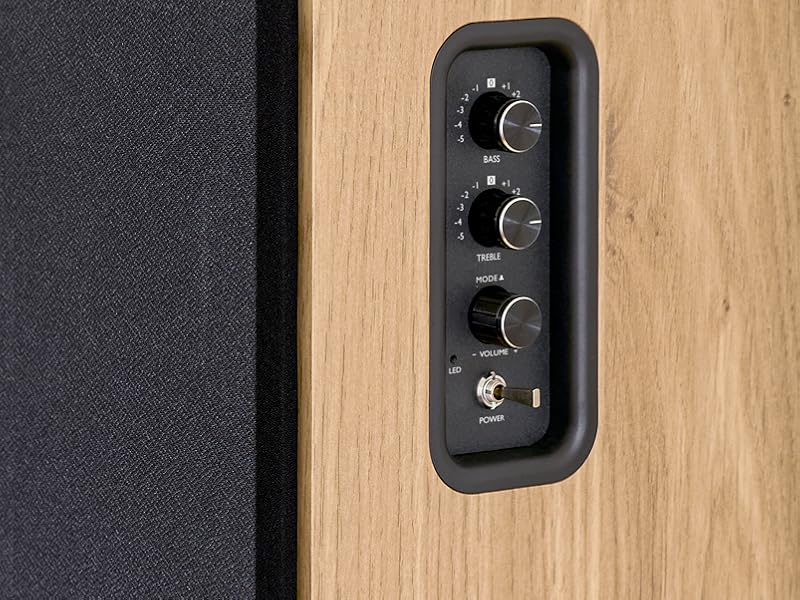
Image 5.1: Recommended speaker placement on a desk.
5.2. Բարձրախոսների միացում
- Identify the active speaker (with controls and inputs) and the passive speaker.
- Connect the included speaker cable from the speaker output terminals on the active speaker to the input terminals on the passive speaker. Ensure correct polarity (+ to + and - to -).
5.3. Աուդիո աղբյուրների միացում
Connect your desired audio sources to the active speaker using the appropriate cables.
- Օպտիկական մուտք. Use an optical cable to connect your TV, game console, or Blu-ray player to the OPTICAL IN port.
- HDMI (ARC) Input: Use an HDMI cable to connect your TV's HDMI ARC port to the TV AUDIO (HDMI) port on the speaker. This allows your TV remote to control the speaker volume.
- RCA (AUX) Input: Use an RCA cable (or the provided 3.5mm jack to RCA adapter) to connect devices like a turntable, CD player, or PC to the AUX IN (RCA) ports.
- USB մուտք. Տեղադրեք USB ֆլեշ կրիչ, որը պարունակում է MP3 files into the USB PLAY port.

Image 5.2: Speakers connected to a television via HDMI ARC.
5.4. Bluetooth զուգավորում
- Համոզվեք, որ բարձրախոսները միացված են։
- Press the 'BT' button on the remote control or the side panel to select Bluetooth input. The LED indicator will flash, indicating pairing mode.
- Ձեր սմարթֆոնի, պլանշետի կամ համակարգչի վրա միացրեք Bluetooth-ը և որոնեք հասանելի սարքերը։
- Select "THOMSON WS902DUO" from the list of devices.
- Զուգակցվելուց հետո LED ցուցիչը կդադարի թարթել և կմնա անփոփոխ։ Այժմ կարող եք անլար կերպով հեռարձակել աուդիո։
5.5. Subwoofer Connection (Optional)
If you wish to enhance bass further, connect an active subwoofer to the 'Sub Out' port on the rear panel of the active speaker using an RCA cable.
6. Գործառնական հրահանգներ
6.1. Միացնել/անջատել
Use the power switch on the side control panel or the power button on the remote control to turn the speakers on or off.
6.2. Աղբյուրի ընտրություն
Press the corresponding source button on the remote control (OPT, BT, ARC, USB, LINE) to switch between connected audio inputs. The LED indicator will change to reflect the selected source.
6.3. Ձայնի վերահսկում
Adjust the volume using the 'Volume' knob on the side control panel or the 'VOL+/-' buttons on the remote control.
6.4. Աուդիո ճշգրտումներ
Fine-tune the sound to your preference:
- Բաս/տրեյբլ: Use the 'Bass' and 'Treble' knobs on the side control panel to adjust the low and high frequencies.
- EQ ռեժիմներ. Press the 'MOVIE', 'MUSIC', or 'DIALOG' buttons on the remote control to select preset equalization settings optimized for different content types.
6.5. USB նվագարկումը
When a USB flash drive with MP3 files is inserted and USB source is selected, the speakers will automatically begin playing. Use the playback control buttons on the remote control (Play/Pause, Skip) to manage your music.
6.6. Bluetooth օպերացիա
After successful pairing (see Section 5.4), you can stream audio from your Bluetooth device. Use your device's controls or the speaker's remote control for playback and volume adjustments.
7. Պահպանում
Ճիշտ սպասարկումը ապահովում է ձեր բարձրախոսների երկարակեցությունը և աշխատանքը։
- Մաքրում: Wipe the speaker surfaces with a soft, dry cloth. Do not use liquid cleaners or abrasive materials.
- Օդափոխում: Համոզվեք, որ օդափոխության բացերը խցանված չեն գերտաքացումից խուսափելու համար:
- Պահպանում: Եթե բարձրախոսները երկար ժամանակով եք պահում, անջատեք դրանք վարդակից և պահեք զով, չոր տեղում։
- Խուսափեք խոնավությունից. Keep the speakers away from water and high humidity.
8: Անսարքություն
Եթե որևէ խնդրի հանդիպեք, դիմեք անսարքությունների վերացման հետևյալ ուղեցույցին.
| Խնդիր | Հնարավոր պատճառ | Լուծում |
|---|---|---|
| Ոչ մի ուժ | Power cable not connected; Power switch off; Wall outlet not working. | Ensure power cable is securely connected. Turn on the power switch. Test the wall outlet with another device. |
| Ոչ մի ձայն | Incorrect input source selected; Volume too low; Mute function active; Audio cable not connected properly. | Select the correct input source. Increase volume. Press Mute button on remote. Check all audio cable connections. |
| Bluetooth-ի զուգավորումը ձախողվեց | Speakers not in pairing mode; Device too far; Bluetooth disabled on source device. | Ensure speakers are in Bluetooth pairing mode (flashing LED). Move device closer to speakers. Enable Bluetooth on your source device. |
| USB նվագարկումը չի աշխատում | USB drive not formatted correctly; Files not MP3; USB drive not inserted properly. | Ensure USB drive is FAT32 formatted. Verify files are in MP3 format. Re-insert USB drive firmly. |
| Ձայնի աղավաղում | Volume too high; Source audio quality poor; Bass/Treble settings too extreme. | Lower the volume. Test with a different audio source. Adjust Bass and Treble controls. |
9. Տեխնիկական պայմաններ
| Առանձնահատկություն | Հստակեցում |
|---|---|
| Բրենդ | ԹՈՄՍՈՆ |
| Մոդելի համարը | WS902DUO |
| Բարձրախոսի առավելագույն ելքային հզորություն | 150 Վտ |
| Հաճախականության արձագանք | 60 Հց |
| Միացման տեխնոլոգիա | Bluetooth, HDMI (ARC), օպտիկական, RCA, USB |
| Bluetooth տարբերակ | 5.3 |
| Աուդիո ելքի ռեժիմ | Ստերեո (2.0 ալիք) |
| Ներածման ծավալըtage | 230 վոլտ (AC) |
| Մոնտաժման տեսակը | Դարակաշար |
| Բարձրախոսի տեսակը | Multimedia Bookshelf |
| Հատուկ առանձնահատկություններ | Stereo Pairing, USB Port, Sub-Out, Remote Control, EQ Modes |
| Առաջարկվող կիրառումներ | Smartphone, Tablet, PC, TV, Game Console, DVD Player, Turntable |
| Գույն | Բնական փայտի հարդարում |
| Վերահսկման մեթոդ | Remote Control, Side Panel Knobs |
| Վուֆերի չափը | 10 սանտիմետր |
| Չափերը (H x W x D) | 28 cm x 24 cm x 47 cm (approximate, per speaker) |
| Քաշը | 5048 Grams (total for pair) |
| Նյութերի քանակը | 2 |
| Ծագման երկիր | Չինաստան |
10. Երաշխիքային տեղեկատվություն
This THOMSON WS902DUO product comes with a 1 տարվա սահմանափակ երաշխիք from the date of purchase. This warranty covers manufacturing defects and workmanship under normal use. It does not cover damage caused by misuse, accidents, unauthorized modifications, or normal wear and tear. Please retain your proof of purchase for warranty claims.
11. Հաճախորդների աջակցություն
For technical assistance, warranty claims, or any questions regarding your THOMSON WS902DUO speakers, please contact your retailer or visit the official THOMSON support website. Please have your model number (WS902DUO) and proof of purchase ready when contacting support.
Առցանց աջակցություն. www.thomsonconsumer.com (Please check for regional support contacts)