
Անվտանգության կարևոր ցուցումներ
Please read these instructions carefully before using the Avtech DGM5907SVSGAT IP Dome Camera. Keep this manual for future reference.
- Ensure proper power supply (PoE or compatible adapter) to prevent damage.
- Do not expose the camera to extreme temperatures, humidity, or direct sunlight beyond its operating specifications.
- Զգուշորեն վարվեք տեսախցիկի հետ։ Խուսափեք այն վայր գցելուց կամ ուժեղ թրթռումների ենթարկելուց։
- Installation should be performed by qualified personnel and comply with local electrical codes.
- Մի՛ փորձեք ապամոնտաժել կամ փոփոխել տեսախցիկը։ Սա կչեղարկի երաշխիքը։
- Clean the camera lens and housing with a soft, dry cloth. Avoid harsh chemicals.
Ապրանքը ավարտվել էview
The Avtech DGM5907SVSGAT is a 5MP AI IP Dome Camera designed for advanced surveillance. It features AI-based human and vehicle detection to minimize false alarms, ONVIF support for system integration, and Power-over-Ethernet (PoE) for simplified installation. The camera provides clear images with Starlight visibility, an integrated microphone for audio recording, and an effective IR range of up to 50 meters for night surveillance. Its WDR (Wide Dynamic Range) function enhances image clarity in challenging lighting conditions, and the IP66 housing ensures durability in various environments.
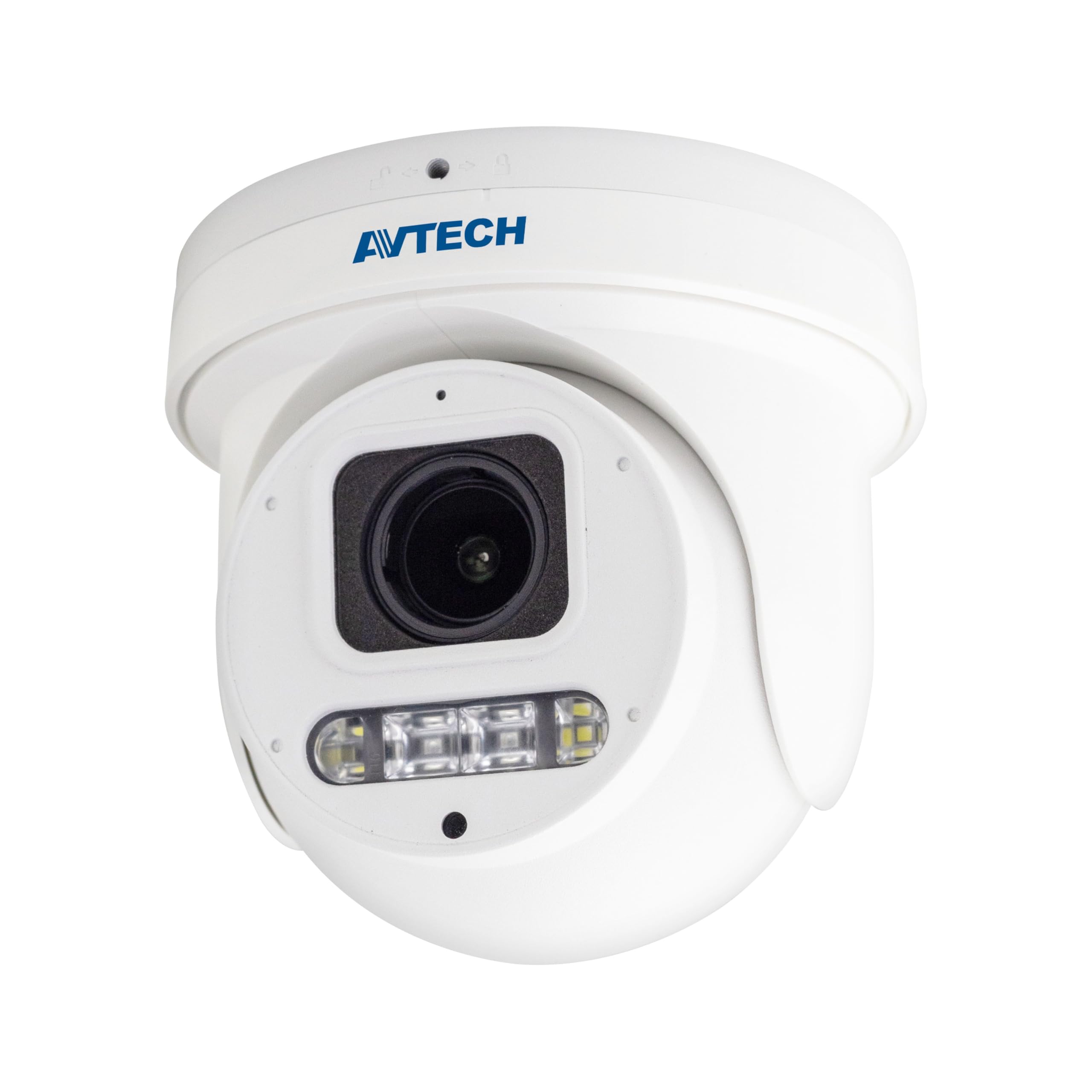
Նկար 1: Ճակատ view of the Avtech DGM5907SVSGAT 5MP AI IP Dome Camera. This image shows the dome-shaped camera housing, the lens assembly, and the IR LEDs visible around the lens.
Փաթեթի բովանդակությունը
Ստուգեք, որ բոլոր իրերը առկա են փաթեթում: Եթե որևէ իր բացակայում է կամ վնասված է, անմիջապես կապվեք ձեր վաճառողի հետ:
- Avtech DGM5907SVSGAT 5MP AI IP Dome Camera
- Mounting Screw Kit (screws, wall anchors)
- Անջրանցիկ միակցիչ Ethernet մալուխի համար
- Արագ մեկնարկի ուղեցույց
- Հորատման կաղապար
Կարգավորում
1. Ֆիզիկական տեղադրում
Before mounting, ensure the installation location provides a clear field of view and is within range of your network infrastructure (PoE switch/injector).
- Պատրաստեք տեղադրման մակերեսը. Օգտագործեք տրամադրված հորատման ձևանմուշը՝ պատի կամ առաստաղի վրա պտուտակների անցքերը նշելու համար։
- Հորատման անցքեր. Drill pilot holes at the marked positions. Insert wall anchors if mounting on drywall or masonry.
- Secure the Camera Base: Attach the camera's mounting base to the surface using the supplied screws.
- Միացնել ցանցային մալուխը. Connect an Ethernet cable (RJ-45) from your PoE switch/injector to the camera's network port. Ensure the waterproof connector is properly sealed if installing outdoors.
- Կարգավորել տեսախցիկի անկյունը. Loosen the adjustment screws on the dome to position the camera lens for the desired viewանկյունը։ Կարգավորելուց հետո ամրացրեք պտուտակները։
Նկար 2: Illustrative diagram of the Avtech DGM5907SVSGAT camera mounting process. This image depicts the camera base being secured to a surface, with an Ethernet cable connected.
2. Networkանցի կազմաձևում
The camera typically obtains an IP address automatically via DHCP. If your network does not use DHCP, you may need to use a discovery tool provided by Avtech or manually configure the IP address.
- Միացեք ցանցին. Ensure the camera is powered via PoE and connected to your local network.
- Discover IP Address: Use the Avtech IP Camera Utility software (available on the Avtech webկայք)՝ ձեր ցանցում տեսախցիկի IP հասցեն հայտնաբերելու համար։
- Մուտք Web Ինտերֆեյս: Բացեք ա web browser (Internet Explorer 6+, Microsoft Edge, or Google Chrome) and enter the camera's IP address in the address bar.
- Մուտք. Enter the default username and password (refer to the Quick Start Guide for default credentials). It is highly recommended to change the default password immediately for security.
- Նախնական տեղադրման մոգ. Follow the on-screen wizard to configure basic network settings, date/time, and user accounts.
Գործառնական հրահանգներ
1. Կենդանի View և Ձայնագրում
Մուտք գործելուց հետո web interface, you can access the live video feed and manage recording settings.
- Ապրեք View: Navigate to the 'Live View' section to see the real-time video feed from the camera.
- Recording to MicroSD: The camera supports a MicroSD card up to 256 GB. Insert the card into the designated slot (usually accessible by opening the dome cover). Configure recording schedules and event-triggered recording (e.g., motion detection, AI detection) in the 'Storage' or 'Recording' settings.
- Տեսանյութի սեղմում. The camera supports H.265 and H.264 compression. H.265 offers better compression efficiency, reducing storage and bandwidth requirements. Adjust this in the 'Video Settings'.
2. AI Detection (Human and Vehicle)
The AI detection feature helps reduce false alarms by distinguishing between humans/vehicles and other moving objects.
- Enable AI Detection: Go to 'Event' or 'AI Settings' in the web interface. Enable 'Human Detection' and/or 'Vehicle Detection'.
- Կարգավորել հայտնաբերման գոտիները՝ Draw specific areas on the live view where you want AI detection to be active.
- Սահմանել զգայունությունը՝ Adjust the sensitivity levels to optimize detection performance and minimize false positives.
- Configure Actions: Specify actions to be taken upon detection, such as recording, sending notifications, or triggering alarms.
3. Պատկերի բարելավման հնարավորություններ
- IR Գիշերային տեսլական. The camera automatically switches to IR mode in low light conditions, providing clear black and white images up to 50 meters. Ensure the IR LEDs are not obstructed.
- WDR (լայն դինամիկ տիրույթ): Enable WDR in 'Image Settings' to improve image quality in scenes with both very bright and very dark areas, such as entrances or windows.
- Starlight Visibility: This feature enhances low-light performance, allowing the camera to capture color images in very dim conditions before switching to IR mode.
Տեխնիկական սպասարկում
Կանոնավոր սպասարկումը ապահովում է ձեր տեսախցիկի օպտիմալ աշխատանքը և երկարակեցությունը։
- Մաքրում: Periodically clean the camera lens and housing with a soft, lint-free cloth. For stubborn dirt, use a mild cleaning solution specifically designed for optical lenses. Do not use abrasive cleaners.
- Fրագրակազմի թարմացումներ. Check the Avtech official website regularly for firmware updates. Firmware updates can improve performance, add new features, and enhance security. Follow the instructions provided with the firmware update package carefully.
- Պահպանման կառավարում. If using a MicroSD card for recording, periodically review արձանագրված footage and manage storage space. Format the MicroSD card occasionally to maintain performance.
- Մալուխի ստուգում. For outdoor installations, inspect network cables and waterproof connectors for any signs of wear or damage.
Անսարքությունների վերացում
Այս բաժինը անդրադառնում է ձեր տեսախցիկի հետ կապված հաճախ հանդիպող խնդիրներին։
| Խնդիր | Հնարավոր պատճառ | Լուծում |
|---|---|---|
| Պատկերի/տեսանյութի հոսք չկա | No power; Network connection issue; Incorrect IP address | Check PoE connection; Verify network cable; Use IP utility to find camera IP; Ensure firewall is not blocking access. |
| Տեսախցիկ անցանց | Network cable disconnected; Router/switch issue; IP address conflict | Check physical network connections; Restart network equipment; Verify unique IP address. |
| Պատկերի վատ որակը | Dirty lens; Incorrect resolution settings; Insufficient lighting; WDR not enabled | Clean the lens; Adjust resolution in settings; Ensure adequate lighting or enable IR; Enable WDR for high contrast scenes. |
| Հաճախակի կեղծ ահազանգեր | Sensitivity too high; Detection zone too wide; Environmental factors (e.g., moving branches) | Adjust AI detection sensitivity; Refine detection zones; Ensure AI detection is enabled for human/vehicle only. |
| Հնարավոր չէ մուտք գործել web ինտերֆեյս | Incorrect IP address; Browser compatibility; Firewall blocking | Verify IP address; Use recommended browsers (IE, Edge, Chrome); Temporarily disable firewall for testing. |
Տեխնիկական պայմաններ
Detailed technical specifications for the Avtech DGM5907SVSGAT IP Dome Camera.
- Պատկերի ցուցիչ. 1/2.8» CMOS
- Առավելագույն լուծում. 2592 x 1944 (5 ՄՊ)
- Ոսպնյակներ: f2.7 ~ 13.5mm / F1.6 ~ F2.2
- Viewing Angle (Diagonal): Tele 40° ~ Wide 117°
- Նվազագույն լուսավորություն. 0.001 Lux (IR off), 0 Lux (IR on)
- Կափարիչի արագություն. AUTO, 1/25s ~ 1/100000s
- IR LED- ներ: 4 միավոր
- Effective IR Distance: Մինչև 50 մետր
- Օր/գիշերային ռեժիմ. Ավտոմատ
- WDR: Այո (120 դԲ)
- RTC (իրական ժամանակի ժամացույց). Այո՛
- MicroSD բնիկ. Մինչև 256 ԳԲ
- Տեսանյութի սեղմում. H.265 / H.264
- Main Stream Resolution: 5MP (2592x1944) / 4MP (2560x1440) / 3MP (2304x1296) / 2MP (1080P) / 720P
- Շրջանակի արագություն. 5MP @ 25FPS
- Բազմակի տեսանյութերի հոսքեր. 2 հոսք
- Bitrate Control: 512Kbps - 12Mbps, VBR/CBR
- Պատկերի բարելավում. WDR / BLC / HLC / 2D DNR / 3D DNR
- Աուդիո: Ինտեգրված խոսափող
- Ցանցային արձանագրություններ. ONVIF supported
- Հզորությունը: PoE (Power-over-Ethernet)
- Բնակարանային: IP66 Մթնոլորտակայուն
- Համատեղելիություն: Internet Explorer 6+, Microsoft Edge, Google Chrome, Windows 10/8/7, DirectX 9.0+
Երաշխիք և աջակցություն
Avtech products are designed for reliability and performance. This product comes with a standard manufacturer's warranty against defects in materials and workmanship.
- Երաշխիքային ժամկետը. Please refer to your purchase documentation or the Avtech official webկայքում՝ ձեր տարածաշրջանում կիրառելի երաշխիքային պայմանների և տևողության վերաբերյալ տեղեկություններ ստանալու համար։
- Տեխնիկական աջակցություն. For technical assistance, troubleshooting, or warranty claims, please contact Avtech customer support.
- Առցանց ռեսուրսներ. Visit the official Avtech website for FAQs, driver downloads, firmware updates, and additional product information.
Կոնտակտային տվյալներ:
Webկայքը: www.avtech.com.tw
Էլ. support@avtech.com
Հեռախոս: +1-XXX-XXX-XXXX