
1. Ներածություն և ավարտview
This manual provides essential information for setting up, operating, maintaining, and troubleshooting your HP 17-inch Business Laptop. This device is designed for productivity and features a 13th Generation Intel Core i5 processor, a 17.3-inch HD+ anti-glare display, a backlit keyboard with a numeric keypad, and a fingerprint reader for enhanced security. It comes pre-installed with Windows 11 Home.
Հիմնական հատկանիշները ներառում են.
- Պրոցեսոր: 13th Gen Intel Core i5-1334U 10-core processor for efficient multitasking.
- Օպերացիոն համակարգ: Windows 11 Home for a modern and secure computing experience.
- Ցուցադրել: 17.3-inch HD+ (1366x768) anti-glare screen with micro-edge design.
- Հիշողություն և պահեստավորում. Up to 64GB DDR4 RAM and up to 2TB NVMe M.2 SSD for fast performance and ampպահեստավորում.
- Միացում: USB 3.2 Gen 1 Type-C, USB 3.2 Gen 1 Type-A, HDMI 1.4, and a headphone/microphone combo jack.
- Անվտանգություն: Integrated fingerprint reader.
- Հարմարավետություն: Full-size backlit keyboard with numeric keypad and HP Fast Charge battery technology.
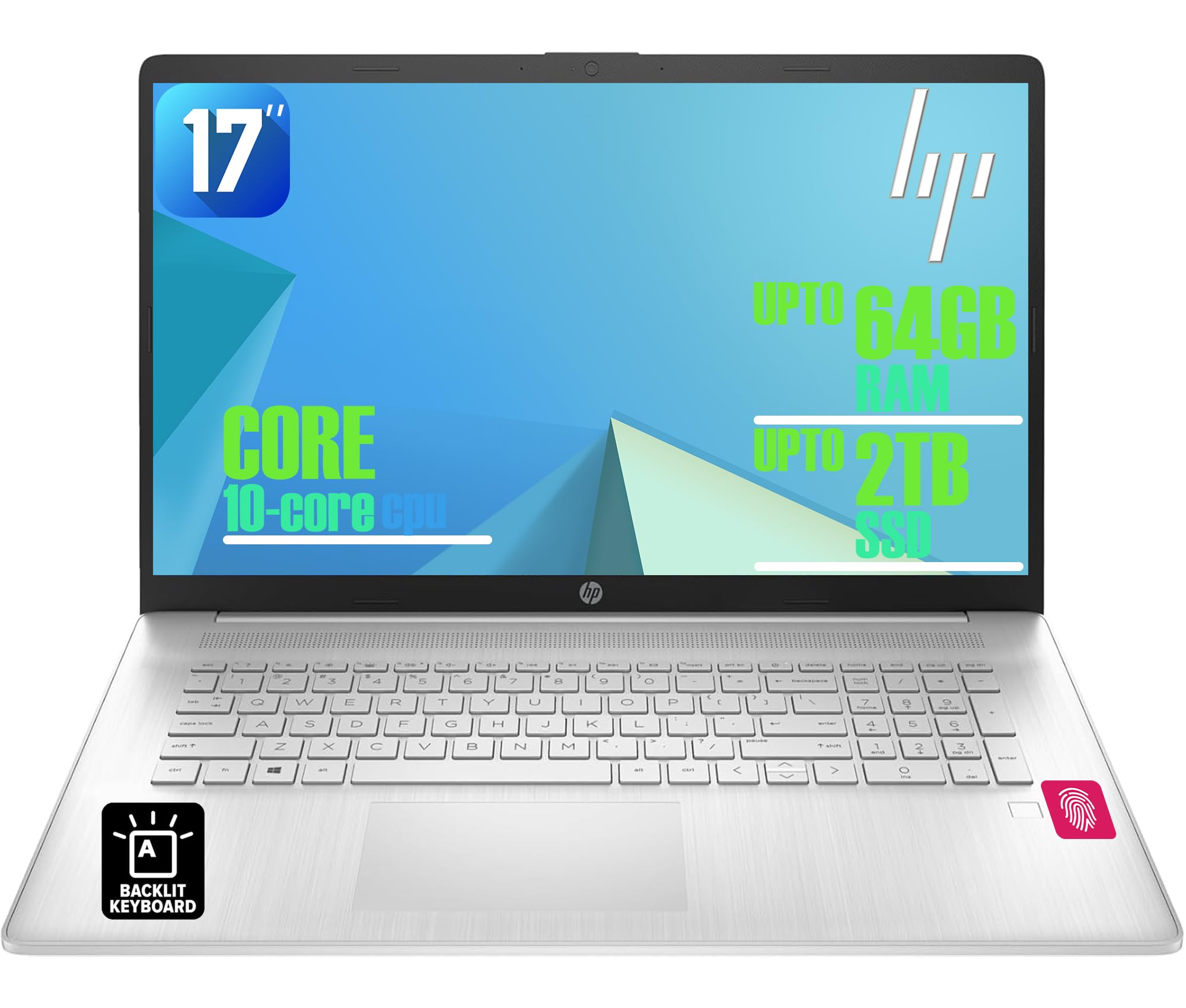
Figure 1: HP 17-inch Business Laptop (Silver)
2. Կարգավորում
2.1 Տուփից հանում և նախնական ստուգում
Carefully remove the laptop and all accessories from the packaging. Check for any visible damage. The package should include the HP 17-inch laptop, a power adapter, and documentation.
2.2 Միացում հոսանքին
- Connect the power adapter to the AC smart pin port on the side of the laptop.
- Միացրեք հոսանքի ադապտեր պատի վարդակից:
- Առաջին օգտագործումից առաջ թողեք նոութբուքը լիցքավորվի առնվազն 30 րոպե կամ մինչև մարտկոցի ցուցիչը ցույց տա բավարար լիցք։
2.3 Սկզբնական բեռնում և Windows-ի կարգավորում
- Բացեք նոութբուքի կափարիչը և սեղմեք միացման կոճակը, որը սովորաբար գտնվում է ստեղնաշարի վերին աջ անկյունում։
- Հետևեք էկրանին հայտնվող հրահանգներին՝ Windows 11 Home-ի կարգավորման գործընթացն ավարտելու համար: Սա ներառում է ձեր տարածաշրջանի, լեզվի ընտրությունը, Wi-Fi ցանցին միանալը և օգտատիրոջ հաշիվ ստեղծելը:
2.4 Ծայրամասային սարքերի միացում
Your HP laptop offers various ports for connecting external devices:
- USB պորտեր. Use the USB 3.2 Gen 1 Type-C port or the two USB 3.2 Gen 1 Type-A ports for connecting external drives, mice, keyboards, or other USB accessories.
- HDMI: Connect an external monitor or projector using the HDMI 1.4 port.
- Աուդիո: Plug headphones or an external microphone into the 3.5mm headphone/microphone combo jack.

Նկար 2. Կողք view illustrating available ports (USB Type-C, USB Type-A, HDMI, Headphone/microphone combo, AC smart pin)
3. Ձեր նոութբուքի շահագործումը
3.1 Էլեկտրաէներգիայի կառավարում
- Միացում՝ Սեղմեք հոսանքի կոճակը:
- Քնելու ռեժիմ: Փակեք կափարիչը կամ ընտրեք «Քնի ռեժիմ» «Սկսել» ցանկից։
- Անջատել. «Սկսել» ընտրացանկից ընտրեք «Անջատել»։
- Վերագործարկեք՝ Select 'Restart' from the Start menu.
3.2 Ստեղնաշար և սենսորային վահանակ
The laptop features a full-size backlit keyboard with a numeric keypad. Use the function keys (Fn) in combination with other keys for specific actions like adjusting screen brightness, volume, or toggling the keyboard backlight.
The integrated touchpad supports multi-touch gestures for navigation. Refer to Windows settings for customizing touchpad behavior.

Figure 3: Backlit keyboard with numeric keypad and integrated fingerprint reader
3.3 մատնահետքերի ընթերցող
The integrated fingerprint reader allows for secure and quick login using Windows Hello. To set up, navigate to Կարգավորումներ > Հաշիվներ > Մուտք գործելու տարբերակներ և հետևեք հրահանգներին՝ ձեր մատնահետքը գրանցելու համար։
3.4 Անլար կապ
- Wi-Fi: The laptop supports Realtek Wi-Fi 6 (2x2). To connect to a wireless network, click the Wi-Fi icon in the taskbar, select your desired network, and enter the password if required.
- Bluetooth: Bluetooth 5.3 is integrated for connecting wireless accessories like headphones or mice. Enable Bluetooth from Կարգավորումներ > Bluetooth և սարքեր և զուգակցեք ձեր սարքերը։
3.5 Ցուցադրել և Webտեսախցիկ
The 17.3-inch HD+ anti-glare display provides a clear viewing experience. The HP True Vision 720p HD webcam with dual microphones is suitable for video calls and online meetings.
3.6 HP QuickDrop
HP QuickDrop allows for wireless file transfer between your laptop and mobile devices without needing cables. Install the HP QuickDrop app on both your laptop and mobile device and follow the in-app instructions to pair and transfer files.

Figure 4: HP QuickDrop for wireless file transfer between laptop and phone
4. Պահպանում
4.1 Ձեր նոութբուքի մաքրումը
- Էկրան: Թեթև օգտագործեք փափուկ, առանց մզկի կտորի, դampջրով կամ էկրան մաքրող միջոցով։ Մի՛ ցողեք հեղուկը անմիջապես էկրանի վրա։
- Ստեղնաշար և շասսի. Օգտագործեք փափուկ, չոր կտոր։ Համառ կեղտի դեպքում՝ մի փոքրamp cloth can be used, ensuring no liquid enters the device. Compressed air can help remove debris from between keys.
4.2 Մարտկոցի խնամք
The laptop is equipped with a 41Wh Lithium-Ion Battery. To maximize battery lifespan:
- Խուսափեք ծայրահեղ ջերմաստիճանից:
- Պարբերաբար մի՛ լիցքաթափեք մարտկոցը։
- Utilize HP Fast Charge, which can charge the battery from 0 to 50% in approximately 45 minutes.

Figure 5: Battery life indicator (Up to 8 hours wireless streaming)
4.3 Ծրագրային ապահովման թարմացումներ
Պարբերաբար ստուգեք և տեղադրեք Windows-ի թարմացումները՝ համոզվելու համար, որ ձեր համակարգում տեղադրված են վերջին անվտանգության թարմացումները և կատարողականի բարելավումները: Անցեք Կարգավորումներ > Windows-ի թարմացում թարմացումները կառավարելու համար։
5: Անսարքություն
This section addresses common issues you might encounter with your HP laptop.
5.1 Հզորության հետ կապված խնդիրներ
- Նոութբուքը չի միանում. Համոզվեք, որ սնուցման ադապտերը ապահով կերպով միացված է և՛ նոութբուքին, և՛ աշխատող սնուցման վարդակիցին: Ստուգեք, թե արդյոք սնուցման ադապտերի ցուցիչի լույսը միացված է: Փորձեք այլ վարդակից:
- Մարտկոցը չի լիցքավորվում. Ստուգեք սնուցման ադապտերի միացումը: Ստուգեք մարտկոցի վիճակը Windows-ի կարգավորումներում:
5.2 Ցուցադրման խնդիրներ
- Էկրանին պատկեր չկա։ :( Համոզվեք, որ նոութբուքը միացված է։ Եթե միացված է արտաքին մոնիտոր, փորձեք անջատել այն կամ սեղմել Fn + F4 (or the corresponding display toggle key) to switch display output.
- Dim screen: Adjust brightness using the function keys (e.g., Fn + F2/F3) or through Windows settings.
5.3 Կապի հետ կապված խնդիրներ
- Wi-Fi-ը չի միանում. Համոզվեք, որ Wi-Fi-ը միացված է Windows-ի կարգավորումներում: Վերագործարկեք ձեր ռաութերը և նոութբուքը: Ստուգեք թարմացված ցանցային դրայվերների առկայությունը:
- Bluetooth սարքը չի զուգակցվում. Համոզվեք, որ Bluetooth-ը միացված է և՛ նոութբուքի, և՛ սարքի վրա։ Համոզվեք, որ սարքը զուգավորման ռեժիմում է։
5.4 Ընդհանուր կատարողականի խնդիրներ
- Դանդաղ կատարողականություն. Close unnecessary applications. Check for malware. Ensure sufficient free space on the SSD.
- Համակարգը կախվում է. Մամուլ Ctrl + Alt + Del to open Task Manager and end unresponsive tasks. If unresponsive, perform a hard shutdown by holding the power button for several seconds.
6. Տեխնիկական պայմաններ
The following table outlines the key technical specifications for the HP 17-inch Business Laptop (Model: HP laptop).
| Առանձնահատկություն | Հստակեցում |
|---|---|
| Բրենդ | HP |
| Մոդելի անվանումը | HP նոութբուք |
| Պրոցեսոր | 13th Gen Intel Core i5-1334U (10 Cores, up to 4.6 GHz) |
| Օպերացիոն համակարգ | Windows 11 Home |
| Ցուցադրել | 17.3-inch HD+ (1366x768) Anti-glare, 250 nits |
| Գրաֆիկա | Intel Iris Xe Graphics (ինտեգրված) |
| RAM հիշողություն | Up to 64GB DDR4 SDRAM 3200 MHz |
| Պահպանում | Up to 2TB NVMe M.2 SSD |
| Անլար կապ | Realtek Wi-Fi 6 (2x2), Bluetooth 5.3 |
| Նավահանգիստներ | 1x USB 3.2 Gen 1 Type-C, 2x USB 3.2 Gen 1 Type-A, 1x HDMI 1.4, 1x Headphone/microphone combo jack |
| Ստեղնաշար | Լիաչափ լուսավորվող ստեղնաշար թվային ստեղնաշարով |
| Անվտանգություն | Մատնահետքի ընթերցող |
| Տեսախցիկ | 720p HD տեսախցիկ՝ գաղտնիության ռեժիմով |
| Մարտկոց | 41Wh Lithium-Ion (HP Fast Charge) |
| Չափերը (L x W x H) | 15.78" x 10.15" x 0.81" (մոտավորապես) |
| Քաշը | 4.6 ֆունտ (մոտ.) |
| Գույն | Բնական արծաթ |

Figure 6: Laptop dimensions (15.78" W x 10.15" D x 0.78" H) and weight (4.60 lbs)
7. Երաշխիք և աջակցություն
7.1 Արտադրողի երաշխիք
Your HP laptop is covered by a manufacturer's warranty. Please refer to the warranty documentation included with your product for specific terms, conditions, and duration. Keep your proof of purchase for warranty claims.
7.2 Տեխնիկական աջակցություն
Տեխնիկական օգնության, դրայվերների ներբեռնման կամ լրացուցիչ աջակցության համար այցելեք HP-ի պաշտոնական աջակցության էջը։ website. You will typically need your product's serial number or model number to access specific support resources.
Առցանց աջակցություն. https://support.hp.com