
Ներածություն
This manual provides essential information for setting up, operating, and maintaining your TCL 32S5K 32-inch HD QLED Google Smart TV. Please read this manual thoroughly before using your television to ensure safe and optimal performance. Keep this manual for future reference.
Անվտանգության տեղեկատվություն
Այս հեռուստացույցն օգտագործելիս միշտ հետևեք անվտանգության հիմնական միջոցառումներին, որպեսզի նվազեցնեք հրդեհի, էլեկտրական ցնցումների և վնասվածքի ռիսկը։ Մի՛ ենթարկեք հեռուստացույցը անձրևի կամ խոնավության ազդեցությանը։ Մի՛ բացեք հեռուստացույցի կափարիչը։asing; refer all servicing to qualified personnel. Ensure proper ventilation and avoid placing the TV near heat sources. Use only the power cord and accessories specified by the manufacturer.
Փաթեթի բովանդակությունը
Ստուգեք, որ բոլոր իրերը առկա են փաթեթում.
- TCL 32S5K 32-inch HD QLED Google Smart TV
- Հեռակառավարման վահանակ
- Հոսանքի լարը
- Հեռուստացույցի հենակ (2 հատ) և պտուտակներ
- Արագ մեկնարկի ուղեցույց
- Երաշխիքային քարտ
Կարգավորում
Ֆիզիկական տեղադրում
Ստենդի տեղադրում. Place the TV screen-down on a soft, flat surface. Attach the two stand pieces to the designated slots on the bottom of the TV using the provided screws. Ensure the stand is securely fastened.
Պատի տեղադրում. If wall-mounting, ensure you use a VESA-compatible wall mount (not included) and follow the wall mount manufacturer's instructions. Disconnect the power cord before mounting.
Սարքերի միացում
Connect your external devices to the appropriate ports on the TV. Refer to the image below for port locations and types.

Figure 1: Rear and Side Connectivity Ports. This image illustrates the various input and output ports available on the TCL 32S5K Smart TV, including USB 2.0, LAN, Antenna/Cable In, Digital Audio Out (Optical), HDMI 1, HDMI 2, and AV In adapter.
- HDMI Ports (1, 2): Միացրեք Blu-ray նվագարկիչներ, խաղային կոնսոլներ, մալուխային/արբանյակային հեռուստատեսության ընդունիչներ կամ HDMI-ով այլ սարքեր:
- USB 2.0 միացք. Միացրեք USB կրիչներ՝ մեդիա վերարտադրման համար։
- LAN նավահանգիստ. Միացրեք Ethernet մալուխ՝ լարային ինտերնետ կապի համար։
- Անտենայի/մալուխի մուտք՝ Միացրեք անտենան կամ մալուխային հեռուստատեսության ազդանշանը։
- Թվային աուդիո ելք (օպտիկական): Connect to an external audio receiver or soundbar for digital audio.
- AV մուտքի ադապտեր՝ Օգտագործեք տրամադրված ադապտերը՝ կոմպոզիտային տեսա և ստերեո աուդիո ելքերով հին սարքերը միացնելու համար։
Սկզբնական միացում և Google TV կարգավորում
After connecting all necessary cables, plug the power cord into an electrical outlet. Press the power button on the remote control or on the TV. Follow the on-screen instructions to complete the initial setup, which includes selecting your language, connecting to a Wi-Fi network, and signing in to your Google account to access Google TV features.
Գործող
Հեռակառավարման գործառույթներ
The remote control allows you to navigate the Google TV interface, adjust volume, change channels, access apps, and control playback. Familiarize yourself with the button layout for easy operation.
Google TV ինտերֆեյս
Google TV organizes your favorite movies, shows, and live TV from across your apps and subscriptions. Use the remote to browse recommendations, search for content, and manage your watch list. Access the Google Play Store to download additional applications.
Միացման առանձնահատկությունները
- Wi-Fi: Connects your TV to your home wireless network for internet access and streaming.
- Bluetooth: Pair Bluetooth-enabled devices such as headphones or game controllers for a personalized experience.
- Googlecast (Chromecast built-in): Cast content from your compatible mobile devices or computer directly to your TV screen.
Նկարի և ձայնի կարգավորումներ
Your TCL 32S5K TV features QLED technology, Full HD resolution, HDR10 support, and Dolby Audio for an enhanced viewing and listening experience. Adjust picture modes (e.g., Standard, Vivid, Movie) and sound modes (e.g., Standard, Music, Movie) through the TV settings menu to suit your preferences.

Figure 2: Image Quality Features. This image highlights the key display technologies of the TCL 32S5K Smart TV, including QLED for vibrant colors, FHD (Full High Definition) for clear resolution, and HDR10 for enhanced contrast and brightness.
Տեխնիկական սպասարկում
Հեռուստացույցի մաքրում
Հեռուստացույցը մաքրելուց առաջ միշտ անջատեք այն էլեկտրական վարդակից։ Էկրանը և պատյանը սրբելու համար օգտագործեք փափուկ, չոր կտոր։ Համառ հետքերի դեպքում թեթևակի սրբեքampen the cloth with water or a mild, non-abrasive screen cleaner. Never spray cleaner directly onto the screen or allow liquids to enter the TV's openings.
Ծրագրային ապահովման թարմացումներ
Your Google TV may receive automatic software updates. Ensure your TV is connected to the internet to receive these updates, which can improve performance and add new features. You can also manually check for updates in the TV's settings menu.
Անսարքությունների վերացում
Եթե ձեր հեռուստացույցի հետ կապված խնդիրներ ունեք, դիմեք հետևյալ տարածված լուծումներին.
- Հզորություն չկա. Ստուգեք, թե արդյոք սնուցման լարը ամուր միացված է և՛ հեռուստացույցին, և՛ էլեկտրական վարդակիցին։ Փորձեք այլ վարդակից։
- No Picture/Poor Picture: Ensure all cables are correctly connected. Check the input source. Adjust picture settings. If using an antenna, check signal strength.
- No Sound/Poor Sound: Check volume levels and mute settings. Ensure external audio devices are properly connected and selected as the audio output.
- Հեռակառավարումը չի աշխատում. Փոխարինեք մարտկոցները։ Համոզվեք, որ հեռակառավարման վահանակի և հեռուստացույցի ինֆրակարմիր սենսորի միջև խոչընդոտներ չկան։
- Ցանցային կապի խնդիրներ՝ Վերագործարկեք ձեր ռաութերն ու մոդեմը: Վերամիացեք Wi-Fi ցանցին հեռուստացույցի կարգավորումներում: Կաբելային միացման դեպքում համոզվեք, որ Ethernet մալուխը ճիշտ է միացված:
- Google TV Slow/Unresponsive: Restart the TV by unplugging it for a few minutes and plugging it back in. Clear cache for problematic apps in settings.
Մշտական խնդիրների դեպքում դիմեք TCL աջակցության ծառայությանը։ webկայք կամ կապվեք հաճախորդների սպասարկման հետ:
Տեխնիկական պայմաններ
Below are the technical specifications for the TCL 32S5K Smart TV:
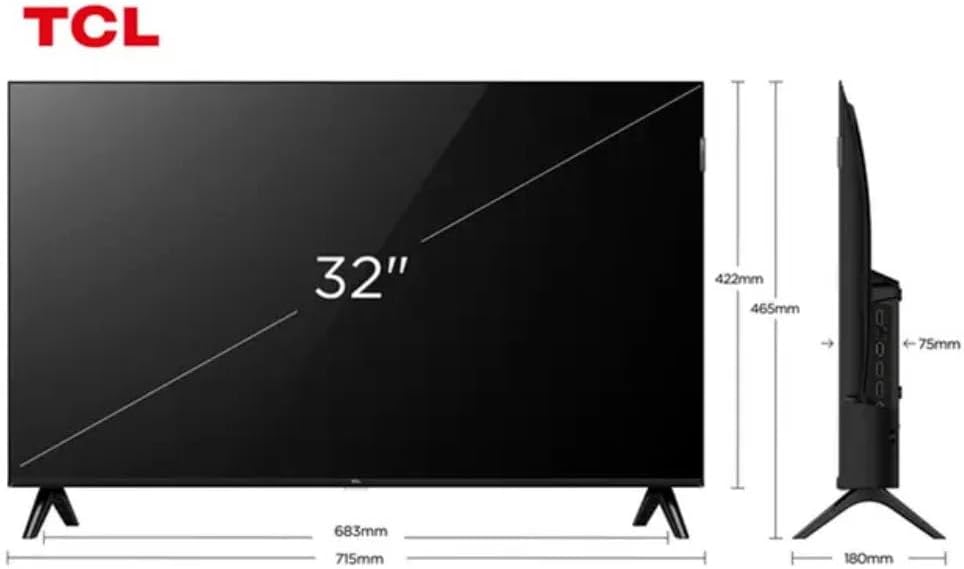
Figure 3: TV Dimensions. This image provides a detailed diagram of the TCL 32S5K Smart TV's physical dimensions, including screen size (32 inches), width (715mm), height (422mm without stand, 465mm with stand), and depth (75mm).
| Առանձնահատկություն | Նկարագրություն |
|---|---|
| Մոդելի անվանումը | 32S5K |
| Էկրանի չափը | 32 դյույմ |
| Ցուցադրման տեխնոլոգիա | QLED |
| Բանաձեւ | 1080p (Full HD) |
| Թարմացման արագություն | 60 Հց |
| Միացում | Bluetooth, Ethernet, HDMI, USB, Wi-Fi |
| Ընդհանուր HDMI պորտեր | 2 |
| Հատուկ առանձնահատկություններ | Integrated Speaker, Google TV, Googlecast Integrated, HDR10, Dolby Audio |
| Ապրանքի չափերը (D x W x H) | 7.6P x 71.6L x 42.3A centimeters (approx. 3 x 28.2 x 16.7 inches) |
| Արտադրող | TCL |
| Ծագման երկիր | Բրազիլիա |
Երաշխիք և աջակցություն
Երաշխիքային տեղեկատվություն
The TCL 32S5K Smart TV comes with a 1 տարվա արտադրողի երաշխիք. This warranty covers defects in materials and workmanship under normal use. Please retain your proof of purchase for warranty claims. For specific terms and conditions, refer to the warranty card included in your package or visit the official TCL webկայք։
Հաճախորդների աջակցություն
If you require technical assistance, have questions about your product, or need to initiate a warranty claim, please contact TCL customer support. You can typically find contact information on the TCL official webկայքում կամ ձեր ապրանքի փաստաթղթերում։
Before contacting support, please have your TV model number (32S5K) and serial number ready, along with a detailed description of the issue.