
Ներածություն
This manual provides essential information for the safe and efficient use of your ciciglow 4G Slide Phone. Please read these instructions carefully before operating the device and retain them for future reference. This phone combines a classic slide design with modern 4G connectivity and a touch screen interface.
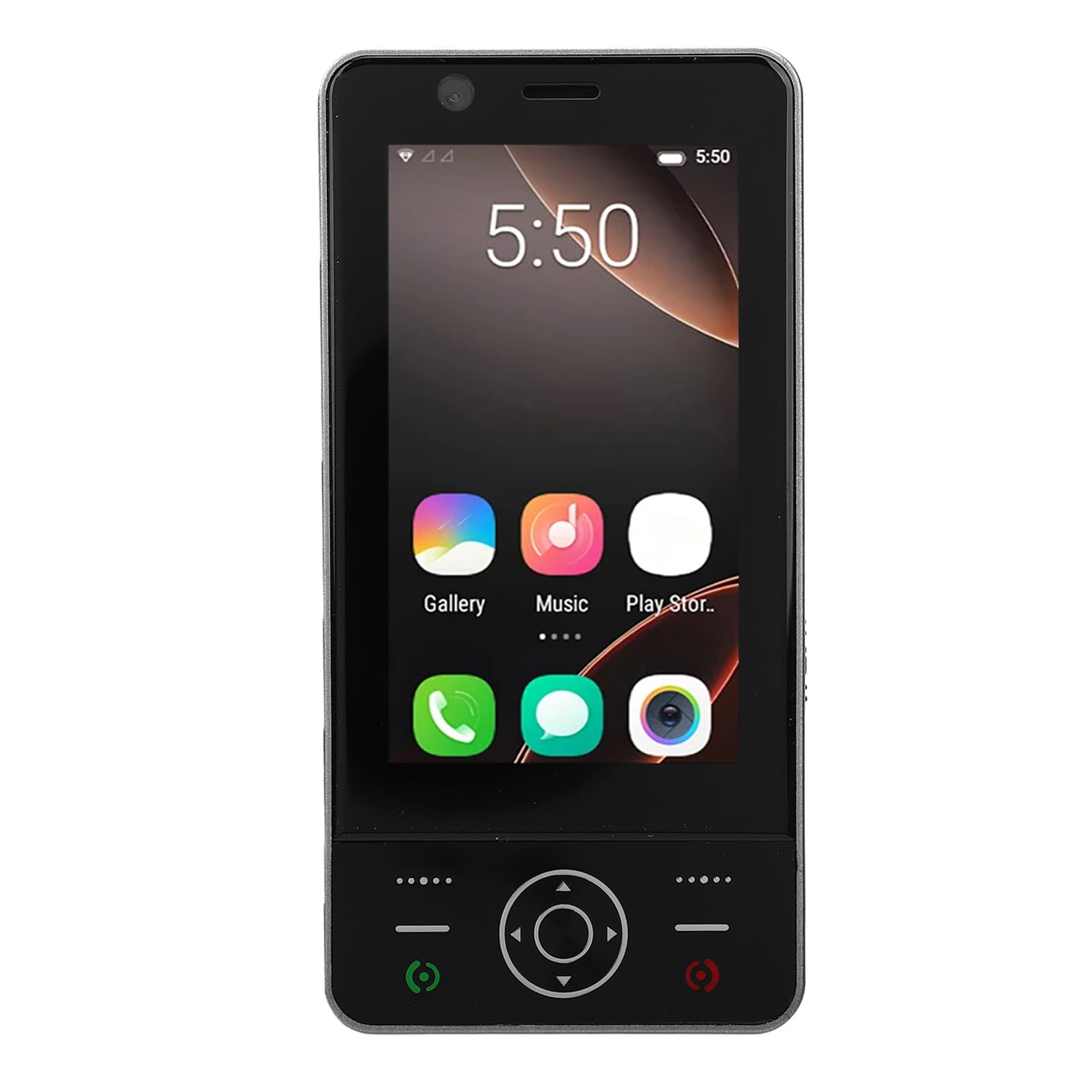
Image: The ciciglow 4G Slide Phone in its open position, displaying the touch screen interface and the physical keypad.
Ապրանքը ավարտվել էview
Հիմնական հատկանիշները
- Slide Design: Compact and portable form factor with a sliding physical keypad.
- Ցուցադրել: 3.0-inch touch screen for intuitive navigation.
- Օպերացիոն համակարգ: Android 8.1 (non-upgradable).
- Ցանցային միացում. Supports 4G/3G/2G networks (GSM 850/900/1800/1900, WCDMA B1/B2/B4/B5/B8, FDD B1/2/3/5/7/8/20/28AB, TDD B38/40/B41).
- SIM քարտի աջակցություն. Dual SIM slots for flexible network usage.
- Պահպանում: 2GB RAM and 16GB internal storage, expandable up to 32GB via memory card (not included).
- Անլար: Bluetooth V5.0 and Wi-Fi connectivity.
- Տեսախցիկ: 2MP front and rear cameras.
- Մարտկոց. Ներկառուցված 2000 mAh մարտկոց:
- Նավահանգիստներ: Type-C charging port and 3.5mm headphone jack.
Փաթեթի բովանդակությունը
Ստուգեք, որ բոլոր իրերը առկա են փաթեթում.
- 1 x ciciglow 4G Slide Phone
- 1 x լիցքավորման մալուխ (տիպ-C)
- 1 x ժապավեն
- 2 x Օգտագործողի ձեռնարկ (այս փաստաթուղթը)
- 1 x SIM քարտի հեռացման գործիք

Image: The ciciglow 4G Slide Phone, lanyard, charging cable, and SIM ejector tool, representing the package contents.
Կարգավորում
1. SIM քարտ(եր)ի և հիշողության քարտի տեղադրում
- Գտեք SIM քարտի սկուտեղը հեռախոսի կողքին։
- Օգտագործեք տրամադրված SIM քարտի դուրսբերման գործիքը՝ արկղը բացելու համար։
- Carefully place your Nano-SIM card(s) into the designated slots. Ensure the gold contacts face downwards.
- If using a memory card (MicroSD, up to 32GB), insert it into the dedicated memory card slot on the tray.
- Զգուշորեն սեղմեք սկուտեղը հեռախոսի մեջ, մինչև այն հարթվի սարքի կորպուսի հետ։
2. Սարքի լիցքավորում
- Connect the Type-C charging cable to the charging port at the bottom of the phone.
- Մալուխի մյուս ծայրը միացրեք համատեղելի USB սնուցման ադապտերին (չի մատակարարվում) կամ համակարգչի USB միացքին։
- Առաջին օգտագործումից առաջ թողեք, որ հեռախոսը լիովին լիցքավորվի: Էկրանի վրա մարտկոցի ցուցիչը կցուցադրի լիցքավորման կարգավիճակը:
3. Միացում/անջատում
- Միացնել. Սեղմեք և պահեք միացման կոճակը (սովորաբար կողքի վրա է), մինչև էկրանը լուսավորվի։
- Անջատելու համար. Սեղմեք և պահեք միացման կոճակը, այնուհետև էկրանին երևացող տարբերակներից ընտրեք «Անջատել»։
Գործառնական հրահանգներ
Հիմնական նավարկություն
The ciciglow 4G Slide Phone offers dual navigation methods: the 3.0-inch touch screen and the physical keypad.
- Սենսորային էկրան. Սեղմեք՝ ընտրելու համար, սահեցրեք՝ ոլորելու համար, մատները մոտեցրեք՝ մեծացնելու համար։
- Ֆիզիկական ստեղնաշար՝ Use the directional pad for menu navigation and the numeric keys for dialing or text input when the keypad is extended.

Image: The phone with its keypad extended, illustrating the combination of touch screen and physical button controls.
Զանգեր կատարելը և ստանալը
- Զանգահարելու համար. Open the dialer application on the touch screen or slide open the phone to use the physical keypad. Enter the phone number and press the call button.
- Զանգ ստանալու համար. When a call comes in, swipe the answer icon on the touch screen or press the green call button on the keypad.

Image: A person using the ciciglow 4G Slide Phone for a call, demonstrating its ergonomic design.
Տեքստային հաղորդագրությունների փոխանակում
Access the messaging application from the home screen. You can compose messages using the on-screen keyboard or the physical keypad when extended.
Միացում Wi-Fi-ին
- Գնալ դեպի Կարգավորումներ > Ցանց և ինտերնետ > Wi-Fi.
- Միացնել/անջատել Wi-Fi-ը On.
- Ընտրեք ձեր ցանկալի ցանցը ցանկից և մուտքագրեք գաղտնաբառը, եթե ձեզ հուշեն։
Bluetooth- ի զուգավորում
- Գնալ դեպի Կարգավորումներ > Միացված սարքեր > Bluetooth.
- Միացնել Bluetooth-ը On.
- Ensure the device you wish to pair with is in pairing mode.
- Ընտրեք սարքը հասանելի սարքերի ցանկից և հետևեք էկրանին հայտնվող ցանկացած հուշմանը՝ զուգավորումն ավարտելու համար։
Տեսախցիկի օգտագործումը
Open the Camera application from the home screen. Tap the screen to focus and press the shutter button to take a photo. You can switch between front and rear cameras within the app.
Տեխնիկական սպասարկում
Ձեր սարքի մաքրում
- Հեռախոսի էկրանը և կորպուսը մաքրելու համար օգտագործեք փափուկ, առանց թելերի կտոր։
- Խուսափեք կոշտ քիմիական նյութերի, հղկող մաքրող միջոցների կամ աէրոզոլային սփրեյների օգտագործումից։
- Պահեք նավահանգիստները փոշուց և բեկորներից զերծ։
Մարտկոցի խնամք
- Խուսափեք հեռախոսը ծայրահեղ ջերմաստիճանների ենթարկելուց։
- Մի ծակեք կամ ապամոնտաժեք մարտկոցը:
- Մարտկոցի օպտիմալ աշխատանքի համար խուսափեք մարտկոցի հաճախակի լրիվ լիցքաթափումից կամ այն երկար ժամանակ 100% լիցքավորված վիճակում պահելուց։
Ծրագրային ապահովման թարմացումներ
The operating system for this device is Android 8.1 and is not upgradable. Ensure you have the latest available applications from the Play Store for optimal performance.
Անսարքությունների վերացում
| Խնդիր | Հնարավոր լուծում |
|---|---|
| Հեռախոսը չի միանում։ | Ensure the battery is charged. Connect the phone to a charger for at least 30 minutes. If it still doesn't power on, contact support. |
| Ցանցային ազդանշան չկա: | Check if the SIM card is correctly inserted. Verify that you are in an area with network coverage. Restart the phone. |
| Սենսորային էկրանը չի արձագանքում։ | Restart the phone. Ensure the screen is clean and dry. If the issue persists, contact support. |
| Հնարավոր չէ միանալ Wi-Fi-ին: | Ensure Wi-Fi is enabled on the phone and the router is working. Re-enter the Wi-Fi password. Restart both the phone and the router. |
| Հավելվածները դանդաղ են աշխատում կամ խափանում են։ | Close unnecessary background applications. Clear app cache (Settings > Apps > [App Name] > Storage > Clear cache). Restart the phone. |
Տեխնիկական պայմաններ
| Առանձնահատկություն | Մանրամասն |
|---|---|
| Բրենդ | ciciglow |
| Մոդելի անվանումը | ciciglowzsbnh152p6-13 |
| Օպերացիոն համակարգ | Android 8.1 (Non-upgradable) |
| Պրոցեսոր | MTK6737 |
| Էկրանի չափը | 3.0 դյույմ |
| Ցուցադրման տեսակը | Touch Screen, LED |
| Հիշողություն (RAM) | 2 ԳԲ |
| Պահեստ (ROM) | 16 ԳԲ |
| Ընդլայնվող պահեստ | Supports up to 32GB Memory Card (MicroSD) |
| Բջջային տեխնոլոգիա | 4G/3G/2G |
| Հաճախականության գոտի | 2G GSM 850/900/1800/1900, 3G WCDMA B1/B2/B4/B5/B8, 4G FDD B1/2/3/5/7/8/20/28AB, TDD B38/40/B41 |
| SIM քարտի անցքերի քանակը | Կրկնակի SIM |
| Անլար կապ | Wi-Fi, Bluetooth V5.0 |
| Տեսախցիկ | 2MP առջևի և հետևի տեսախցիկներ |
| Մարտկոցի հզորությունը | 2000 մԱժ (ներկառուցված) |
| Լիցքավորման նավահանգիստ | Type-C |
| Ականջակալների Jack | 3.5 մմ |
| Չափերը (մոտ.) | Height: 136mm (5.35in), Width: 52mm (2.05in), Thickness: 19mm (0.74in) |
| Քաշը (մոտ.) | 135 գ |

Image: Detailed dimensions and weight of the ciciglow 4G Slide Phone.

Image: An illustration of the phone's internal chipset, highlighting the MTK6737 processor, Android 8.1, 16GB ROM, and 2GB RAM.
Երաշխիք և աջակցություն
Երաշխիքային տեղեկատվություն
This ciciglow 4G Slide Phone is covered by a manufacturer's warranty for 90 days from the date of purchase. Please retain your proof of purchase for warranty claims.
Հաճախորդների աջակցություն
For further assistance, technical support, or warranty inquiries, please refer to the contact information provided with your purchase or visit the official ciciglow brand store online. You can find more information at the ciciglow Store.