
Ներածություն
This manual provides essential information for the safe and efficient use of your Samsung 43-Inch Class U8000H Series Crystal UHD 4K Smart TV. Please read all instructions carefully before using the product and retain this manual for future reference.
Ինչ կա տուփի մեջ
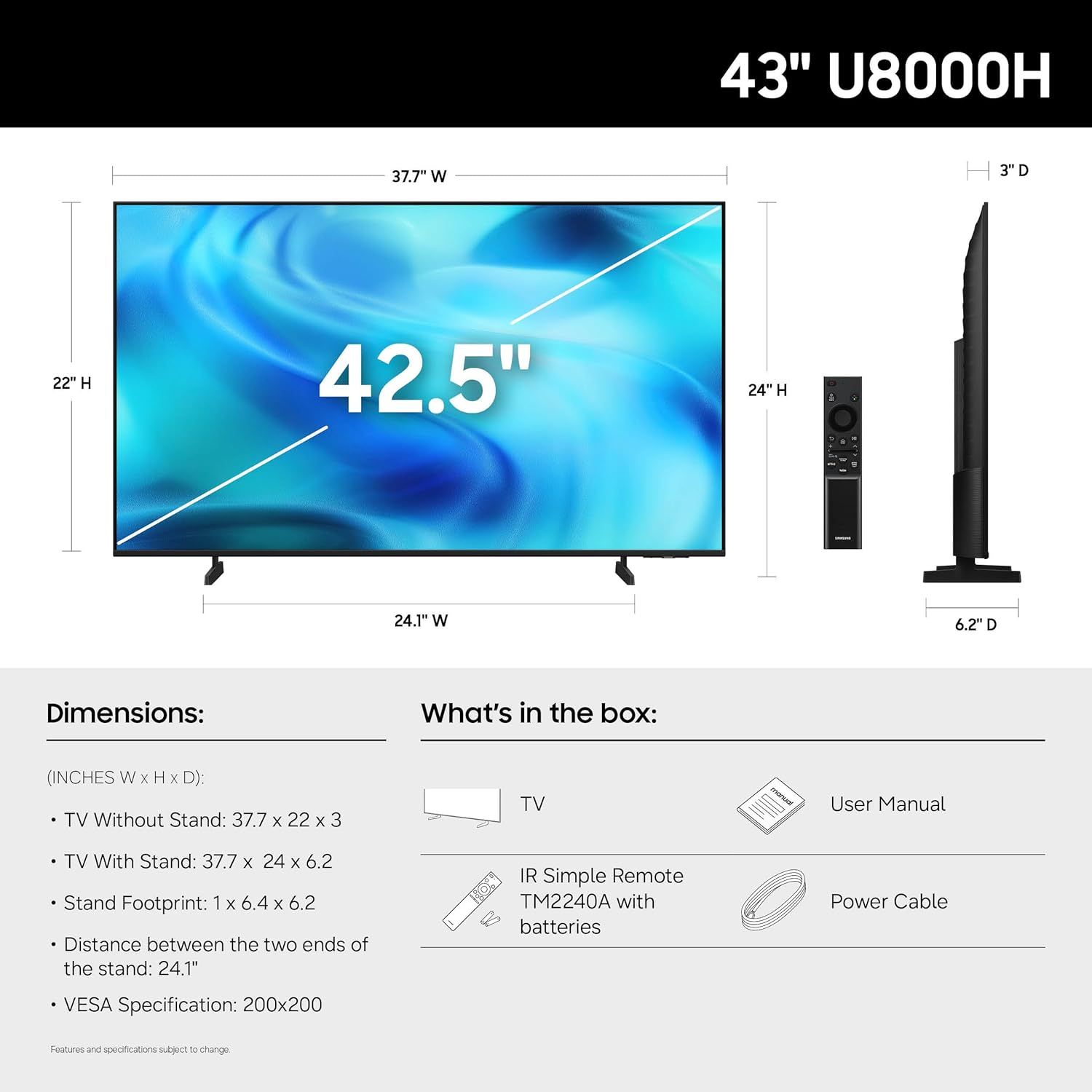
Ստուգեք, որ բոլոր բաղադրիչները առկա են փաթեթավորման մեջ՝
- Samsung 43-Inch U8000H Series Crystal UHD 4K Smart TV
- Power Cable
- Հեռակառավարման վահանակ
- Կանգնեք
- Օգտագործողի ձեռնարկ (այս փաստաթուղթը)
- Երաշխիքային քարտ

Image: Included components for the Samsung U8000H Series TV.
Կարգավորում
1. Physical Setup (Stand or Wall Mount)
Before proceeding, ensure the TV is placed on a stable, level surface or securely mounted to a wall. Refer to the separate wall mount instructions if applicable.
- Ստենդը ամրացնելը. Carefully place the TV screen-down on a soft, clean cloth. Align the stand with the designated slots on the bottom of the TV. Secure the stand using the provided screws.
- Պատի տեղադրում. If wall mounting, ensure you use a VESA-compatible mount (200 x 200 mm) and follow the mount manufacturer's instructions. Disconnect the stand if already attached.
Պատկեր՝ Հետևի մաս view of the TV, highlighting VESA mounting points and input panel.
2. Միացնող սարքեր
Connect your external devices (cable box, Blu-ray player, gaming console, etc.) to the TV's input ports.
- HDMI: Use HDMI cables for high-definition video and audio. The TV has 3 HDMI ports. HDMI 1 supports eARC for enhanced audio return.
- USB: Connect USB devices for media playback or power. The TV has 1 USB port.
- Ethernet (LAN): Կայուն լարային ինտերնետ կապի համար։
- Անտենա/Մալուխ: Միացրեք անտենան կամ մալուխային հեռուստատեսության ազդանշանը եթերային կամ մալուխային ալիքների համար:

Պատկեր՝ մանրամասն view of the TV's connectivity panel.
3. Սկզբնական միացում և ցանցի կարգավորում
- Միացրեք սնուցման մալուխը հեռուստացույցին, ապա՝ պատի վարդակիցին։
- Սեղմեք հեռակառավարման կամ հեռուստացույցի միացման կոճակը։
- Հետևեք էկրանին տրված հրահանգներին՝ սկզբնական կարգավորումն ավարտելու համար, ներառյալ լեզվի ընտրությունը, ցանցային միացումը (Wi-Fi կամ Ethernet) և ալիքների սկանավորումը:
- For smart features, you may be prompted to log in to or create a Samsung Account.
Հեռուստացույցի շահագործում
Հեռակառավարման վահանակ
Ներառված հեռակառավարման վահանակը թույլ է տալիս նավարկել հեռուստացույցի ինտերֆեյսում, կարգավորել կարգավորումները և մուտք գործել խելացի գործառույթների: Ծանոթացեք կոճակների դասավորությանը՝ օպտիմալ օգտագործման համար:

Image: The standard remote control for the Samsung U8000H Series TV.
Հիմնական հատկանիշները և գործառույթները
-
Crystal Processor 4K: This powerful processor enhances colors and sharpens details, providing a vibrant 4K viewing experience. It also performs 4K upscaling for lower-resolution content.

Image: Visual representation of the Crystal Processor 4K technology.
-
Motion Xcelerator: Enjoy clear picture and smooth motion, especially in fast-paced scenes like sports and games. This technology estimates and adjusts frame transitions in real-time.

Image: Motion Xcelerator in action, demonstrating smooth visuals.
-
Գույնի ուժեղացուցիչ. This feature enhances color intensity, making reds fiery and blues sparkling, transforming content into a visually rich experience.

Image: Demonstrating the enhanced colors with Color Booster.
-
4K որակի բարձրացում։ Upgrade your favorite shows and movies to crisp 4K clarity. This advanced technology enhances details and clarity even from lower-quality sources.

Image: Illustration of 4K Upscaling improving image detail.
-
Անվերջ անվճար բովանդակություն (Samsung TV Plus): Access over 2,700 free streaming options, including 750+ subscription-free channels. Content includes news, sports, movies, and more.

Image: Samsung TV Plus interface with free streaming options.
-
Samsung Gaming Hub: Play thousands of video games without a console. This central hub brings together games from consoles, cloud services, and gaming apps.

Image: Samsung Gaming Hub interface.
-
Vision AI Companion: Ask your TV questions and access powerful AI features. Get personalized answers with Bixby, and utilize AI agents like Microsoft Copilot for enhanced viewինգ.

Image: Vision AI Companion features.
-
One UI Tizen: The TV's operating system provides an intuitive smart TV platform tailored to you, with personal data secured by Samsung Knox. It also receives 7 years of automatic OS updates.

Image: One UI Tizen smart TV interface.
-
Samsung Knox անվտանգություն. Enjoy peace of mind with built-in triple-layer data protection. Your TV experiences are secured against harmful apps and phishing sites.

Image: Samsung Knox Security features.
Տեխնիկական սպասարկում
- Էկրանի մաքրում. Զգուշորեն սրբեք էկրանը փափուկ, չոր միկրոֆիբրային կտորով։ Համառ հետքերի դեպքում թեթևակի սրբեքampՄաքրեք կտորը ջրով կամ մասնագիտացված էկրան մաքրող միջոցով։ Խուսափեք կոշտ քիմիական նյութերից կամ հղկող նյութերից։
- Շրջանակի մաքրում. Հեռուստացույցի շրջանակը և հենակը մաքրելու համար օգտագործեք փափուկ, չոր կտոր։
- Օդափոխում: Ապահովեք հեռուստացույցի շուրջ բավարար օդափոխություն՝ գերտաքացումը կանխելու համար: Մի՛ փակեք օդափոխության անցքերը:
- Էլեկտրական լարը: Պարբերաբար ստուգեք սնուցման լարը վնասված լինելու համար։ Վնասված լինելու դեպքում այն անմիջապես փոխարինեք Samsung-ի կողմից լիազորված պահեստամասերով։
Անսարքությունների վերացում
| Խնդիր | Հնարավոր լուծում |
|---|---|
| Ոչ մի ուժ |
|
| Պատկեր չկա / Աղավաղված պատկեր |
|
| Ձայն չկա / Ցածր ձայն |
|
| Հեռակառավարումը չի աշխատում |
|
| Խելացի գործառույթները չեն աշխատում / Ցանցային խնդիրներ |
|
Տեխնիկական պայմաններ
| Առանձնահատկություն | Մանրամասն |
|---|---|
| Մոդելի անվանումը | U8000H |
| Մոդելի համարը | UN43U8000HFXZA |
| Էկրանի չափը | 43 դյույմ |
| Ցուցադրման տեխնոլոգիա | LED |
| Բանաձեւ | 4K UHD (3840 x 2160) |
| Թարմացման արագություն | 60 Հց |
| Պրոցեսոր | Բյուրեղյա պրոցեսոր 4K |
| Աջակցվում է HDR ձևաչափին | HDR10+ |
| Միացում | 3x HDMI, 1x USB, Ethernet (LAN), Wi-Fi, Bluetooth 5.3 |
| Օպերացիոն համակարգ | Տիզեն |
| Վերահսկման մեթոդ | Հավելված, Հեռակառավարում, Ձայն |
| Աուդիո ելք | Ներկառուցված բարձրախոս |
| VESA ստանդարտ ամրացում | 200 x 200 մմ |
| Ապրանքի չափերը (D x W x H) | 6.2"Խ x 37.7"Լ x 24"Բ (հենարանով) |
| Նյութի քաշը | 14.8 ֆունտ (հենարանով) |
| Գույն | Սեւ |

Image: Dimensional diagram of the Samsung 43-inch U8000H TV.
Երաշխիք և աջակցություն
Your Samsung 43-Inch U8000H Series Crystal UHD 4K Smart TV comes with a 1 տարի Արտադրողի երաշխիք. For warranty claims, technical support, or service inquiries, please contact Samsung Customer Service.
You can find additional support resources, FAQs, and contact information on the official Samsung support webկայք։
Առցանց աջակցություն. www.samsung.com/us/support/