1. Ներածություն
This manual provides detailed instructions for the installation, configuration, operation, and maintenance of the Fortinet FortiAP-U321EV Universal Indoor Wireless Access Point. Please read this manual thoroughly before attempting to install or operate the device to ensure proper functionality and safety.
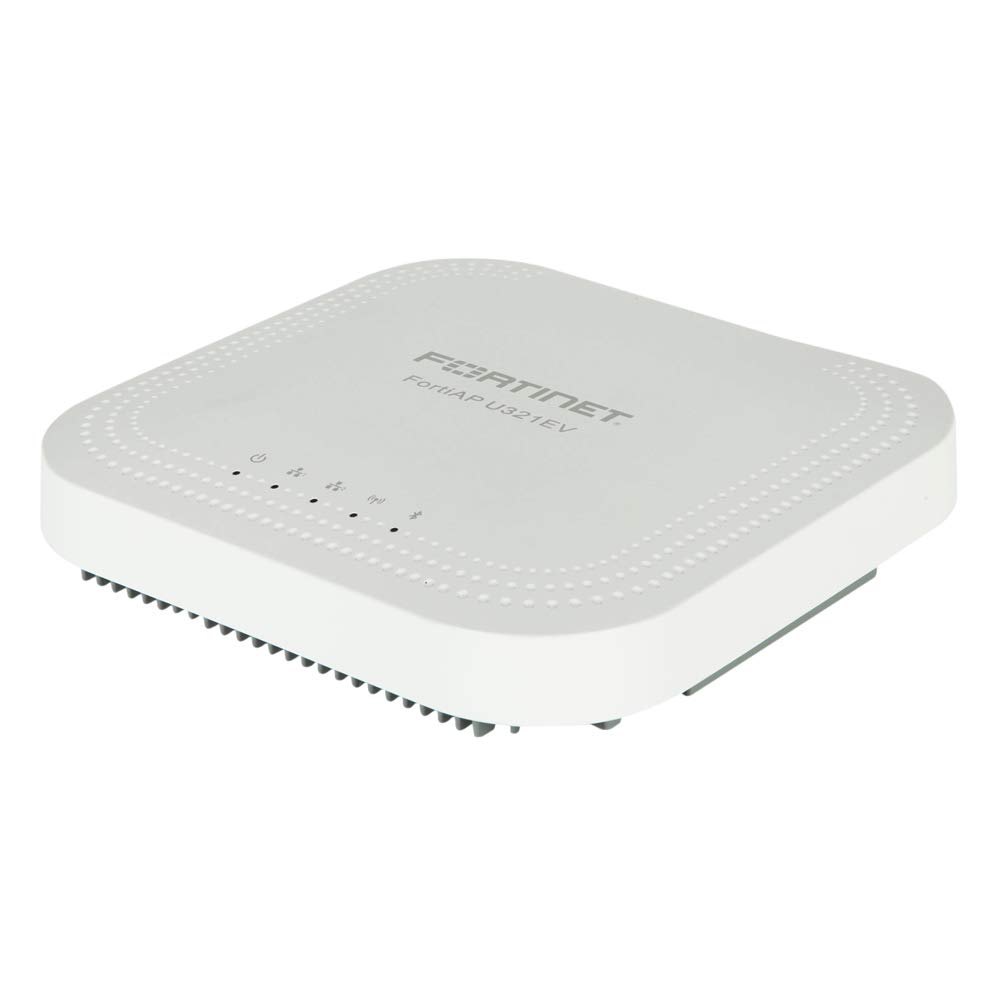
Նկար 1: Ճակատ view of the Fortinet FortiAP-U321EV Universal Indoor Wireless Access Point. This image shows the compact design suitable for indoor deployments.
2. Փաթեթի բովանդակությունը
Ստուգեք, որ բոլոր իրերը առկա են փաթեթում: Եթե որևէ իր բացակայում է կամ վնասված է, անմիջապես կապվեք ձեր մատակարարի հետ:
- FortiAP-U321EV Universal Indoor Wireless Access Point
- Մոնտաժային փակագիծ
- Մոնտաժային պարագաներ (պտուտակներ, խարիսխներ)
- Ethernet Cable (optional, check specific package)
- Արագ մեկնարկի ուղեցույց
3. Կարգավորում և տեղադրում
3.1. Անվտանգության նախազգուշական միջոցներ
- Ensure the installation environment is dry and well-ventilated.
- Սարքը մի ենթարկեք ծայրահեղ ջերմաստիճանի կամ խոնավության:
- Use only the power adapter or Power over Ethernet (PoE) source specified for this device.
- Սարքը մաքրելուց կամ սպասարկելուց առաջ անջատեք հոսանքը։
3.2. Մուտքի կետի տեղադրում
The FortiAP-U321EV can be mounted on a wall or ceiling. Choose a central location for optimal wireless coverage.
- Attach the mounting bracket to the desired surface using the provided screws and anchors.
- Align the FortiAP-U321EV with the mounting bracket.
- Slide the access point onto the bracket until it clicks securely into place.
3.3. Սարքի միացում
The FortiAP-U321EV supports Power over Ethernet (PoE) or an external power adapter (sold separately).
- PoE: Connect an Ethernet cable from a PoE-enabled switch or injector to the LAN port on the FortiAP-U321EV.
- Արտաքին հոսանքի ադապտեր. Connect the power adapter to the device's power input and then to a power outlet.
The device will power on automatically. Observe the LED indicators for status.
3.4. Սկզբնական կոնֆիգուրացիա
The FortiAP-U321EV is typically managed by a FortiGate firewall or FortiCloud. Refer to the FortiGate or FortiCloud documentation for detailed configuration steps.
- Connect the FortiAP to your network.
- Ensure the FortiAP can reach the FortiGate or FortiCloud.
- Authorize and configure the FortiAP from your FortiGate or FortiCloud interface.
4. Operating the FortiAP-U321EV
4.1. LED ցուցիչներ
The device features LED indicators to provide status information:
- Power LED:
- Մշտապես կանաչ՝ սարքը միացված է և աշխատում է նորմալ։
- Թարթող կանաչ՝ Սարքը բեռնվում է կամ կատարում է ներկառուցված ծրագրի թարմացում:
- Անջատված է։ Սարքն անջատված է։
- Wi-Fi LED (2.4GHz/5GHz):
- Solid Green: Wireless radio is active and transmitting.
- Flashing Green: Data activity on the wireless radio.
- Off: Wireless radio is disabled.
4.2. Անլար կապ
Once configured via FortiGate or FortiCloud, the FortiAP-U321EV will broadcast the configured SSIDs (Wi-Fi networks). Users can connect to these networks using standard Wi-Fi client devices.
- Ensure your client device's Wi-Fi is enabled.
- Select the appropriate SSID from the list of available networks.
- Մուտքագրեք ցանցի գաղտնաբառը (անհրաժեշտության դեպքում):
5. Պահպանում
5.1. Որոնվածի թարմացումներ
Regularly update the device firmware to ensure optimal performance, security, and access to new features. Firmware updates are typically managed through the connected FortiGate or FortiCloud platform.
- Access your FortiGate or FortiCloud management interface.
- Navigate to the FortiAP management section.
- Check for available firmware updates and follow the on-screen instructions to apply them.
- It is recommended to perform updates during off-peak hours to minimize service disruption.
5.2. Մաքրում
To clean the device, power it off and disconnect it from the power source. Use a soft, dry cloth to wipe the exterior. Do not use liquid cleaners or aerosols.
6: Անսարքություն
This section addresses common issues you might encounter with your FortiAP-U321EV.
| Խնդիր | Հնարավոր պատճառ | Լուծում |
|---|---|---|
| Լույսի ցուցիչ չկա | No power supply or faulty power source. |
|
| Wi-Fi ազդանշան չկա | Wireless radios disabled or incorrect configuration. |
|
| Slow Wi-Fi connection | Interference, poor signal strength, or network congestion. |
|
| Cannot connect to FortiGate/FortiCloud | Network connectivity issues or incorrect management settings. |
|
7. Տեխնիկական պայմաններ
Key technical specifications for the FortiAP-U321EV:
- Մոդել: FAP-U321EV
- Անլար տեսակը: 802.11a/b/g/n (Dual Radio, 3x3 MIMO 2.4/5GHz)
- Հաճախականության տիրույթի դաս. Dual-Band
- Օպերացիոն համակարգ: FortiOS
- Միացման տեխնոլոգիա. Անլար
- Նյութի Քաշը: Մոտ 3.88 ֆունտ (1.76 կգ)
- Փաթեթի չափսերը. Մոտավորապես 13.23 x 11.61 x 4.13 դյույմ (33.6 x 29.5 x 10.5 սմ)
- Արտադրող: Fortinet, Inc
- Հատուկ առանձնահատկություն. WPS (Wi-Fi պաշտպանված կարգավորում)
- Առաջարկվող կիրառումներ. Տուն, Փոքր գրասենյակ
8. Երաշխիքային տեղեկատվություն
Fortinet products are covered by a limited warranty. For specific warranty terms and conditions, including duration and coverage details, please refer to the official Fortinet warranty policy available on their website or contact your authorized Fortinet reseller. Keep your proof of purchase for warranty claims.
9. Տեխնիկական աջակցություն
For technical assistance, product documentation, and software downloads, please visit the official Fortinet support website. You may also contact your authorized Fortinet partner or reseller for local support.
- Fortinet աջակցություն Webկայքը: support.fortinet.com
- Fortinet Main Webկայքը: www.fortinet.com


