
Ներածություն
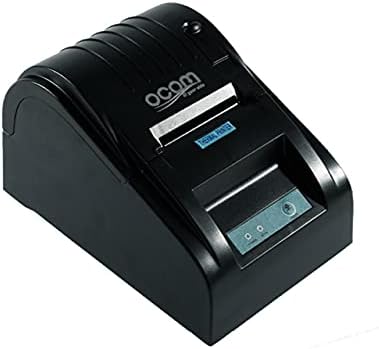
This image shows the OCOM OCPP-585A-U-B Thermal Receipt Printer from a slightly elevated front-right angle. The printer is black with a sleek, compact design. The paper output slot is visible at the top, and the control panel with 'POWER' and 'MODE' indicators is located on the front.
This manual provides detailed instructions for the OCOM OCPP-585A-U-B Thermal Receipt Printer. Please read this manual carefully before using the printer to ensure proper operation and longevity.
Կարգավորման ուղեցույց
1. Փաթեթազերծում
Carefully remove the printer and all accessories from the packaging. Verify that all components are present: printer unit, power adapter, USB cable, and a roll of thermal paper.
2. Ջերմային թղթի բեռնում
- Open the paper cover by pushing the cover open button (usually located on the side or front).
- Insert the thermal paper roll into the paper compartment, ensuring the printing side of the paper faces the print head. The paper should feed smoothly from the bottom of the roll.
- Pull out a small length of paper beyond the paper exit slot.
- Թղթի կափարիչը ամուր փակեք, մինչև այն իր տեղում կտտացվի։
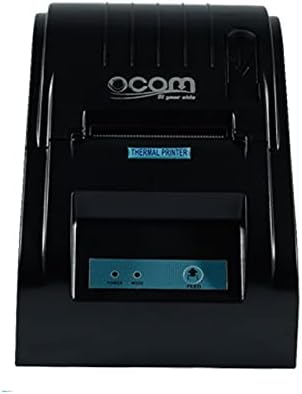
This image displays the OCOM OCPP-585A-U-B Thermal Receipt Printer from a direct top-down perspective. The paper compartment is visible, showing a thermal paper roll correctly inserted. The 'THERMAL PRINTER' label and the control panel with 'POWER' and 'MODE' indicators are clearly visible.
3. Տպիչի միացումը
- Connect the power adapter to the printer's power input port and then plug it into a power outlet.
- Connect the USB cable to the printer's USB port and the other end to your computer or POS system.
- Press the power button to turn on the printer. The power indicator light should illuminate.
Գործառնական հրահանգներ
Հիմնական տպագրություն
Once connected and powered on, the printer is ready to receive print commands from your connected device. Ensure the correct printer driver is installed on your computer/POS system.
- Բացեք փաստաթուղթը կամ հավելվածը, որից ցանկանում եք տպել:
- Select 'Print' from the file մենյու.
- Choose 'OCOM OCPP-585A-U-B' as your printer.
- Adjust print settings if necessary (e.g., paper size, print quality).
- Սեղմեք «Տպել»։
Self-Test Print
To perform a self-test print, ensure the printer is off. Hold down the 'FEED' button (if available, or a combination of buttons as per specific model) while turning on the printer. Release the button once printing begins. This will print a configuration page, confirming basic printer functionality.
Տեխնիկական սպասարկում
Տպիչ գլխիկի մաքրում
Regular cleaning of the print head ensures optimal print quality and extends printer life.
- Անջատեք տպիչը և անջատեք հոսանքի լարը:
- Բացեք թղթի ծածկը:
- Թեթևակի օգտագործեք բամբակյա փայտիկampened with isopropyl alcohol to gently wipe the thermal print head (the dark strip inside the printer).
- Թողեք տպիչի գլխիկը լիովին չորանա, նախքան կափարիչը փակելը և տպիչը միացնելը։
Cleaning the Paper Path
Հեռացրեք թղթի փոշին կամ մնացորդները թղթի ուղուց՝ օգտագործելով փափուկ խոզանակ կամ սեղմված օդ։
Անսարքությունների վերացում
| Խնդիր | Հնարավոր պատճառ | Լուծում |
|---|---|---|
| Տպիչը չի միանում | Power cable loose; Power outlet faulty | Ստուգեք հոսանքի միացումները։ Փորձեք այլ վարդակից։ |
| Տպման արդյունք չկա | Paper loaded incorrectly; Out of paper; Driver not installed/selected | Reload paper correctly; Replace paper roll; Install/select correct printer driver |
| Faint or blank print | Thermal paper loaded upside down; Print head dirty; Paper quality issue | Flip paper roll; Clean print head; Try new thermal paper |
| Տպիչը անջատված է | USB cable disconnected; Printer driver issue | Reconnect USB cable; Reinstall printer driver |
Տեխնիկական պայմաններ
| Առանձնահատկություն | Մանրամասն |
|---|---|
| Առաջին հասանելի ամսաթիվը | 2021 հունիսի 20 թ |
| Արտադրող | OCOM |
| ASIN | B097LSGP62 |
| Նյութի մոդելի համարը | OCPP-585-U-B |
| Ապրանքանիշի անվանումը | OCOM |
| Միացման տեխնոլոգիա | USB |
| Տպիչի տեխնոլոգիա | Ջերմային |
| Գույն | Սեւ |
| Մոդելի անվանումը | OCPP 585 U B |
| Տպագիր մեդիա | Պիտակներ |
| Սկաների տեսակը | Անդորրագիր |
Երաշխիք և աջակցություն
This OCOM printer typically comes with a standard manufacturer's warranty. Please refer to the warranty card included with your product for specific terms and conditions, or visit the official OCOM webկայքը երաշխիքային մանրամասն տեղեկությունների համար:
For technical support, driver downloads, or further assistance, please visit the OCOM official support website or contact their customer service. Keep your model number (OCPP-585A-U-B) and purchase details ready when seeking support.