Ներածություն
Thank you for choosing the MOSENMO CR1632 Selfie Stick Tripod. This device combines a portable selfie stick with a stable tripod stand, featuring an extendable design and a detachable wireless remote control. It is designed to enhance your mobile photography and videography experience, offering versatility for various shooting scenarios with both iPhone and Android smartphones. Please read this manual carefully to ensure proper use and optimal performance of your device.
Ապրանքը ավարտվել էview
The MOSENMO CR1632 is a versatile 2-in-1 device that functions as both a selfie stick and a tripod. Key features include:
- Ընդլայնվող դիզայն. Reaches up to 40 inches (approximately 101 cm) for wide-angle shots and group photos.
- Ինտեգրված եռոտանի՝ Foldable legs provide a stable base for hands-free recording.
- Rotatable Phone Holder: Supports 180-degree rotation for horizontal and vertical phone mounting, and 360-degree adjustment for optimal shooting angles. Accommodates phones up to 3.7 inches wide.
- Անջատվող անլար հեռակառավարիչ։ Bluetooth-enabled remote control for convenient photo and video capture from a distance of up to 33 feet (10 meters).
- Կոմպակտ և թեթև. Folds down to 7.5 inches (approximately 19 cm) for easy portability.

Image: The MOSENMO CR1632 Selfie Stick Tripod in its fully extended tripod configuration, with a smartphone securely mounted and the wireless remote being held by a hand, indicating remote photo capture.
Կարգավորման հրահանգներ
Follow these steps to set up your MOSENMO CR1632 Selfie Stick Tripod:
- Ապափաթեթավորեք Սարքը. Carefully remove the selfie stick tripod and wireless remote from its packaging.
- Extend the Stick: Gently pull the top section of the stick upwards to extend it to your desired length.
- Open the Tripod (Optional): If using as a tripod, locate the legs at the base of the handle. Spread them outwards until they form a stable triangular base.
- Տեղադրեք ձեր հեռախոսը. Open the phone holder clamp and carefully insert your smartphone. Ensure it is securely gripped by the holder. The holder supports phones up to 3.7 inches in width.
- Pair the Wireless Remote:
- Հեռացրեք հեռակառավարման վահանակը բռնակի վրա գտնվող իր անցքից։
- Press and hold the camera button on the remote until the indicator light flashes, indicating it is in pairing mode.
- Ձեր սմարթֆոնի վրա մտեք Bluetooth կարգավորումներ և որոնեք նոր սարքեր։
- Select "SelfieShow" or "MOSENMO" (device name may vary) from the list of available devices to pair. The indicator light on the remote will stop flashing once successfully paired.

Image: A visual guide demonstrating the setup process, including extending the stick, deploying the tripod legs, securing the phone, detaching the remote, pairing via Bluetooth, and capturing an image.
Գործառնական հրահանգներ
Once set up, your MOSENMO CR1632 is ready for use:
- Adjusting Phone Holder Angle: The phone holder can be rotated 180 degrees to switch between horizontal and vertical phone orientations. It can also be tilted 360 degrees to achieve the perfect shooting angle.
- Օգտագործումը որպես սելֆիի ձողիկ՝ Hold the handle firmly and extend the stick to your desired length. Use the detachable remote to capture photos or start/stop video recording.
- Օգտագործումը որպես եռոտանի՝ Place the tripod on a flat, stable surface. Adjust the stick's height and phone holder angle as needed. Use the remote to take photos or videos without touching your phone, minimizing shake.
- Լուսանկարների/տեսանյութերի նկարահանում. Open your phone's camera application. Press the camera button on the wireless remote to trigger the shutter or start/stop video recording.
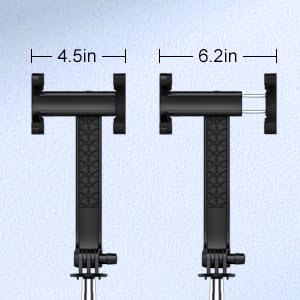
Image: A diagram illustrating the adjustable width of the phone holder, accommodating devices from 4.5 inches to 6.2 inches.
Տեխնիկական սպասարկում
To ensure the longevity and proper functioning of your selfie stick tripod:
- Մաքրում: Սրբեք սարքը փափուկ, չոր կտորով։ Խուսափեք կոշտ քիմիական նյութերի կամ հղկող նյութերի օգտագործումից։
- Պահպանում: When not in use, collapse the selfie stick tripod to its compact size and store it in a cool, dry place away from direct sunlight and extreme temperatures.
- Հեռակա մարտկոցի փոխարինում. The wireless remote uses a CR1632 lithium battery. If the remote fails to turn on or connect, the battery may need replacement. To replace, gently pry open the battery cover on the remote, remove the old battery, and insert a new CR1632 battery with the positive (+) side facing up.

Պատկեր՝ մանրամասն view of the detachable wireless remote, highlighting the camera button, the internal lithium battery, and the battery cover for replacement.
Անսարքությունների վերացում
If you encounter issues with your MOSENMO CR1632, refer to the following common solutions:
- Հեռակառավարիչը չի միանում՝
- Ensure the remote is charged or has a fresh CR1632 battery.
- Համոզվեք, որ Bluetooth-ը միացված է ձեր սմարթֆոնի վրա:
- Turn off and on the remote, then try pairing again.
- Forget the device in your phone's Bluetooth settings and attempt to pair from scratch.
- Remote Not Working After Pairing:
- Check the remote's battery. It may have run out, especially if received with low charge.
- Համոզվեք, որ ձեր հեռախոսի տեսախցիկի հավելվածը բաց է և ակտիվ։
- Verify that the remote is within the 33-foot operating range.
- Tripod Stability Issues:
- Ensure the tripod legs are fully extended and locked into position on a flat, even surface.
- Avoid placing heavy accessories on the phone holder that might unbalance the tripod.
- While designed for stability, some slight wobble may occur when fully extended, especially with heavier phones. Ensure the phone is centered in the holder.
- Phone Not Fitting in Holder:
- The holder accommodates phones up to 3.7 inches (approximately 9.4 cm) wide. Verify your phone's dimensions, especially if it has a bulky case.
- Ensure you are fully extending the spring-loaded clamp.
Տեխնիկական պայմաններ
| Մոդելի համարը | CR1632 |
| Ծալովի չափս | 7.5 դյույմ (19 սմ) |
| Ընդլայնման առավելագույն երկարությունը | 40 դյույմ (101 սմ) |
| Նյութի քաշը | 6.7 ունցիա (190 գրամ) |
| Հեռախոսի պահոցի լայնությունը | Մինչև 3.7 դյույմ (9.4 սմ) |
| Անլար հեռակառավարման մարտկոց | 1 x CR1632 3V Lithium Battery |
| Bluetooth կառավարման հեռավորություն | Մինչև 33 ֆուտ (10 մետր) |
| Համատեղելի սարքեր | iPhone, Android սմարթֆոններ |
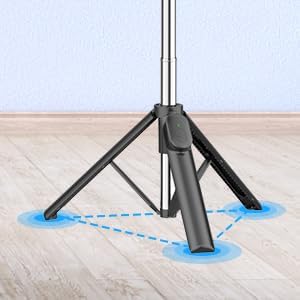
Image: A close-up of the tripod base, illustrating its stable three-point contact with the surface, ensuring steady support for your device.
Երաշխիք և աջակցություն
Երաշխիքային տեղեկատվություն. This product comes with a standard manufacturer's warranty. Please refer to the product packaging or contact MOSENMO customer service for specific warranty terms and conditions.
Հաճախորդների աջակցություն. For any questions, technical assistance, or issues not covered in this manual, please contact MOSENMO customer support through the retailer's platform or the official MOSENMO webկայք։ Խնդրում ենք աջակցության ծառայությանը դիմելիս պատրաստ ունեցեք ձեր մոդելի համարը (CR1632) և գնման մանրամասները։


