Ներածություն
The KEF Coda W Wireless HiFi Speaker system offers high-fidelity audio in an accessible, all-in-one package. Designed to deliver detailed and immersive sound, it provides versatile connectivity options for various audio sources. The Coda W combines classic design principles with advanced acoustic technology.

Պատկեր՝ առջևի view of the KEF Coda W Wireless HiFi Speakers in Moss Green.
Փաթեթի բովանդակությունը
Խնդրում ենք համոզվել, որ ստորև թվարկված բոլոր իրերը առկա են ձեր փաթեթում.
- KEF Coda W Primary Speaker
- KEF Coda W Secondary Speaker
- Power Cable
- Արագ մեկնարկի ուղեցույց
- Հեռակառավարման վահանակ
- USB-C Inter-speaker Cable
Կարգավորման ուղեցույց
- Տեղադրում: Position your KEF Coda W speakers in your desired listening area. For optimal stereo imaging, place them equidistant from your listening position and at ear level. Ensure adequate space around the speakers for proper ventilation and sound dispersion.

Image: KEF Coda W speakers positioned on a desk, demonstrating typical placement.
- Connect Primary and Secondary Speakers: Use the provided USB-C inter-speaker cable to connect the Primary speaker to the Secondary speaker. Locate the "TO P/S" port on the Secondary speaker and the corresponding port on the Primary speaker.
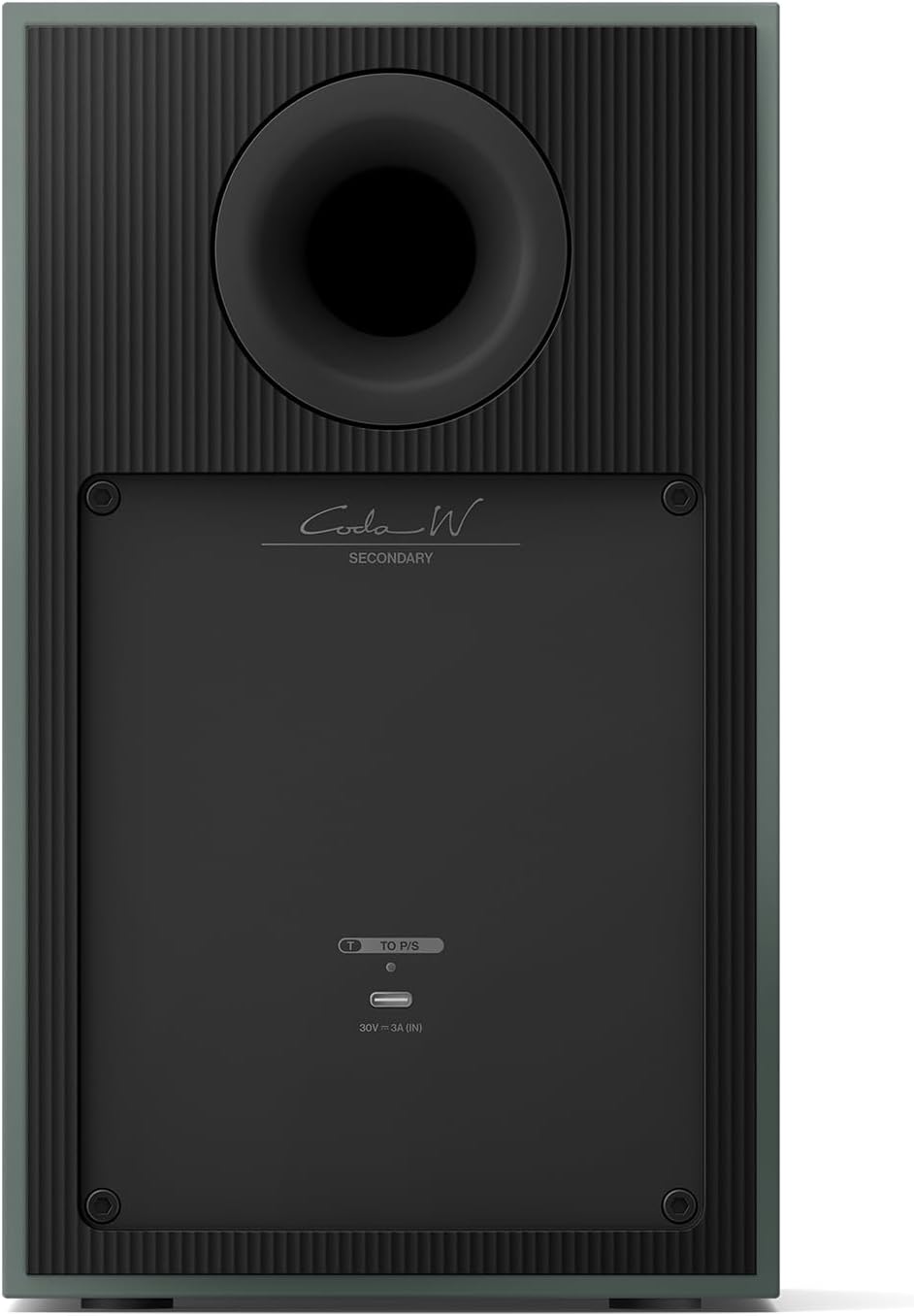
Image: Rear panel of the KEF Coda W Primary speaker, highlighting the connectivity options including the USB-C inter-speaker port.
- Էլեկտրաէներգիայի միացում. Connect the power cable to the AC input on the Primary speaker, then plug the other end into a wall outlet.
- Նախնական միացում. Press the power button on the Primary speaker or use the remote control to turn on the system. The indicator light will illuminate.
- App Setup (Recommended): Download the KEF Connect app from your device's app store. Follow the in-app instructions to connect your Coda W speakers to your Wi-Fi network and configure settings. This enables advanced features and streaming options.
Գործառնական հրահանգներ
Միացման ընտրանքներ.
- Bluetooth 5.4 with aptX: For wireless streaming from compatible devices. Activate Bluetooth pairing mode on the speakers and select "KEF Coda W" from your device's Bluetooth settings.
- HDMI ARC: Connect your TV using an HDMI cable to the HDMI ARC port on the Primary speaker for high-fidelity TV audio.
- USB-C աուդիո: For high-resolution audio playback from computers or other USB-C enabled devices. Supports up to 24-bit/192kHz.
- RCA (LINE) Input: Connect analog sources such as CD players or turntables with a built-in phono preamp.
- Հեռախոսային մուտքագրում. Directly connect turntables without a built-in phono preamp.
- Օպտիկական մուտք. For digital audio sources like game consoles or older TVs.
Հեռակառավարման վահանակ.
Use the included remote control to adjust volume, switch input sources, and power the speakers on/off. Ensure batteries are correctly inserted.
Տեխնիկական սպասարկում
- Keep the speakers clean by gently wiping them with a soft, dry cloth. Avoid using abrasive cleaners or solvents.
- Ապահովեք բարձրախոսների շուրջ պատշաճ օդափոխություն՝ գերտաքացումից խուսափելու համար:
- Protect the speakers from direct sunlight, excessive heat, moisture, and dust.
- Do not attempt to open the speaker enclosures, as this may void your warranty and expose you to electrical hazards.
Անսարքությունների վերացում
| Խնդիր | Հնարավոր պատճառ | Լուծում |
|---|---|---|
| Ոչ մի ձայն | Power cable disconnected, incorrect input selected, volume too low. | Check power connection, verify input source, increase volume. |
| Bluetooth զուգավորման հետ կապված խնդիրներ | Speakers not in pairing mode, device too far, interference. | Ensure speakers are in BT pairing mode, move device closer, restart speakers and device. |
| Աղավաղված աուդիո | Source audio quality, cable issues, volume too high. | Check audio source, replace cables, reduce volume. |
| Հեռակառավարումը չի աշխատում | Մարտկոցները մեռած են, խոչընդոտ, հեռակառավարման վահանակը հասանելի չէ։ | Replace batteries, remove obstructions, ensure line of sight to speakers. |
Տեխնիկական պայմաններ
- Մոդելի անվանումը: Կոդա Վ
- Բարձրախոսի տեսակը: Գրքերի դարակ
- Միացման տեխնոլոգիա. Bluetooth, HDMI, օպտիկական, RCA, USB
- Բարձրախոսի առավելագույն ելքային հզորությունը. 100 Վտ
- Ապրանքանիշը: KEF
- Ապրանքի չափսերը. 10.55"D x 13.2"W x 11.2"H
- Նյութի Քաշը: 33.5 ֆունտ
- Գույնը: Մոս Կանաչ
- Հատուկ առանձնահատկություններ. Բասի ուժեղացում, բարձր թույլտվության աուդիո, USB միացք
- Ներառված բաղադրիչներ. Power Cable, Quick Start Guide, Remote
- UPC: 637203051777
- Արտադրող: KEF
Երաշխիք և աջակցություն
For warranty information and technical support, please refer to the Quick Start Guide included in your package or visit the official KEF webկայք։ Պահպանեք ձեր գնման ապացույցը երաշխիքային պահանջների համար։
Online resources and FAQs may also be available on the KEF support pages.


